Do you think IIT Guwahati certified course can help you in your career?
Introduction
Hey Ninjas! Welcome back to the blog. You must have heard about AngularJS. AngularJS is a framework written in JavaScript language. We can create dynamic web pages and many more using AngularJS. We can add these in our HTML using the <script> tag.
There are many topics that come under AngularJS, but today we will discuss the AngularJS Form Validation in detail.
AngularJS Form Validation
A form is made up of various elements, such as checkboxes, input textboxes, number text, and email text. AngularJS allows us to validate form and input field controls on the client side rather than compared to server-side validations. AngularJS inform users of invalid data while submitting forms with a better user experience.
There are three states that are used to detect the errors:
$dirty: This says that the value has been altered.
$error: This displays the exact error.
$invalid: This states that entered value is invalid.
States of AngularJS Form Validation
AngularJS stores the data of changes in the input field. Let's have a look at the states of form input fields.
States
Description
$valid
It indicates that the field's content is valid.
$invalid
It indicates that the field's content is not valid.
$dirty
It shows that the field is modified.
$pristine
It shows that the field is not modified yet.
$touched
It indicates that the field is touched.
$untouched
It indicates that the field is not touched.
$submitted
It indicates that the form has been submitted.
Validation Directives
Now, let's see the validation directives in the AngularJS Form Validation.
Directive
Description
ng-required
It is used to make a field required to fill.
ng-minlength
It is used to set a minimum length of the input.
ng-maxlength
It is used to set the maximum length of the input.
ng-pattern
It shows a pattern validation error key if the value of the ngModel parameter does not match the given RegEx expression.
If you want to learn more about ng and other important directives, go to our AngularJS Directive blog.
Sample Examples
Now, our concepts for the AngularJS Form Validation are clear. It's time to check our ideas on live examples. Let's go.
Example 1
We are creating a simple input box to send a validated text to the user. Let's have a look.
<!DOCTYPE html>
<html>
    <script src="https://ajax.googleapis.com/ajax/libs/angularjs/1.6.9/angular.min.js"></script>
    <body ng-app="">
        <p>Enter your name in the input box:</p>

        <form name="myForm">
            <input name="myInput" ng-model="myInput" required />
        </form>

        <h3>Validation State is:</h3>
        <h1>{{myForm.myInput.$valid}}</h1>
    </body>
</html>
Output 1:
Output 2:
Explanation:
As you can see, the validation state is false in output 1. The reason is
The validation state will show the message "false" if the input box is empty.
Similarly, the validation state will show the message "true" as soon as we enter something in the input box.
Example 2
In our next example, we will create a form asking for a username and age. Let's check it out.
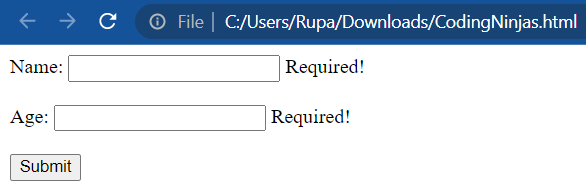
At first, the form will look like output 1, where it will ask for the Name and the Age. It has a submit button also.
Now the question is, Will our form still validate if we did not fill or misses any field? The answer is "No". The form will ask you to fill out the fields you missed, as shown in Output 2.
Output 3 shows the message "Form Validated Successfully!" which means you filled in the details correctly.
In this example, the first field (name) will accept any text, but it will only take a number in the second field (age).
Custom Validation
Custom Validation is a term used while creating conditions that are not declared by default. For instance, you can set your validations at any specific place that will be checked while validating any result.
AngularJS offers HTML input types like text, number, date, radio, checkbox, etc., and validation directives like min, max, pattern, required, etc., to execute custom validation. We can make our validations using the $validators. The $validators accept two parameters, modelValue and viewValue. A $setValidity is called internally to return a true or false value. This process repeats itself with every change in the input.
In the below example, the $parsers command takes myValidation as a parameter. An expression can be parsed and evaluated using the function that the $parsers returns.
Let's take a quick example of this.
<!DOCTYPE html>
<html>
    <script src="https://ajax.googleapis.com/ajax/libs/angularjs/1.6.9/angular.min.js"></script>
    <body ng-app="myApp">
        <p>Fill the given form:</p>

        <form name="myForm">
            Name:
            <input
                name="myInput"
                ng-model="myInput"
                required
                my-directive
            /><br /><br />
            Age:
            <input name="age" type="number" required /><br /><br />
        </form>

        <p>
            The Name field must contain the character "N" to be considered as valid.
        </p>

        <h3>Validation State is:</h3>
        <h1>{{myForm.myInput.$valid}}</h1>

        <script>
            var app = angular.module('myApp', []);
            app.directive('myDirective', function () {
                return {
                    require: 'ngModel',
                    link: function (scope, element, attr, mCtrl) {
                        function myValidation(value) {
                            if (value.indexOf('N') > -1) {
                                mCtrl.$setValidity('charE', true);
                            } else {
                                mCtrl.$setValidity('charE', false);
                            }
                            return value;
                        }
                        mCtrl.$parsers.push(myValidation);
                    },
                };
            });
        </script>
    </body>
</html>
Output 1:
Output 2:
Explanation:
The first output shows the empty fields with a false validation state. This will come to your screen when you first run the program.
The validation state is true in the second output as the Name field has the character ‘N’ in it.
The validation state will remain false until it encounters the character ‘N’ in the Name field.
Frequently Asked Questions
What is the need for AngularJS form validation?
AngularJS form validation is needed to avoid unnecessary errors caused by carelessness from the user's side. AngularJS form validation is also used to prevent abuse by malicious users.
What is the difference between touched and dirty?
The dirty property returns true if the element's contents get changed. The touched property returns true if the user has visited the element.
What is the $error state property in AngularJS?
The $error state property in AngularJS returns an object hash containing references to controls or forms with failing validators. Some of the built-in validation tokens are email, max, length, number, pattern etc.
How to check form is invalid in AngularJS?
The name attribute can be used flexibly to publish the form instance into the scope. Thus, you can check the value of the $scope.yourformname.$valid property of scope to see if the form is valid.
Mention three types of data validation.
The three most common types of data validation are Range Check, Format Check, and Consistency Check.
Conclusion
This article discusses the topic of AngularJS Form Validation. In detail, we have seen the definition of AngularJS Form Validation, states, validation directives, sample examples, and custom validation.
We hope this blog has helped you enhance your knowledge of AngularJS Form Validation. If you want to learn more, then check out our articles.
But suppose you have just started your learning process and are looking for questions from tech giants like Amazon, Microsoft, Uber, etc. In that case, you must look at the problems, interview experiences, and interview bundles for placement preparations.
However, you may consider our paid courses to give your career an edge over others!
Happy Learning!
Live masterclass
Ace 6-Figure GenAI Roles with AI-Engineering tool-kit
by Shantanu Shubham
29 Oct, 2026
11:30 AM
Build Your Own AI Data Analyst Using SQL + GenAI for 20L+ CTC
by Sumit Shukla
26 Oct, 2026
11:30 AM
Beyond Chatbots: Build an AI Support Agent & Prepare for AI Engineer Interviews
by Yogesh
27 Oct, 2026
11:30 AM
Prompt-to-Dashboard: Build Power BI Reports Faster with GenAI
by Abhishek Soni
28 Oct, 2026
11:30 AM
Ace 6-Figure GenAI Roles with AI-Engineering tool-kit
by Shantanu Shubham
29 Oct, 2026
11:30 AM
Build Your Own AI Data Analyst Using SQL + GenAI for 20L+ CTC









 7+ registered

