Do you think IIT Guwahati certified course can help you in your career?
Introduction
The ASP.NET Life Cycle is critical for application development. It consists of several steps that aid in the production of dynamic output.
The ASP.NET life cycle explains how:
ASP.NET processes pages to provide dynamic output.
The application, as well as its pages, are created and processed.
ASP.NET dynamically compiles the pages.
The life cycle of ASP.NET can be separated into two categories:
Application Life Cycle
Page Life Cycle
ASP.Net Application Life Cycle
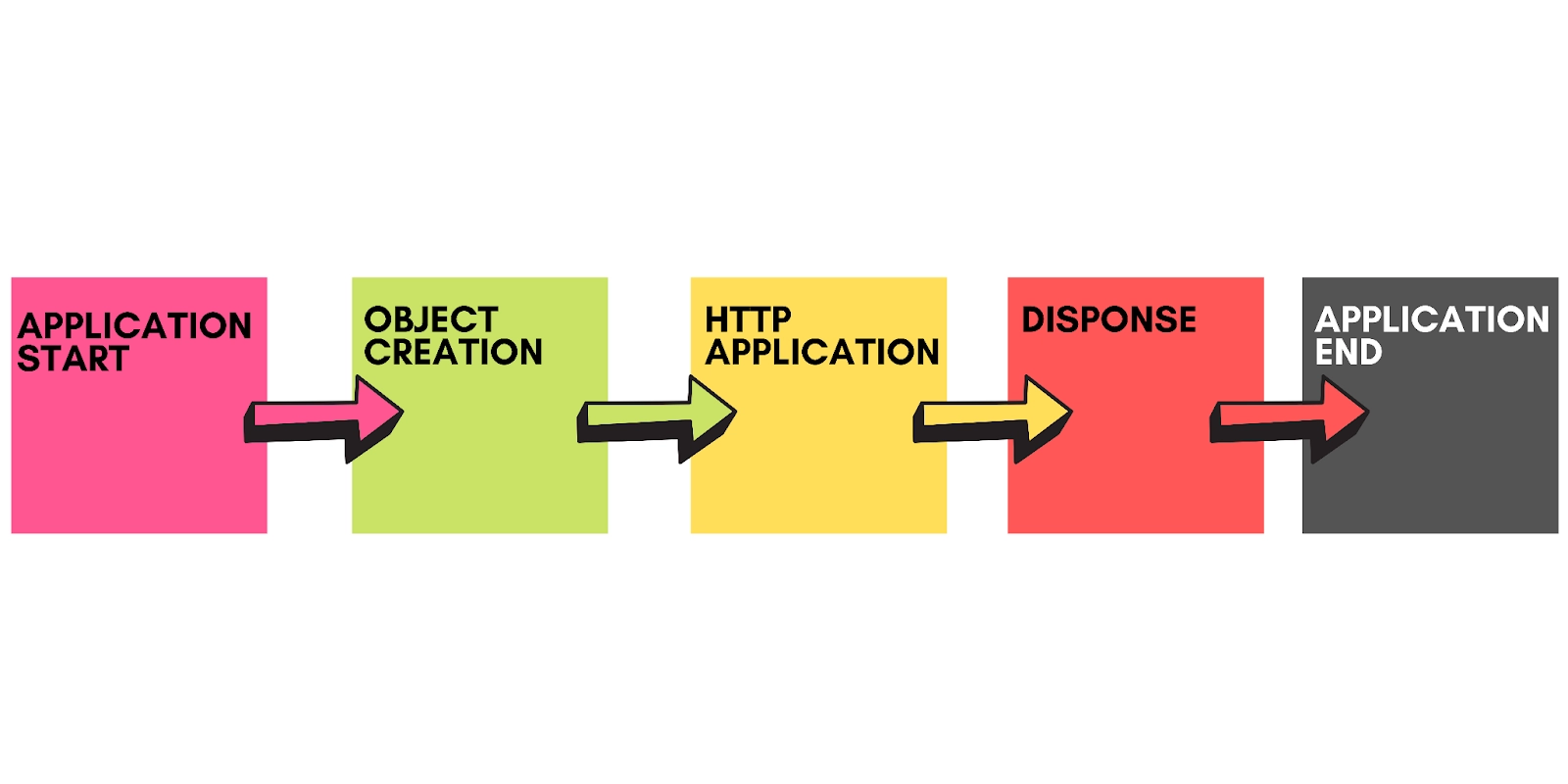
The steps of the application life cycle are as follows:
A user requests access to an application resource, such as a page. This request is sent to the webserver by the browser.
When the unified pipeline receives the initial request following events occur:
An object created of the class ApplicationManager.
To provide information about the resources, an object of the class HostingEnvironment is constructed.
The application's top-level objects are compiled.
It is necessary to generate response objects. HttpContext, HttpRequest, and HttpResponse are the application objects created and initialised.
An HttpApplication object, its instance is generated and assigned to the request.
The HttpApplication class handles the request. This class raised many different events to process the request.
ASP.Net Page Life Cycle
When a page is requested, the server loads it into memory, processes it, and sends it to the browser. It is then discharged from memory. Methods and events are accessible at each step, which can be overridden depending on the application's needs. Put another way, and you can alter the default code by writing your own.
The Page class organises all of the controls on the page into a hierarchical tree. Except for the directives, all of the components on the page are part of this control tree. You may examine the control tree by adding trace= "true" to the page directive. We'll go through page directives and trace under 'directives' and 'event handling'.
Phases of the Page Life Cycle
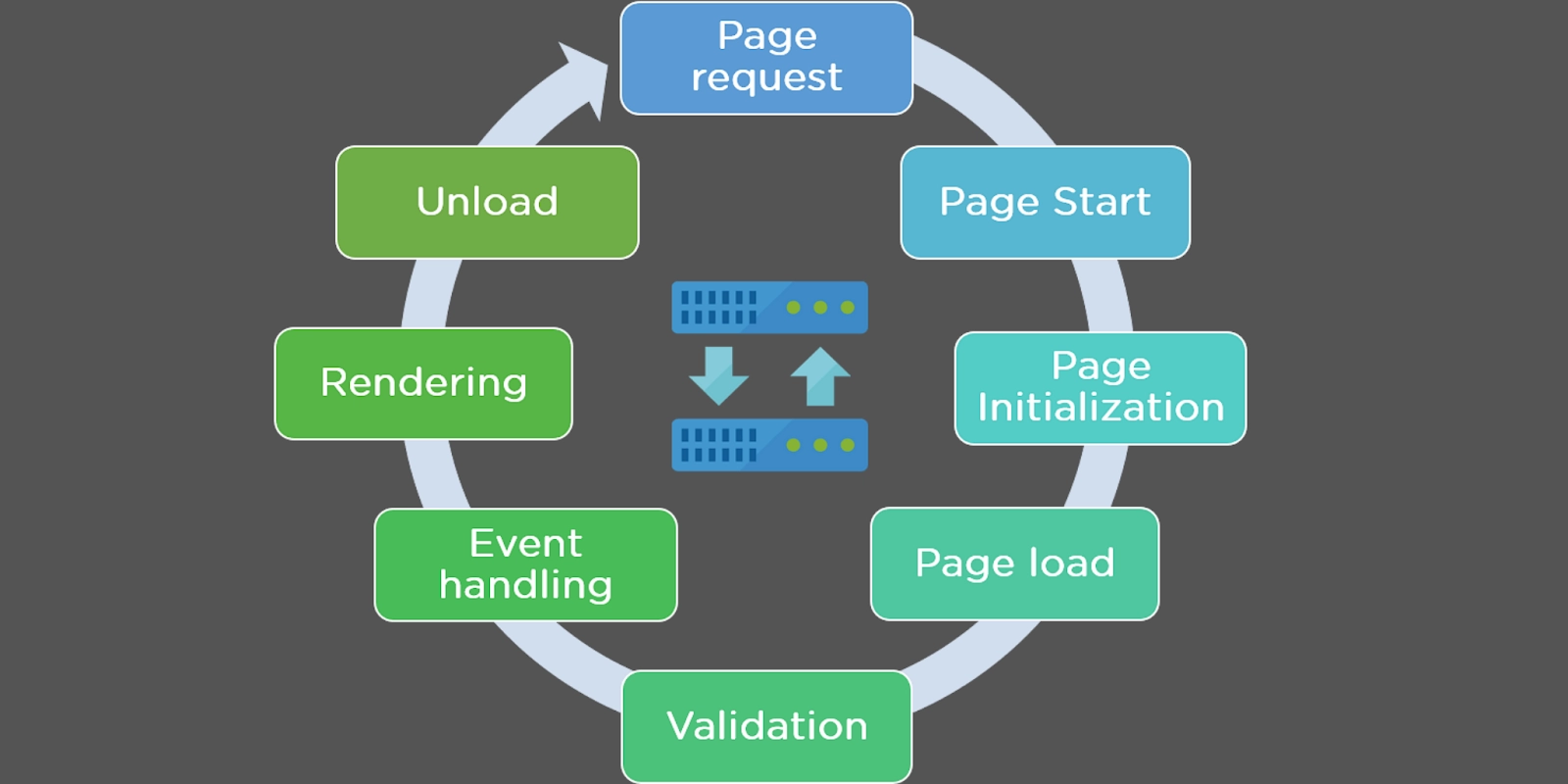
The following are the phases of the page life cycle:
Initialisation
The controls on the page are created.
The state's restoration and maintenance
The event handler codes are executed.
The rendering of a page
Understanding the page cycle aids in the creation of code that causes a specified event to occur at any point during the page's life cycle. It also aids in creating custom controls and their timely initialisation, as well as the populating of their properties with view-state data and the execution of control behaviour code.
Stages of Page Lifecycle
Different stages of an ASP.NET page are as follows:
ASP.NET Page Lifecycle
Description
Page Request
When ASP.NET receives a page request, it determines whether to parse and compile the page or a cached version; the response is provided appropriately.
Starting the Page Life Cycle
The Request and Response objects are set in the page life cycle. The IsPostBack property of the page is set to true if the request is an old request or a postback. The page's UICulture attribute is also set.
Page Initialization
The controls on the page are given unique IDs by setting the UniqueID property, and the themes are applied at this point. Postback data is loaded for a new request, and control attributes are restored to view-state values.
Page Load
Control attributes are set using the view state and control state values.
Validation
The validation control's Validate method is called, and if it succeeds, the page's IsValid attribute is set to true.
Handling Postback Events
If the request is a postback (old request).
Page Rendering
The page's view state and all controls are preserved at this point. The page executes the Render method for each command, and the rendered output is written to the OutputStream class of the page's Response property.
Unload
The rendered page is provided to the client, and page properties like Response and Request are unloaded, along with any other cleanup.
Page Life Cycle Events
The page raises several events at each point of its life cycle, which can be coded. An event handler is a function or subroutine bound to an event by declarative characteristics like Onclick or handle.
The following are the events that occur during the life cycle of a page:
Here’s the provided content organized into a structured table format:
ASP.NET Page Lifecycle Events
Description
PreInit
The initial event in the page life cycle. It identifies whether the page is a postback by checking the IsPostBack attribute. It produces dynamic controls, receives and sets profile property values, and establishes themes and master pages. Overloading the OnPreInit method or constructing a Page PreInit handler can handle this event.
Init
The control property is initialized, and the control tree is constructed in the Init event. Overloading the OnInit method or creating a Page Init handler can handle this event.
InitComplete
The InitComplete event helps you keep track of your view's current state. All controls enable View-state tracking.
LoadViewState
The LoadViewState event allows view state information to be loaded into controls.
LoadPostData
The contents of all the input fields defined with the tag are processed during this step.
PreLoad
There is a preload before the postback data is loaded in the controls. Overloading the OnPreLoad method or constructing a Page PreLoad handler can handle this event.
Load
The load event is called for the page initially, then for all child controls in a recursive manner. Create the rules in the control tree. Overloading the OnLoad method or constructing a Page Load handler can handle this event.
LoadComplete
The loading process has been completed, the control event handlers have been executed, and page validation has occurred. Overloading the OnLoadComplete function or constructing a Page LoadComplete handler can handle this event.
PreRender
Just before the output is rendered, the PreRender event happens. Pages and controls can execute any modifications before the work is generated by handling this event.
PreRenderComplete
This event ensures that the pre-rendering phase is completed, as the PreRender event is recursively fired for all child controls.
SaveStateComplete
The current state of the page's control is saved. Information about personalization, control state, and view state is preserved. The markup for HTML is created. Overriding the Render method or establishing a Page Render handler can handle this stage.
UnLoad
The UnLoad phase of the page life cycle is the final phase. It recursively raises the UnLoad event for all controls and the page itself. After the final cleanup, all resources and references, such as database connections, are removed. Modifying the OnUnLoad method or implementing a Page UnLoad handler can handle this event.
ASP.NET is a server-side programming language used to create dynamic web pages and applications. Developers can use HTML, CSS, and JavaScript to construct web applications.
What is the ASP.NET page life cycle?
The ASP.NET page life cycle consists of stages like Initialization, Load, Postback Event Handling, Rendering, and Unload. These stages allow the framework to create and manage page requests, ensuring controls are properly initialized and rendered.
What are the main stages in the ASP.NET application life cycle?
The main stages in the ASP.NET application life cycle include Application Start, Request Processing, Session Management, Application End, and Cleanup. These stages manage application settings, handle requests, maintain user sessions, and clean up resources when the application is terminated.
Define the unload phase in the page life cycle in the ASP.NET life cycle?
Once the output has been given to the user, unload is a process that helps to delete all unneeded information from memory.
Write down the different phases of the page life cycle in the ASP.NET life cycle?
These are the following phases in the page life cycle which are mentioned below: Page Request, Start, Initialisation, Load, Validation, Event Handling, Rendering, Unload
Conclusion
In this article, we have discussed the life cycle of ASP.NET. There are two types of Life Cycles in the ASP.NET Life Cycle: Application Life Cycle and Page Life Cycle. We saw the many steps and phases involved in the two kinds of ASP.NET Life Cycles in that section.
You can also explore many other open-source, server-side web-application frameworks other than ASP.net with the article Top 10 web development frameworks.







 1+ registered

