Get a skill gap analysis, personalised roadmap, and AI-powered resume optimisation.
Introduction
The assert keyword in Python tests whether a condition is true and raises an Assertion Error if it's not. It's a debugging tool that helps catch bugs early in the development process by checking for expected conditions in the code. This mechanism is very useful for catching early signs of trouble in your code by verifying that variables hold expected values or that a series of operations yields certain results.
In this article, we'll discuss the assert keyword in depth. We'll discuss what it is, how to use it with & without error messages, using it inside functions, with boolean conditions, for testing variable types & dictionary values, & practical applications.
Assert Keyword in Python
Assert is a keyword in Python that tests whether a condition is true and raises an AssertionError if it's not. It acts as a debugging aid that tests expected conditions.
When you write an assert statement, you simply test a condition. If the condition is true, nothing happens & your program continues to execute normally. But if the condition is evaluated as false, Python raises an AssertionError exception with an optional error message.
For example:
x = 5
assert x > 0, "x is not positive"
You can also try this code with Online Python Compiler
In this code, we're asserting that the variable x is greater than 0. If x is indeed greater than 0, the program continues normally. But if x is less than or equal to 0, an AssertionError is raised with the message "x is not positive".
The assert keyword is often used as a debugging tool to check for conditions that should always be true. It's a way to ensure your code is working as expected and to catch potential bugs early.
Some basic use cases for assert are:
Checking function parameters have valid values
Ensuring variables have the expected types or values
Validating return values of functions
Testing pre & post conditions in algorithms
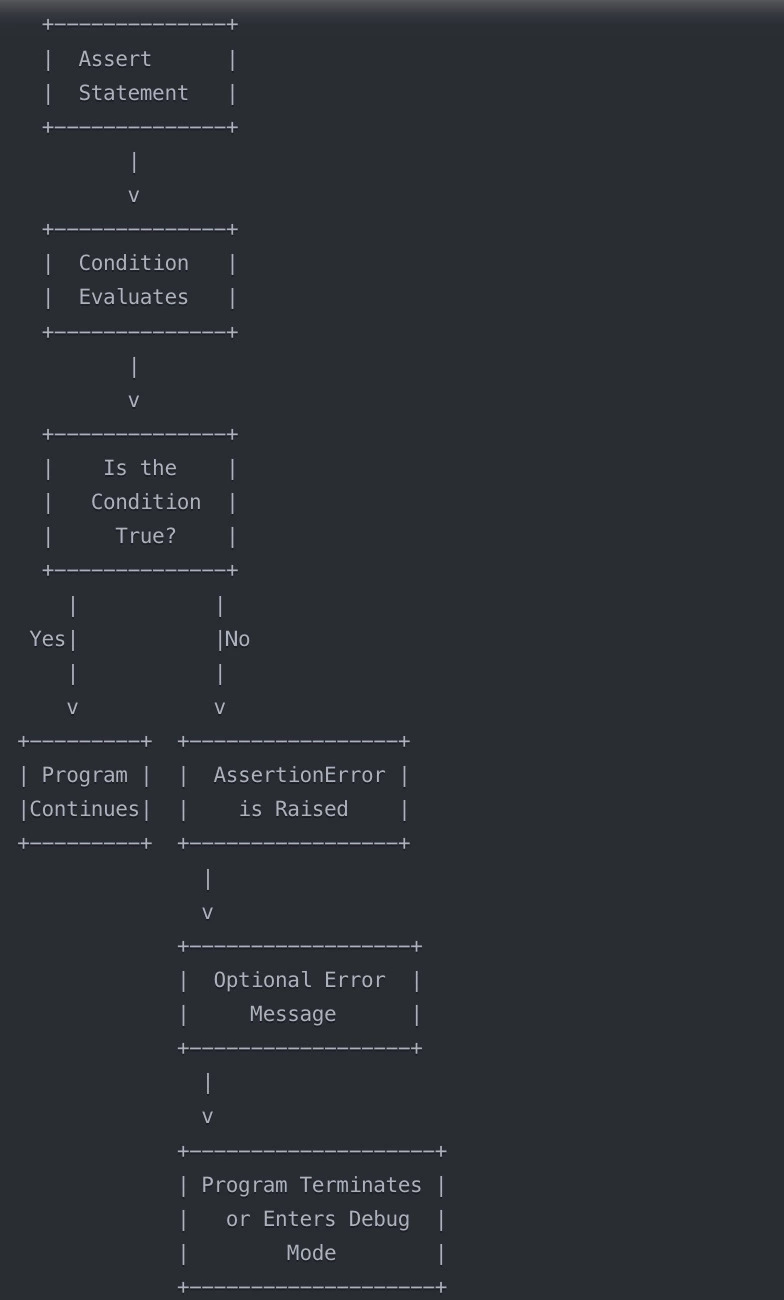
Flowchart of Python Assert Statement
Let’s understand how the flowchart works:
The assert statement is encountered in the code.
The condition in the assert statement is evaluated.
If the condition is true, the program continues executing normally.
If the condition is false, an AssertionError is raised.
An optional error message can be provided with the AssertionError to give more context about the failure.
When an AssertionError is raised, the program terminates or enters debug mode (if running in a debugger).
The flowchart provides a visual representation of the logic flow when an assert statement is used in Python code. It helps understand how the assertion works and what happens when the condition being asserted is true or false.
Python assert keyword Syntax
The syntax for using the assert keyword in Python is :
assert condition, error_message
In this syntax:
`assert`: This is the keyword that starts the assertion statement.
`condition`: This is an expression that evaluates to either True or False. It's the condition you're testing.
`error_message` (optional): This is a string that provides additional information about the AssertionError if the condition is false. It's separated from the condition by a comma.
Let’s look at a couple of examples to understand the syntax:
# Assert without an error message
assert x > 0

# Assert with an error message
assert x > 0, "x must be positive"
In the first example, we're simply asserting that the variable `x` is greater than 0. If `x` is less than or equal to 0, an AssertionError will be raised with no additional message.
In the second example, we're asserting the same condition, but we've included an error message. If the assertion fails (i.e., if `x` is not greater than 0), an AssertionError will be raised with the message "x must be positive".
It's important to note that the `error_message` is optional. You can include it to provide more context about why the assertion failed, which can be helpful for debugging. But if you omit it, Python will still raise an AssertionError if the condition is false.
The assert statement is usually written on a single line, but you can split it across multiple lines if the condition is long or complex:
assert (x > 0 and
        y < 10 and
        z == 'hello'), "Invalid values for x, y, and z"
In this case, the condition spans multiple lines & is wrapped in parentheses for clarity. The error message is provided on the last line.
Python assert keyword without error message
When using the assert keyword in Python, you can choose to include an error message or omit it. If you omit the error message, Python will still raise an AssertionError if the condition is false, but the error message will be a generic one.
Let’s discuss an example of using assert without an error message:
x = 5
assert x > 0
print("This line will execute if the assertion passes")
In this code, we're asserting that `x` is greater than 0. If `x` is indeed greater than 0 (which it is in this case), the assertion passes & the program continues to the next line, printing the message "This line will execute if the assertion passes".
However, if the condition is false, an AssertionError will be raised with a generic error message. For example:
x = -5
assert x > 0
print("This line will not execute if the assertion fails")
In this case, `x` is -5, which is not greater than 0. When the assert statement is encountered, Python evaluates the condition `x > 0`, finds it to be false, & raises an AssertionError. The generic error message will look something like this:
Traceback (most recent call last):
  File "example.py", line 2, in <module>
    assert x > 0
AssertionError
The traceback shows the line number where the assertion failed & the condition that was being asserted. However, it doesn't provide any additional context about why the assertion failed.
Omitting the error message can be useful if the condition being asserted is self-explanatory or if you don't need to provide any additional debugging information. It can also make your code more concise.
However, in many cases, it's helpful to include an error message to provide more context about the assertion failure.
Python assert keyword with an error message
Including an error message with your assert statement can be very helpful for debugging purposes. The error message provides additional context about why the assertion failed, making it easier to identify & fix the issue.
Let’s look at an example of using assert with an error message:
x = -5
assert x > 0, "x must be positive"
In this code, we're asserting that `x` is greater than 0, just like in the previous example. However, this time we've included an error message: "x must be positive".
If the condition `x > 0` is true, the assertion passes & the program continues normally. But if the condition is false (as it is in this case), an AssertionError is raised with the specified error message:
Traceback (most recent call last):
  File "example.py", line 2, in <module>
    assert x > 0, "x must be positive"
AssertionError: x must be positive
The traceback shows the line number where the assertion failed, the condition that was being asserted, & the error message we provided.
Including an error message makes it much easier to understand what went wrong when an assertion fails. Instead of just seeing a generic AssertionError, you get a specific message that tells you what the problem is.
For example:
def divide(a, b):
    assert b != 0, "Cannot divide by zero"
    return a / b

result = divide(10, 0)
In this case, we have a function `divide` that takes two parameters `a` & `b`. We're asserting that `b` is not equal to 0 before performing the division, since dividing by zero is undefined.
If we call `divide(10, 0)`, the assertion will fail with the message "Cannot divide by zero." This immediately makes the issue clear.
Error messages should be concise but descriptive. They should convey what the problem is & what the expected condition was. Good error messages can save a lot of debugging time.
Assert Inside a Function
Assertions are often used inside functions to check that the input parameters meet certain conditions or that the return value is valid. This is a good way to catch bugs early & ensure that your functions are being used correctly.
For example:
def calculate_square_root(x):
    assert x >= 0, "Cannot calculate square root of a negative number"
    return x ** 0.5

result = calculate_square_root(16)
print(result)
You can also try this code with Online Python Compiler
result = calculate_square_root(-16) # Raises AssertionError: Cannot calculate square root of a negative number
In this code, we have a function `calculate_square_root` that calculates the square root of a number `x`. Inside the function, we have an assertion that checks if `x` is greater than or equal to 0. This is because the square root of a negative number is undefined in the real number system.
If we call `calculate_square_root(16)`, the assertion passes because 16 is greater than 0, & the function returns the square root of 16, which is 4.
However, if we call `calculate_square_root(-16)`, the assertion fails because -16 is less than 0. An AssertionError is raised with the message "Cannot calculate square root of a negative number".
Using assertions in this way helps ensure that the function is being called with valid parameters. It's a good practice to put assertions at the beginning of a function to check for valid inputs.
You can also use assertions to check the return value of a function:
def get_even_numbers(numbers):
    even_numbers = [num for num in numbers if num % 2 == 0]
    assert len(even_numbers) > 0, "No even numbers found"
    return even_numbers

numbers = [1, 2, 3, 4, 5, 6]
result = get_even_numbers(numbers)
print(result)  # Output: [2, 4, 6]

numbers = [1, 3, 5, 7]
result = get_even_numbers(numbers)  # Raises AssertionError: No even numbers found
Output
[2, 4, 6]
ERROR!
Traceback (most recent call last):
 File "<main.py>", line 11, in <module>
 File "<main.py>", line 3, in get_even_numbers
AssertionError: No even numbers found
In this example, the `get_even_numbers` function takes a list of numbers & returns a new list containing only the even numbers. The assertion checks that the resulting list of even numbers is not empty. If it is empty, it means no even numbers were found in the input, & an AssertionError is raised.
Note: Assertions are powerful tools for validating function inputs and outputs. They can help catch issues early and make your code more robust.
Assert with Boolean Condition
In Python, the assert statement checks if a given condition is true. The condition is usually a boolean expression that evaluates to either True or False.
For example:
x = 5
assert x > 0
In this case, the assertion will pass because the condition `x > 0` is true (5 is indeed greater than 0).
You can use any boolean expression with assert. Here are a few more examples:
# Checking if a number is even
num = 10
assert num % 2 == 0

# Checking if a string is not empty
string = "Hello"
assert string != ""

# Checking if an item is in a list
fruits = ['apple', 'banana', 'orange']
assert 'banana' in fruits
In each of these cases, the assertion will pass because the condition is true.
`num % 2 == 0` checks if `num` is divisible by 2 (i.e., if it's even).
`string != ""` checks if `string` is not an empty string.
`'banana' in fruits` checks if the string 'banana' is in the `fruits` list.
If any of these conditions were false, an AssertionError would be raised.
You can also use more complex boolean expressions with logical operators like `and`, `or`, and `not`:
x = 5
y = 10
assert x > 0 and y < 20

a = True
b = False
assert a or b

z = None
assert not z
In these examples
`x > 0 and y < 20` will pass because both conditions are true.
`a or b` will pass because at least one of the conditions is true.
`not z` will pass because `z` is None, and `not None` evaluates to True.
When to use this: Boolean conditions with assert allow you to test a wide variety of conditions in your code. It's a powerful way to ensure that your program is behaving as expected.
Assert Type of Variable in Python
In Python, you can use the assert statement to check the type of a variable. This is often useful when you're working with function parameters or when you need to ensure that variables have the expected types before performing operations on them.
To check a variable's type, you can use the `isinstance()` function. It takes two arguments: the variable you want to check and the expected type. It returns True if the variable is of the expected type and False otherwise.
For example:
def greet(name):
    assert isinstance(name, str), "Name must be a string"
    print(f"Hello, {name}!")

greet("Shrut")  # Output: Hello,Shrut!
greet(123)  # Raises AssertionError: Name must be a string
You can also try this code with Online Python Compiler
Hello, Shrut!
ERROR!
Traceback (most recent call last):
 File "<main.py>", line 6, in <module>
 File "<main.py>", line 2, in greet
AssertionError: Name must be a string
In this code, we have a `greet` function that takes a `name` parameter. We use `assert isinstance(name, str)` to check that `name` is a string. If it is, the function proceeds to print the greeting. If it's not, an AssertionError is raised with the message "Name must be a string".
You can check for any type using `isinstance()`, not just strings. Let’s look at a few more examples:
x = 5
assert isinstance(x, int)

y = 5.5
assert isinstance(y, float)

z = [1, 2, 3]
assert isinstance(z, list)

a = {'apple': 1, 'banana': 2}
assert isinstance(a, dict)

b = (1, 2)
assert isinstance(b, tuple)
Each of these assertions will pass because the variable is of the expected type.
You can also check if a variable is one of several types by providing a tuple of types:
def add(a, b):
    assert isinstance(a, (int, float)), "a must be an int or float"
    assert isinstance(b, (int, float)), "b must be an int or float"
    return a + b

result = add(5, 10)  # 15
result = add(5.5, 10)  # 15.5
result = add("hello", 10)  # Raises AssertionError: a must be an int or float
In this example, the `add` function checks that both `a` and `b` are integers or floats before adding them.
Asserting Dictionary Values
Dictionaries are a common data structure in Python, and you may need to check that a dictionary contains certain keys or that the values associated with those keys meet certain conditions. You can use assertions for this.
For example:
person = {'name': 'Shrut', 'age': 30, 'city': 'New York'}

# Asserting that a key exists
assert 'name' in person, "Dictionary must contain a 'name' key"

# Asserting the value type of a key
assert isinstance(person['age'], int), "Age must be an integer"

# Asserting the value of a key
assert person['city'] == 'New York', "City must be New York"
In this code, we have a `person` dictionary that contains information about a person.
The first assertion checks that the 'name' key exists in the dictionary. If it doesn't, an AssertionError is raised with the message "Dictionary must contain a 'name' key".
The second assertion checks that the value associated with the 'age' key is an integer. We use `isinstance()` for this.
The third assertion checks that the value associated with the 'city' key is 'New York'. If it's not, an AssertionError is raised with the message "City must be New York".
You can also assert on the structure of a nested dictionary:
student = {
    'name': 'Dev',
    'grades': {
        'math': 85,
        'physics': 92
    }
}

assert 'grades' in student, "Student must have grades"
assert isinstance(student['grades'], dict), "Grades must be a dictionary"
assert student['grades']['math'] > 80, "Math grade must be above 80"
Here, we're checking that the `student` dictionary has a 'grades' key, that the value of 'grades' is itself a dictionary, and that the 'math' grade within the 'grades' dictionary is above 80.
Note: Assertions can be a powerful tool for validating the structure and content of dictionaries in your code. They can help ensure that your functions are working with the data they expect and can catch bugs early if the data doesn't match those expectations.
Practical Applications
Let’s take a few scenarios where assertions can be useful:
1. Debugging: Assertions are often used as a debugging tool. You can sprinkle assertions throughout your code to check that variables have the expected values at different points in your program's execution. If an assertion fails, you know there's a bug somewhere before that point.
2. Function Pre-conditions and Post-conditions: Assertions are commonly used to check the pre-conditions and post-conditions of functions. Pre-conditions are conditions that must be true before the function is called, while post-conditions are conditions that should be true after the function has completed. For example:
def divide(a, b):
    assert b != 0, "Cannot divide by zero"  # Pre-condition
    result = a / b
    assert isinstance(result, float), "Result must be a float"  # Post-condition
    return result
Validating External Data: Assertions can verify the integrity of data received from external sources, ensuring it meets expected formats and includes required fields.
Invariants: Use assertions to check conditions that must always hold true in your program, such as maintaining the balance of a binary tree after insertions or deletions.
Testing: Assertions play a key role in unit tests, validating that functions produce expected results, as seen in frameworks like Python's unittest.
Let’s take an example of using assertions for data validation:
def process_data(data):
    assert isinstance(data, dict), "Data must be a dictionary"
    assert 'id' in data, "Data must contain an 'id' field"
    assert isinstance(data['id'], int), "ID must be an integer"

    # Process the data here...

# Example usage
valid_data = {'id': 123, 'name': 'Shrut'}
process_data(valid_data)  # OK


invalid_data = {'name': 'Dev'}
process_data(invalid_data)  # Raises AssertionError: Data must contain an 'id' field
In this example, the `process_data` function uses assertions to validate that its input data is a dictionary, that it contains an 'id' field, and that the 'id' field is an integer. If any of these assertions fail, an AssertionError is raised, indicating that the input data is not valid.
Why Use Python Assert Statement?
Readability: Assertions clearly indicate expected conditions in your code, serving as documentation to help developers understand assumptions and invariants.
Conciseness: They allow for succinct checks, avoiding verbose if statements and manual exception raising.
Debugging: Strategically placed assertions quickly pinpoint where and why the program's state becomes invalid.
Fail Fast: Assertions halt execution upon detecting invalid conditions, preventing bugs from propagating further.
Modularity: They enforce contracts between code components by verifying pre-conditions and post-conditions, ensuring correct function usage.
Efficiency: Assertions have negligible performance impact in optimized production runs, as they are ignored with the -O flag in Python.
Testing: Widely used in unit tests, assertions provide a simple way to validate expected program behavior.
Frequently Asked Questions
What happens when an assertion fails?
When an assertion fails, Python raises an AssertionError exception. If this exception isn't handled, the program will terminate & print a traceback showing where the assertion failed.
Can assertions be disabled?
Yes, assertions can be disabled globally by running Python with the -O or -OO flags. When assertions are disabled, the assert statements are skipped, which can slightly improve performance but removes the safety checks.
When should assertions not be used?
Assertions should not be used for data validation in public-facing APIs or for checking user input. Since assertions can be disabled, using them for these purposes could allow invalid data to silently pass through. Use regular if statements & exceptions for these cases.
Conclusion
In this article, we've discussed Python's assert statement in depth. We've learned how to use assertions to check conditions, validate function inputs and outputs, and ensure the correctness of our programs. We've seen how assertions can make our code more readable, robust, and maintainable.










 7+ registered

