




Introduction
In this article, we will study Queue class in C# in detail with some examples.

Queue
A queue can be understood as a collection of objects that is in first-in, first-out order. When you require first-in, first-out or FIFO access to objects, you use a queue.
If we want to work on the Queues, we need to know about the two most important methods in the Queue:
- Enqueue: It is the method that is used to add elements into the Queue. The insertion is done at the back of the Queue.
- Dequeue: It is the method that is used to remove elements from the Queue. The deletion is done from the front of the Queue.
Let’s understand this from the example
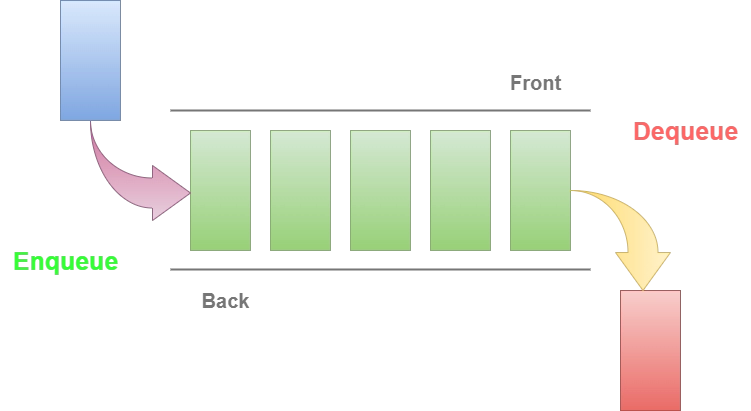
This class is part of a namespace known as System.Collections and implements ICloneable, ICollection, and IEnumerable interfaces.
Must Read IEnumerable vs IQueryable.
Characteristics of the Queue Class
The Queue class characteristics include:
- The element is added to the end of the queue via the enqueue method.
- The oldest element at the beginning of the Queue is removed by dequeue.
- Peek does not remove an element from the queue; instead, it returns the oldest element that is at the beginning of the queue.
- The quantity of elements that a queue can hold is its capacity.
- A Queue's capacity is automatically extended as needed by reallocating its internal array when elements are added to it.
- For reference types, the queue accepts null as a valid value and permits duplicate items.
After the characteristics of the Queue, let us see the constructors, methods and properties of the Queue:
Constructors
Let us see the constructors of the Queue class in C#:
| Constructor | Description |
|---|---|
| Queue() | This helps in the initialization of a new instance of a Queue class which is empty and uses the default growth factor, and has the default initial capacity. |
| Queue(ICollection) | This helps in the initialization of a new instance of a Queue class which contains elements that are copied from a specified collection, and uses the default growth factor, and has the same initial capacity as the no. of elements copied. |
| Queue(Int32) | This helps in the initialization of a new instance of a Queue class which is empty, uses the default growth factor, and has the specified initial capacity. |
| Queue(Int32, Single) | This helps in the initialization of a new instance of a Queue class which is empty, uses the specified growth factor, and has the specified initial capacity. |
After the constructors, let’s look at the properties of the Queue class.
Properties
Let us see the properties of the Queue class in C#:
| Property | Description |
|---|---|
| Count | Returns the number of elements that exist in the Queue. |
| IsSynchronized | Returns a value that indicates whether access to the Queue is synchronized (thread-safe). |
| SyncRoot | It returns an object that can be used to synchronize access to the Queue. |
After the properties, let’s look at the methods of the Queue class.
Methods
Let us see the methods of the Queue class in C#:
| Method | Description |
|---|---|
| Clear() | Removes all the objects from a Queue. |
| Clone() | It helps in creating a shallow copy of that Queue. |
| Contains(Object) | It determines whether an element is present in the Queue. |
| CopyTo(Array, Int32) | It copies the elements of the Queue to an existing 1-dimensional Array from the specified index of the array. |
| Dequeue() | It returns and removes the object that is at the beginning of the Queue. |
| Enqueue(Object) | It adds an object to the last of the Queue. |
| Equals(Object) | It determines whether the object that is specified is equal to the current object. |
| GetEnumerator() | It returns an enumerator which iterates through the Queue. |
| GetHashCode() | Serves as the default hash function. |
| GetType() | Gets the Type of the current instance. |
| MemberwiseClone() | It helps in creating a shallow copy of the current Object. |
| Peek() | It returns the object that is at the beginning of Queue without actually removing it. |
| Synchronized(Queue) | It returns a new Queue that wraps the original queue and is thread-safe. |
| ToArray() | It copies the Queue elements to a new array. |
| ToString() | It returns a string that helps in the representation of the current object. |
| TrimToSize() | Sets the capacity to the actual number of elements in the Queue. |
Examples
Now, we will see different examples in which we will implement a Queue and try to use different methods and properties on the Queue.
Example 1: Let us see an example in which we will create a Queue and insert elements using “enqueue”. After every insertion, we will return the number of elements present in the Queue using “count”:
using System;
using System.Collections;

class CodingNinjas {

    public static void Main()
    {

        // Let's create an empty Queue.
        Queue testQueue = new Queue();

        // Now insertion of elements into that Queue.
        testQueue.Enqueue("apple");

        /*
        Now showing the total numbers of elements present in that Queue.
        */
        Console.Write(" The total no. of elements in the Queue are: ");

        Console.WriteLine(testQueue.Count);

        testQueue.Enqueue("mango");

        /*
        Showing the total numbers of elements present in that Queue.
        */
        Console.Write("The total no. of elements in the Queue are: ");

        Console.WriteLine(testQueue.Count);

        testQueue.Enqueue("grapes");

        /*
        Showing the total numbers of elements present in that Queue.
        */
        Console.Write("The total no. of elements in the Queue are: ");

        Console.WriteLine(testQueue.Count);

        testQueue.Enqueue("orange");

        /*
        Showing the total numbers of elements present in that Queue.
        */
        Console.Write("The total no. of elements in the Queue are: ");

        Console.WriteLine(testQueue.Count);

        testQueue.Enqueue("grapes");

        /*
        Showing the total numbers of elements present in that Queue.
        */
        Console.Write("The total no. of elements in the Queue are: ");

        Console.WriteLine(testQueue.Count);

        testQueue.Enqueue("peach");

        /*
        Showing the total numbers of elements present in that Queue.
        */
        Console.Write("The total no. of elements in the Queue are: ");

        Console.WriteLine(testQueue.Count);
    }
}
Output:
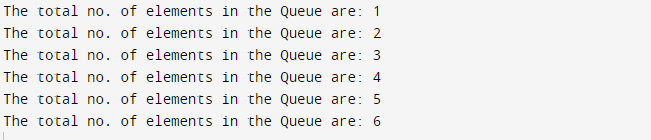
Example 2: Now, let us see an example in which we will create a Queue and insert elements using “enqueue”. After insertion of all the elements, we will return the number of elements present in the Queue using “count”:
using System;
using System.Collections;

class CodingNinjas {

    public static void Main()
    {


        // Let's create an empty Queue.
        Queue testQueue = new Queue();

        // Now insertion of elements into that Queue.
        testQueue.Enqueue("Apple");
        testQueue.Enqueue("Banana");
        testQueue.Enqueue("Mango");
        testQueue.Enqueue("Grapes");
        testQueue.Enqueue("Peach");

        /*
        Showing the total numbers of elements present in that Queue.
        */
        Console.Write("The total no. of elements in the Queue are: ");

        Console.WriteLine(testQueue.Count);
    }
}
Output:

Example 3: Now, we will see an example in which we will create a Queue and insert elements using “enqueue”. After insertions, we will check whether an element exists in the Queue or not, using “contains()” method:
using System;
using System.Collections;

class CodingNinjas {

    public static void Main()
    {

        // Let's create an empty Queue.
        Queue testQueue = new Queue();

        // Now insertion of elements into that Queue.
        testQueue.Enqueue(7);
        testQueue.Enqueue(14);
        testQueue.Enqueue(21);
        testQueue.Enqueue(28);
        testQueue.Enqueue(35);

        /*
        Let's check whether an element
        exists in that Queue or not.
        If it is present,
        the function will return True,
        else False.
        */

        Console.WriteLine(testQueue.Contains(5));
    }
}
Output:

Example 4: Here is an example in which we will create a Queue and insert elements using “enqueue”. After insertions, we will convert that Queue into an Object array using “ToArray()” method:
using System;
using System.Collections;

class CodingNinjas {

    public static void Main()
    {

        // Let's create an empty Queue.
        Queue testQueue = new Queue();

        // Now insertion of elements into that Queue.
        testQueue.Enqueue("Apple");
        testQueue.Enqueue("Mango");
        testQueue.Enqueue("Grapes");
        testQueue.Enqueue("Banana");
        testQueue.Enqueue("Peach");

        /*
        We will convert that Queue into an object array.
        */
        Object[] obarr = testQueue.ToArray();

        // Displaying the elements in array
        foreach(Object ob in obarr)
        {
            Console.WriteLine(ob);
        }
    }
}
Output:

Must Read Difference between ArrayList and LinkedList
Recommended Topic - singleton design pattern in c#


 7+ registered

