Generating random bytes0️⃣1️⃣
You will learn how to retrieve random bytes from Cloud HSM's random number generator in this topic.

In the cloud location(s) where your service will produce random bytes, grant the "cloudkms.locations.generateRandomBytes" permission. Permissions and roles are where you may get information about permissions in the Cloud Key Management Service.
using Google.Api.Gax.ResourceNames;
using Google.Cloud.Kms.V1;


public class GenerateRandomBytesSample
{
    public byte[] GenerateRandomBytes(
      string projectId = "my-project", string locationId = "us-east1", int numBytes = 256)
    {
        // Creatingclient.
        KeyManagementServiceClient client = KeyManagementServiceClient.Create();


        // Building location name.
        LocationName locationName = new LocationName(projectId, locationId);


        // Calling API.
        GenerateRandomBytesResponse result = client.GenerateRandomBytes(locationName.ToString(), numBytes, ProtectionLevel.Hsm);


        // The information is returned as raw bytes, which may contain characters
        //that cannot be printed. You could base64 encode the outcome in order to print it.


        return result.Data.ToByteArray();
    }
}
The maximum number of random bytes that can be generated by one GenerateRandomBytes API request is 1024. You can use numerous API requests to produce more random bytes.
The Software or External protection layers do not support the GenerateRandomBytes API call.
Verifying attestations through console✅
This part demonstrates how to validate Cloud HSM key attestations, which are always kept in a hardware security module (HSM).

The Cloud Shell will open when you verify the attestation through the console and be pre-populated with the necessary code snippets to carry out the whole attestation verification procedure.
-
Navigate to the console's Key Management page.
-
The key you want to attest to must first be chosen, then the key ring it is on.
-
For the key version you want to attestation, click More more vert and choose Verify attestation.
-
Click Open gcloud CLI in the Verify attestation dialogue box. By doing so, the Cloud Shell will be opened and pre-populated with the code snippet required to complete the verification procedure.
-
Examine Cloud Shell's pre-populated code snippet. The code sample first downloads the attestation verification script and all of its dependencies, then execute the gcloud instructions to download the certificate chains for the attestation and attestation itself.
- To validate the attestation, run the snippet of code.
Verifying attestations manually✅
Before manually checking the attestation, you must download the certificate chains, attestation, and verification script.

-
Download the certificate and attestation chains.
-
Navigate to the console's Key Management page.
-
The key you want to attest to must first be chosen, then the key ring it is on.
-
For the key version you want to attestation, click More more vert and choose Verify attestation.
-
Click Download Attestation Bundle in the Verify attestation dialogue. A zip file containing the certificate and attestation chains will be downloaded as a result.
-
Take the attestation bundle apart to reveal the certificate and attestation chains.
- Examine the documentation for the script to verify the attestation in the attestation file using the certificates in the certificates file after downloading the script for validating attestations and their requirements.
Verifying the attestation using certificate bundles✅
Before certificate chains were developed for each key version, certificate bundles were used to verify attestation. Given that certificate bundles will eventually be deprecated, we advise you to check the attestation using certificate chains manually.

-
Download the certificate bundle that contains Google's root certificate.
-
Download the root certificate for the HSM manufacturer's certificate bundle.
-
Download the attestation.
- Review the documentation for the script to verify the attestation in the attestation file with both certificate bundles after downloading the script for validating attestations with certificate bundles and their requirements.
Luna Cloud HSM☁️
The Google Cloud Platform (GCP) Marketplace now offers the same Thales Luna Cloud HSM service that you are accustomed to from the Data Protection on Demand (DPoD) Marketplace. Customers who use or intend to utilize Google Cloud will find it simpler to integrate Luna HSM with their Google services as a result.
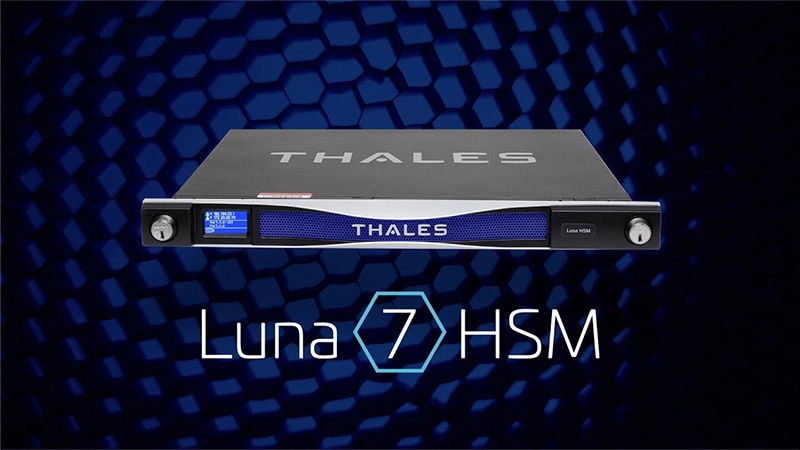
The Luna Cloud HSM service is a general-purpose key vault that is also capable of carrying out cryptographic operations like the encryption and decryption of data encryption keys, the protection of secrets (passwords, SSH keys, etc.), and more, in a variety of environments including on-premises, in the cloud or hybrid infrastructures.
The Luna Cloud HSM service can be deployed in less than 5 minutes and contains a long list of tested connectors. It may be used as a root of trust for a wide range of use cases, including code signing, PKI, Blockchain, and IoT.
You can: With Thales Data Protection on Demand's (DPoD) Thales Luna Cloud HSM service, you can:
-
Create and keep a set of cryptographic keys.
-
Create a single point of trust for all applications and services.
-
key encryption and key decryption for data
-
safeguard secrets (passwords, SSH keys, etc.)
-
Away from certificate authorities, host platforms, and operating systems, isolate keys and signing activities.
- Automate key lifecycle processes and control
Frequently Asked Questions❓
Describe cloud HSM.
The Cloud HSM service lets you host encryption keys and carry out cryptographic operations in a group of FIPS 140-2 Level 3 certified Hardware Security Modules (HSMs). You don't have to worry about clustering, scaling, or patching because Google will take care of managing the HSM cluster for you.
What does an HSM do?
A physical object called a hardware security module (HSM) adds additional security for sensitive data. For crucial operations like encryption, decryption, and authentication for the use of applications, identities, and databases, this kind of device is utilized to provision cryptographic keys.
What do cloud HSM and KMS mean?
With CloudHSM, you have more control over your keys compared to KMS. You have sole access to the single-tenant, multi-AZ cluster that CloudHSM provides. KMS is multitenant, but inside it uses HSMs that are shared among client accounts, so it's not just for you.
What is a key management server?
To manage the whole lifecycle of cryptographic keys and safeguard them from theft or unauthorized use, key management servers (KMS) are employed. The development, use, storage, archival, and destruction of encryption keys are ultimately under the control of KMS systems and other key management technology.
What is a private key?
The private key is utilized for encryption and digital signatures in public key cryptography.
Conclusion✉️
This article covers everything you need about Google Cloud HSM. Still have more questions; Here are some articles and courses for rescue:
Refer to our guided paths on Coding Ninjas Studio to learn more about DSA, Competitive Programming, JavaScript, System Design, etc. Enroll in our courses and refer to the mock test and problems available. Take a look at the interview experiences and interview bundle for placement preparations.
Do upvote our blog to help other ninjas grow.
Happy Learning!
 .
.





 1+ registered

