





Introduction
To access the information out of the huge record, excel functions are used. Let's see some of the functions and examples.
Count
The count function is used to count the number of cells that contain some numbers. It can be used to count the range or array of numbers.
Syntax:
COUNT(value1, [value2], [value3]...)
value1- Required in the syntax to point to the first item or cell reference within which you want to count numbers.
value2- optional argument. 255 additional items can be added, cell references, or ranges within which you want to count numbers.

A9 cell is storing the answer

A10 cell is storing the answer
Note:
- Numbers include negative numbers, percentages, dates, times, fractions, and formulas that return numbers. Empty cells and text values are ignored.
- Count function ignores the logical values, i.e., True and False.
COUNTIF
The COUNTIF is an excel function to count cells in a range that meet a single condition.
We will use the COUNTIF function in Excel to count cells equal to a value, count cells greater than or equal to a value, etc.
1). The COUNTIF function will count the number of cells equal to 9.

2). The COUNTIF function gives the same answer after checking whether the value present at D1 is present in the mentioned cells or not.

3). The COUNTIF function depicts below counts the number of cells greater than 10.

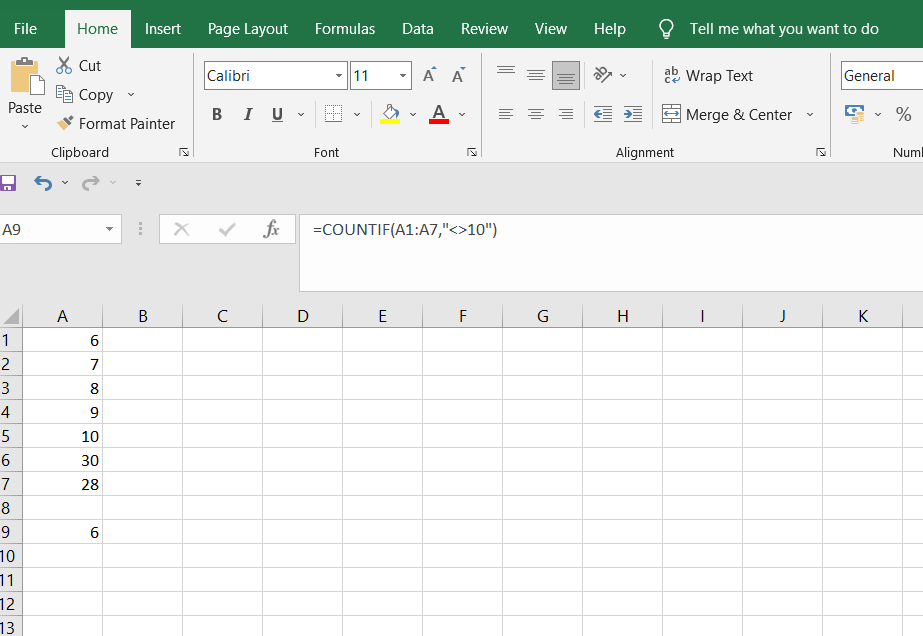
4). The COUNTIF function depicts below counts the number of cells that are not equal to 10.
Count Cells with Text
5). The COUNTIF function depicts below counts the number of cells that contain text.

6). The COUNTIF function below counts the number of cells that contain precisely star + 1 character. A question mark (?) matches exactly one character.

7). The COUNTIFS function below counts cells with text and excludes cells with a space character.

We can use the COUNTIF function in Excel to count Boolean values (TRUE or FALSE).
8). The COUNTIF function depicts the number of cells containing the Boolean TRUE below.

9). The COUNTIF function depicts the number of cells containing the Boolean FALSE below.

Not Equal To
In Excel, <> means not equal to. The <> operator checks if two values are not equal. Let's take a look at a few examples using excel sheets.
1). The formula in cell C1 depicts below returns TRUE because the text value entered in cell A1 is not equal to the text value entered in cell B1.

2). The COUNTIF function depicts below counts the number of cells in the range A1:A5 that are not equal to "Grapes."

3). The COUNTIFS function counts the number of cells in the range A1:A6 that are not equal to "Orange" and not equal to "Cherry."

Count Blank/Nonblank Cells
The COUNTBLANK function will count the number of blank cells in the given range.
Let's look at an example related to this.
1). Here the COUNTBLANK function will count the number of blank cells in the A1 to A6. where A8 will contain the answer.

2). Here the COUNTA function will count the number of nonblank cells in the A1 to A6, where A8 will contain the answer.

3). The COUNTIFS function below counts the number of nonblank cells in the range B1:B6 with one additional criterion of orange, Where A8 will contain the answer.

FAQs
1. What is the use of the COUNTIF function?
It is designed to count the number of cells that meet a single condition. It can work on the data that contain numbers, text, dates.
2. What are the other excel functions?
Other functions are ABS, DISC, DMAX, DMIN, GCD, IF, LINEST, etc.
3. What is the use of the sum function?
The sum function is used to add values. You can add cell references or ranges, or individual values.
4. What is the difference between COUNTIF and COUNTIFS function in the excel sheet?
The COUNTIF function is designed to count cells that meet a single condition in one range. In contrast, the COUNTIFS function can evaluate different criteria in the same or different ranges.


 1+ registered

