Do you think IIT Guwahati certified course can help you in your career?
Introduction
Programming is about more than writing code that works; it's also about handling situations when things don't go as planned. In C++, the perror() function is a handy tool for understanding and managing errors in your code.
In this article, we will delve into the definition, usage, and various applications of perror(), helping you enhance your error handling capabilities.
Understanding perror()
The perror() function is part of the <cstdio> library in C++. Its primary role is to display an error message to the standard error output, stderr, based on the current value of errno, a global variable that stores error numbers. The syntax of the perror() function is as follows:
void perror(const char *str);
Here str is a pointer to a null-terminated string that you want to precede the error message.
#include <cstdio>
#include <fstream>


int main() {
    std::ifstream file("non_existent_file.txt");
    if (!file.is_open()) {
        perror("Error opening file");
    }
    return 0;
}
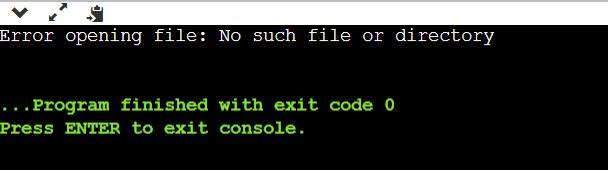
Outputs:
Error opening file: No such file or directory
Real-world Applications of perror()
Understanding when and where to use perror() is key to leveraging its full potential. Here are some situations where perror() shines:
File Operations
perror() is commonly used for diagnosing issues related to file operations, such as opening, reading, or writing a file.
perror() is also useful when dealing with system calls that could potentially fail, like memory allocation, process creation, and more.
#include <cstdio>
#include <cstdlib>

int main() {
    int *ptr = (int*) malloc(sizeof(int) * 1000000000);
    if (ptr == NULL) {
        perror("Memory allocation failed");
    }
    return 0;
}
Output
The Relationship Between perror() and errno
perror() relies on the global variable errno to produce error messages. Whenever a function encounters an error, it typically sets errno to a specific value indicative of the type of error that occurred. The perror() function then interprets this errno value and prints a corresponding message.
It's important to note that errno is not automatically set to 0 after a successful operation, so it should be manually reset to 0 to avoid false positives.
errno = 0; // Resetting errno
Frequently Asked Questions
What does the perror() function do in C++?
The perror() function in C++ displays an error message to the standard error output, based on the current value of the errno variable.
In which library is the perror() function included?
The perror() function is part of the <cstdio> library in C++.
What global variable does perror() rely on to generate error messages?
The perror() function relies on the global variable errno to generate error messages.
Conclusion
In C++, understanding and managing errors is as crucial as writing functional code. The perror() function is a powerful tool for identifying and debugging issues, especially when dealing with file operations and system calls. By effectively utilizing perror(), you can not only improve the robustness of your code but also make it more user-friendly by providing meaningful error messages. Programming is an art, and mastering these tools brings you one step closer to perfecting it.
We hope this blog helped you to understand the concept of the Member Function in C++. You can refer to our guided paths on the Coding Ninjas Studio platform. You can check our course to learn more about DSA, DBMS, Competitive Programming, Python, Java, JavaScript, etc.






 32+ registered

