Appium Vs Robotium
Platforms Supported
The prime difference between Appium and Robotium is that Appium is a cross-platform automated testing tool, while Robotium is compatible only with Android SDK. Robotium can be referred to as the “king for testing Android apps”, as it allows the testing of a vast chain of versions and subversions of the Google mobile operating system. Conversely, Appium is compatible with iOS and Firefox OS along with Android so that it can test the same API on multiple platforms. Appium doesn’t require modification or recompilation of the application while testing.
Use Cases Available
Appium is more extensive when it comes to the evaluation of mobile websites across web browsers like Google Chrome and Safari on mobile devices. It can be used to run automated tests on web apps, along with native and hybrid mobile applications. In contrast, Robotium can be used for evaluating native as well as hybrid mobile applications for Android.
Number of Programming languages supported
Robotium is specially designed for Android Application Testing. Hence it restricts the testers to write the test cases in Java only. It doesn’t provide alternate programming language options to the user and makes the access impossible for non-java users. Appium was devised with a vision of providing multiple options to the user with respect to programming languages, so that he may choose the most compatible language for writing the test cases. For instance, WebDriver-compatible languages, including Java, PHP, C#, Ruby, Python, Perl, Objective-C, Clojure and JavaScript with Node.js.
The table below gives you a head-to-head comparison of the three popular testing tools: Appium, Selendroid and Robotium.
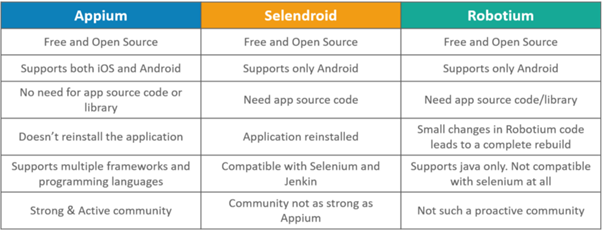
Image Source: medium.com
How to install Appium with Android Studio?
The primary task for learning Appium is installing it; many developers face issues in software installation as the sequence is sometimes incorrect.
Step One: Download the following software in your system:
- Android Studio, the latest version recommended
- Appium Client Library, the latest version
- Appium Server
- Appium Jar files for Java
- Required Java Plugins
Step Two: Install Java on your system and carefully set the environment variables!
Step Three: Install Android Studio on your system by giving the necessary permissions and create a new android project.
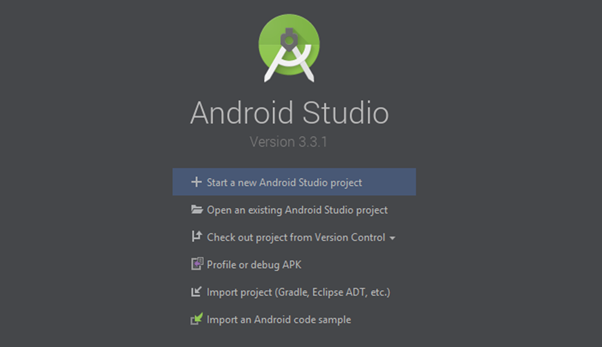
Image Source: Edureka
Step Four: Extract the client library compatible with Appium. Store them separately in a file along with the Appium jar files in your system.
Step Five: Toggle to the “project view” in the Android Studio.
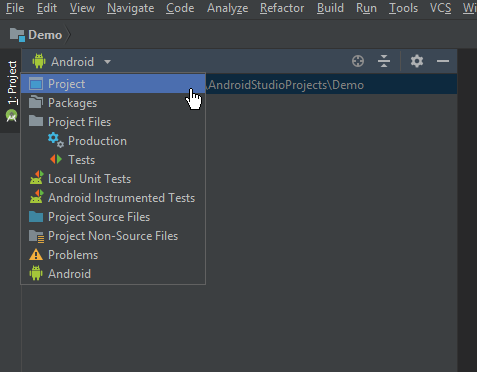
Image Source: Edureka
Step Six: Now select the files that you have extracted in step four and place them in the library folder under the application directory. After that, select them all and append them as libraries.
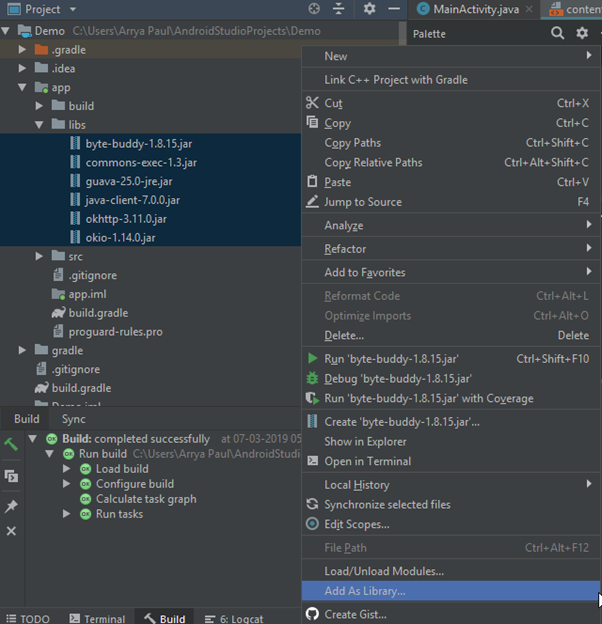
Image Source: Edureka
Step Seven: Once you have added the client files as a library, locate the ” build.gradle” file in the “app” module. Double click on that and rebuild your project. Once the “build successful” message is displayed on the log, it means that your Appium library has been successfully installed. In case of any sequential errors, the error and its cause will be displayed in the log, try to debug it.
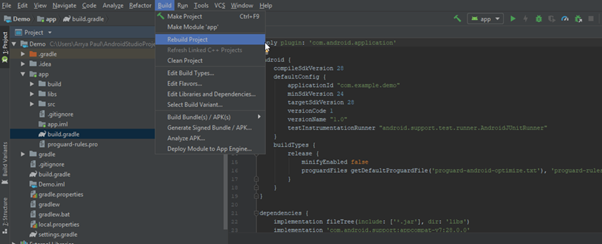
Image Source: Edureka
After you have successfully executed the above mentioned seven steps, you are done with Appium Installation; if you want to install Appium by using the command-line interface, you may refer to our previous article.
Benefits of working with Appium:
- Appium is an open-source automated testing tool; i.e., it is available for free.
- It can be easily installed and added to the Android SDK by following the above-mentioned steps.
- It allows parallel automated testing of hybrid, native, and web applications using a sharable codebase.
- Only a single API needs to be created for Android, iOS, and Windows operating systems.
Unlike other automated testing tools, we don’t need to add any supplementary plugins to make Appium automated. - It runs a test on the particular app that is going to be uploaded in the App Store.
- Additionally, it also supports desktop and mobile application testing for windows also.
- All the complexities of Appium’s cross-functionality are present in the Appium server and are abstracted from the developer so that his automation experience is uniform for both Android and iOS.
- Common tests are run for all the three supporting platforms. i.e., windows, Android, and iOS, so the overall time taken for testing the application is by a factor which is equal to the “number of platforms.”
- Contradictory to the other testing tools, it doesn’t require any extra plugins to make it automation-friendly; it comes with an in-built package.
- It encompasses the concept of testing the same application that is going to be published on the App Store; no provisional apps are required.
The demand for Appium is tremendously increasing in the WebDriver community for automated testing of mobile applications; hence it has a very dense and active community. It is also supported by the Sauce Labs.
Challenges faced by developers while using Appium:
- No detailed error reports are published.
- Since the tests rely on a remote web driver, their execution time is very high.
- In the case of Android, Appium uses a UI Automator which is compatible with the Android SDK, API level 16 or higher only. However, with the help of certain additional plugins, it tends to support certain older APIs also. Particularly, it needs another open-source library known as Selendroid to support the classical APIs. This can be considered as an overhead configuration.
- Setting up Appium locally is a challenge for many developers.
- Usually, an application involves interaction with the device’s microphone, camera pr NFC chip. These interactions require thorough testing, but unfortunately, Appium doesn’t support the testing of these features.
- Appium needs to be connected to several third-party report-generating systems. These as a process consume a lot of developer’s time, and ultimately the end-reports generated are also inconsistent and prone to the system crashes. This leads to the need for installing Appium Studio, which heroically changes the picture by making the testing process much easier and smoother. This leads to faster execution and delivery of the application.





 1+ registered

