Do you think IIT Guwahati certified course can help you in your career?
Introduction
Java programming offers a variety of loops to handle repetitive tasks, & among them, the do-while loop stands out for its unique post-condition checking feature. This means the loop's code block executes at least once before the condition is evaluated. This loop is particularly useful in scenarios where the initial execution of the loop body is necessary regardless of the condition's truth value.
In this article, we'll explore the syntax & applications of the do-while loop, along with illustrations & examples to strengthen our understanding.
Why Use Do While Instead of While?
In Java, both while and do-while loops are used to repeatedly execute a block of code, but there’s a key difference in how they work.
Execution Flow Difference
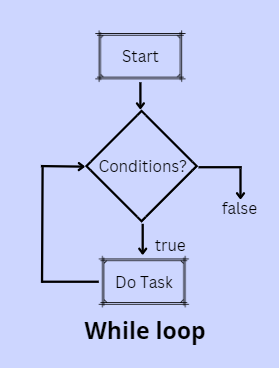
The while loop checks the condition before executing the loop body. If the condition is false initially, the loop body may never run.
while (condition) {
    // Code may never execute if condition is false
}
The do-while loop is different—it always executes the loop body at least once before checking the condition.
do {
    // Code executes at least once
} while (condition);
This happens because in do-while, the condition is checked after the first execution.
When to Use do-while
The do-while loop is most useful when you need the loop to run at least once, regardless of the initial condition. Common examples:
Input Validation: You might ask the user to enter a valid number and keep prompting until they do.
Menu-Driven Programs: Display a menu at least once and keep showing it until the user chooses to exit.
Example:
int option;
do {
    System.out.println("1. Play\n2. Exit");
    option = scanner.nextInt();
} while (option != 2);
Advantages:
Guarantees at least one execution.
Ideal for user interactions and menus.
Limitations:
May be less predictable if the loop should not run when the condition is initially false.
while is preferred when you might need to skip the loop entirely.
Syntax
The do-while loop in Java has a straightforward structure that ensures the loop's body is executed at least once before the condition is checked. Here's how it looks:
do {
   // Statements to execute
} while (condition);
First, the do keyword signals the start of the loop. Inside the curly braces {}, we write the statements we want to run. These could be anything from simple print commands to complex logic. After the closing brace, we have the while keyword followed by a condition inside parentheses (). This condition is checked after the loop body executes. If the condition is true, the loop runs again. If it's false, the loop stops.
Let's break it down with an example:
int count = 1;
do {
    System.out.println("Count is: " + count);
    count++;
} while (count <= 5);
In this example, we start by declaring a variable count with a value of 1. The loop begins & prints "Count is: 1". Then, count is incremented by 1. After the loop body executes, the condition count <= 5 is checked. Since count is now 2, which is less than or equal to 5, the loop runs again. This process repeats until count exceeds 5, at which point the loop stops.
Application of do-while Loop
The do-while loop in Java finds its use in many practical situations, especially where at least one iteration is required irrespective of the condition. It's perfect for scenarios where the user needs to interact with the program, like in menus or input validation.
Imagine a scenario where you're creating a program that asks users for their input until they enter a valid option. The do-while loop is ideal here because you want the prompt to display at least once & continue displaying until a valid input is received. Here’s a simple example:
Java
Java
import java.util.Scanner;

public class UserInputValidation {

    public static void main(String[] args) {

        Scanner scanner = new Scanner(System.in);

        int userInput;

        do {

            System.out.println("Enter a number between 1 & 10:");

            userInput = scanner.nextInt();

        } while (userInput < 1 || userInput > 10);


        System.out.println("You entered a valid number: " + userInput);

    }

}
You can also try this code with Online Java Compiler
Enter a number between 1 & 10:
6
You entered a valid number: 6
In this code, we use a Scanner to read the user's input. We then enter the do-while loop, prompting the user to enter a number between 1 & 10. If the user enters a number outside this range, the condition (userInput < 1 || userInput > 10) evaluates to true, causing the loop to repeat & ask for the input again. This ensures the user is continually prompted until they provide a valid input.
This loop type is also useful in games or simulations where a certain block of code needs to run at least once & then continue based on a condition, like a dice roll game where the player gets to roll at least once & then decides whether to continue based on the game rules.
Illustration
To further understand how the do-while loop works in Java, let’s illustrate its functionality with a practical example. Consider a program that calculates the sum of numbers entered by a user until the user enters 0. This is a common scenario in applications where continuous user input is required until a termination condition is met.
Here's how you could write this program using a do-while loop:
Java
Java
import java.util.Scanner;

public class SumCalculator {

    public static void main(String[] args) {

        Scanner scanner = new Scanner(System.in);

        int sum = 0;

        int number;


        do {

            System.out.println("Enter a number (0 to stop):");

            number = scanner.nextInt();

            sum += number; // Adds the number to the sum

        } while (number != 0);


        System.out.println("Total sum is: " + sum);

    }

}
You can also try this code with Online Java Compiler
Enter a number (0 to stop):
7
Enter a number (0 to stop):
9
Enter a number (0 to stop):
0
Total sum is: 16
In this example, we start by setting up a Scanner to read the user's input and initializing two variables: sum to store the total sum of the numbers entered, and number to store each user input. The program enters the do-while loop, prompting the user to enter a number. The entered number is added to sum, and this process repeats. The condition at the end of the loop checks if the entered number is 0. If it's not 0, the loop continues; if it's 0, the loop stops, and the program prints the total sum.
This illustration shows how the do-while loop ensures that the user is always prompted at least once and can continue entering numbers until they decide to stop by entering 0. It’s a straightforward way to process a sequence of user inputs while maintaining control over when the loop terminates.
Components of do-while Loop
do Keyword
This marks the beginning of the loop. It tells the program that what follows is a block of code to execute at least once before checking any conditions.
Code Block
Enclosed in curly braces {}, this section contains the statements that will be executed each time the loop runs. It can be anything from a simple instruction to increase a variable by one, to complex logic that performs various operations.
while Keyword
Following the code block, the while keyword introduces the condition that will be checked after the code block has executed. If this condition evaluates to true, the loop will run again. If it's false, the loop ends.
Condition
Placed inside parentheses (), this is a boolean expression that the loop evaluates after each execution of the code block. The loop continues as long as this condition remains true.
To clarify these components, let's revisit our previous sum calculator example:
do {
    System.out.println("Enter a number (0 to stop):");
    number = scanner.nextInt();
    sum += number; // This is part of the code block where operations are performed
} while (number != 0);
do Keyword: Initiates the loop.
Code Block: System.out.println("Enter a number (0 to stop):"); number = scanner.nextInt(); sum += number; - This block runs at least once, allowing the user to input a number which is then added to the sum.
while Keyword: Indicates the start of the condition check.
Condition: number != 0 - The loop will continue to run (i.e., prompt the user for a number and add it to the sum) as long as the user does not enter 0.
Execution of do-While Loop
The execution flow of a do-while loop in Java is straightforward yet powerful, ensuring that the loop's body is run at least once. This distinguishes it from other loop types like for or while, where the loop might not execute at all if the condition is not met from the beginning.
Here's a step-by-step breakdown of how the do-while loop operates:
Start: The execution enters the loop without checking the condition first.
Execute Code Block: The statements within the loop's body are executed. This could be anything from simple operations like printing a message or complex logic involving multiple steps.
Condition Check: After the loop's body has been executed, the condition specified after the while keyword is evaluated.
Repeat or Exit: If the condition evaluates to true, the loop goes back to step 2, and the code block is executed again. If the condition is false, the loop ends, and the execution continues with the rest of the program.
To illustrate this, consider a simple program where we want to count down from a specified number to 1:
int start = 5;
do {
    System.out.println("Countdown: " + start);
    start--;  // Decrease the count by 1
} while (start > 0);
In this example, the process is as follows
Start: The loop begins with start at 5.
Execute Code Block: It prints "Countdown: 5" and then decreases start to 4.
Condition Check: Checks if start > 0. Since 4 is greater than 0, the condition is true.
Repeat: The loop goes back to execute the code block, now with start at 4.
Exit: Once start is decreased to 0 and the condition start > 0 is checked, it evaluates to false, ending the loop.
Flowchart of do-while Loop
Start
This is where the loop begins. It’s usually represented by an oval or a rounded rectangle.
Code Block Execution
After the start, there’s a rectangle symbolizing the execution of the loop's code block. This is where the actions you want to repeat are placed. In a do-while loop, this step happens first before any condition is checked.
Condition Evaluation
Following the code block, there's a diamond shape representing a decision point, where the loop's condition is evaluated. This decision determines whether the loop continues or ends.
Repeat or End
If the condition is true (Yes), the flow goes back to the code block, indicating another iteration of the loop. If the condition is false (No), the loop ends, and the flowchart moves on to the next part of the program.
For a clearer understanding, let's consider the counter example again in the context of a flowchart:
Start: The flowchart begins at the Start symbol.
Code Block Execution: The next step is the execution of System.out.println("Counter: " + counter); counter++;. This rectangle represents the code that prints the counter value and then increments it.
Condition Evaluation: The flow then moves to a diamond labeled counter < 3?. This is where the program checks if the counter is less than 3.
Repeat or End: If the condition is true, the flow goes back up to the code block, indicating another loop iteration. If it's false, the loop ends, and the flowchart proceeds to the End of this loop section.
Java Infinitive do-while Loop
A do-while loop in Java is a control flow statement that allows code to be executed repeatedly based on a condition. The infinitive do-while loop runs indefinitely because the loop's condition never evaluates to false. Here’s how it works:
In a do-while loop, the code block is executed at least once, regardless of the condition, because the condition is checked after the block of code.
After executing the code, the condition is evaluated. If the condition is true, the loop continues, and the block is executed again.
In an infinite do-while loop, the condition always evaluates to true, creating a loop that runs endlessly unless interrupted manually (e.g., using a break statement).
Real-World Use Cases of do-while Loop in Java
The do-while loop is useful when the loop body must execute at least once, regardless of the initial condition. Here are two common real-world scenarios where do-while loops are preferred in Java.
1. User Input Validation
When taking input from a user, we often need to ensure the input meets specific criteria. The do-while loop helps by repeatedly prompting the user until valid input is provided.
Example:
Scanner scanner = new Scanner(System.in);
int number;

do {
    System.out.print("Enter a positive number: ");
    number = scanner.nextInt();
} while (number <= 0);

System.out.println("You entered: " + number);
Why Useful? Even if the user enters invalid input initially, the loop ensures they are prompted again until the input is correct.
2. Menu-Driven Programs
do-while loops are commonly used in interactive console applications where a menu is displayed repeatedly until the user chooses to exit.
Example:
int choice;
Scanner scanner = new Scanner(System.in);

do {
    System.out.println("1. Start");
    System.out.println("2. Settings");
    System.out.println("3. Exit");
    System.out.print("Enter your choice: ");
    choice = scanner.nextInt();

    switch (choice) {
        case 1: System.out.println("Starting..."); break;
        case 2: System.out.println("Opening settings..."); break;
        case 3: System.out.println("Exiting..."); break;
        default: System.out.println("Invalid choice!");
    }
} while (choice != 3);
Why Useful? The menu always shows at least once and continues to display until the user selects "Exit".
Best Practices for Using do-while Loops in Java
To write clean, efficient, and maintainable do-while loops, here are some best practices:
When to Use:
Mandatory First Execution: Use do-while when the task must run at least once, like menus or input prompts.
Input Validation: It’s a reliable choice when ensuring the user provides valid input before moving forward.
Readability Tips:
Use Clear Conditions: Avoid writing complex or hard-to-read loop conditions. Example:
// Clear and readable
} while (choice != 3);
Meaningful Variable Names: Instead of vague names like x or y, use descriptive ones like choice, input, or number.
Simple Loop Structure: Keep the loop straightforward to avoid confusing future readers.
Maintainability Tips:
Add Comments: Brief comments can help explain the loop’s purpose.
// Loop until the user selects Exit
Limit Loop Size: Avoid placing too much logic inside the loop; break it into methods if it gets large.
Avoid Side-Effects in Conditions: Keep loop conditions based on stable, predictable variables, not those that change unpredictably inside the loop.
Frequently Asked Questions
Can the do-while loop execute more than once?
Yes, the do-while loop can execute multiple times as long as the condition remains true. It's guaranteed to run at least once because the condition check happens after the initial loop execution.
How is the do-while loop different from the while loop?
The main difference is in the timing of the condition check. In a do-while loop, the condition is checked after the loop's code block has executed, ensuring the code runs at least once. In contrast, a while loop checks the condition before executing the code block, which might result in zero executions if the condition is initially false.
When should I use a do-while loop instead of other loops?
Use a do-while loop when you need to ensure that the loop's body is executed at least once, typically in scenarios like user input validation where you need to prompt the user at least once regardless of the input.
Conclusion
In this article, we looked into the do-while loop in Java, covering its syntax, applications, illustrative examples, and execution process. The do-while loop stands out for its unique feature of executing the loop body at least once before checking the loop condition, making it especially useful for tasks that require at least one iteration, such as collecting user input.
Live masterclass
Ace Data Analyst Interviews with Amazon SQL Case Studies
by Prerita Agarwal
23 Oct, 2026
11:30 AM
One Prompt, Three AI Agents: Build a Portfolio Project for 25L+ GenAI Roles
by Saurav Prateek
19 Oct, 2026
11:30 AM
AI vs You: Crack a Data Analyst Interview Case with Claude + Excel
by Abhishek Soni
21 Oct, 2026
11:30 AM
Build Your Own Perplexity-Style App: Stand Out in GenAI Job Interviews
by Sumit Shukla
22 Oct, 2026
11:30 AM
Ace Data Analyst Interviews with Amazon SQL Case Studies
by Prerita Agarwal
23 Oct, 2026
11:30 AM
One Prompt, Three AI Agents: Build a Portfolio Project for 25L+ GenAI Roles







 1+ registered

