




Introduction
DevTools is a suite of tools for developers that works on Flutter and Dart. It includes layout inspection tools, memory tools, performance tools, and basically all the debugging tools you might need to become a productive and efficient flutter developer, all in one place.

In this article, we will study Flutter Development Tools in detail.
Before we start, let us understand why do we need Development tools in practice?
Why do we need DevTools?
Flutter Development Tools can be used for multiple operations. Some of these operations are:
- Inspection of the UI.
- Inspection of the App state.
- Diagnostic of junk performance of UI.
- Diagnostic of issues with flutter apps.
- CPU Profiling
- Network Profiling
- Debugging at Source-level
- Debugging memory issues in a Dart or Flutter application.
- Logs and information related to diagnostics of an application
- Analysis of code and size of the flutter application.

Installation of the Flutter Development Tools
Installation of Flutter Development Tools in Android Studio:
Step 1: We need to install the Flutter extension in Android Studio, in case you don’t already have it. To do that, Click Settings-> Plug-ins. Once the page is open, search for flutter and then install the plugin.


Step 2: Start by running a Flutter app. Ascertaining that the project is connected to a device and selecting the Run or Debug toolbar buttons.
Step 3: Now, DevTools can be launched from your flutter project's toolbar/menu. First, start your app, start DevTools by following the instructions below:
- Open DevTools toolbar action from Run view.
- DevTools toolbar action is visible in the Debug view. (if debugging)
- DevTools action can be used from the More Actions menu in the Inspector view in your flutter project.
Installation of Development Tools from Visual Studio Code
Step 1: We need to install the Dart extension in order to use Development Tools from VS code. And for debugging of Flutter Applications, Flutter extension is also required.
Step 2: For debugging, you start by running a Flutter app. Then go to Run -> Start Debugging (F5).
Step 3: The Dart Opens DevTools command appears in the VS Code command panel as soon as the debugging is started.
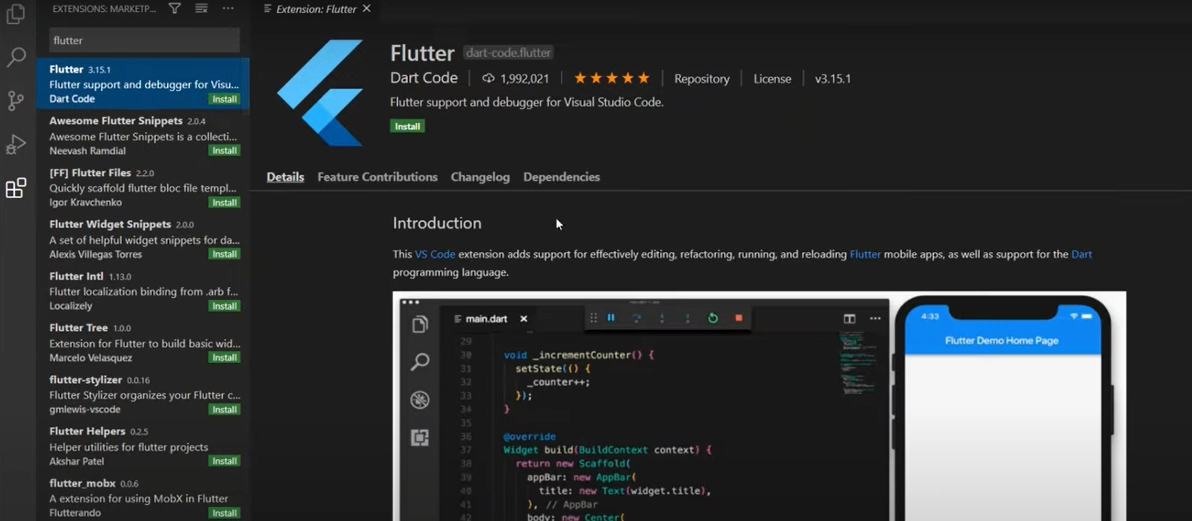
Installation of Development Tools from the command line
If you have flutter on your computer, you can run:
|
Launch the DevTools from the application server. Run the local web server. To do that runs the following commands:
|
On the command line, the output will look something like this:
|
Starting the Application
Go to your application, open the simulator and then run using the following command:
|
Now, we are connected to DevTools.
Start DevTools in Browser
Now search the following URL in the browser to start Dev Tools:
|
Flutter SDK
To update Flutter SDK, we will use the following command:
|
And to upgrade Flutter packages, we will use the following command:
|
We could see the following result,
| Running "flutter packages upgrade" in my_app... 7.4s |
Flutter Inspector
Flutter Inspector is used to explore the flutter widget trees. If we want to achieve this, we will run the following command in the console,
|
You can see an output as shown below −
|
Now go to the url, http://127.0.0.1:50399/.
Frequently Asked Questions
What are Flutter dev tools?
DevTools is a suite of tools for developers that works on Flutter and Dart. It includes layout inspection tools, memory tools, performance tools, and basically all the debugging tools you might need to become a productive and efficient flutter developer, all in one place.
What software does the Flutter app use?
Flutter is Google's portable UI toolkit for crafting beautiful, natively compiled applications for mobile, web, and desktop from a single codebase. Flutter works with existing code, is used by developers and organizations around the world, and is free and open source.
What are Dart dev tools?
Dart Dev Tools is a suite of debugging and performance tools for Flutter and Dart. These tools are divided as part of the dart tool and interact with tools such as dart run, IDEs, and web dev.
What are dev tools?
DevTools is a collection of tools for a web developer that is built for developers directly into the browser "Google Chrome." These tools allow you to view and change/manipulate the DOM, change a page's styles (CSS) in a preview environment, and work with JavaScript by enabling you to debug, view messages, and run JavaScript code in the console.
What software does the Flutter app use?
Flutter is Google's portable UI toolkit for crafting beautiful, natively compiled applications for mobile, web, and desktop from a single codebase. Flutter works with existing code, is used by developers and organizations around the world, and is free and open source.


 6+ registered

