Do you think IIT Guwahati certified course can help you in your career?
Introduction
When we deal with java, we often use an Array to store values. We store values like 'int', 'double', 'float', etc., and we call it an array of primitive data types. Here in this article, you will learn about an array of objects.Cool! Are you wondering about creating an array of objects in java?
Fine! So let us learn to create an array of objects in Java.
What is an Array Of Objects In Java?
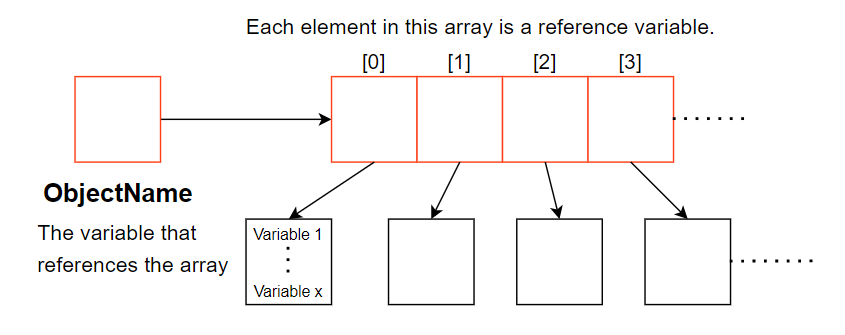
An array of objects in Java represents multiple records in memory which stores an array of objects. Thisarray is not holding objects but holding only references to the objects. That means the array elements store the location of the reference variables of the object.
Why Use an Array of Objects?
In Java, an array of objects allows you to store multiple instances of a class in one organized collection. This is especially useful when dealing with real-world entities like students, products, or books. Let’s explore three key reasons why using an array of objects is practical in Java development.
1. Efficient Grouping of Related Objects
Arrays of objects help you group similar entities under one variable. For example, in a school system, you can store multiple Student objects in a single Student[] array. This allows for better management and tracking of data without creating separate variables for each instance.
Student[] students = new Student[3];
students[0] = new Student("Alice");
2. Better Organization and Code Scalability
Using arrays makes your code more organized and scalable. If you're building an inventory system, storing 100 Product objects in an array keeps your code clean and easier to maintain, especially when the number of items grows.
3. Easy Iteration and Access Using Loops
Arrays support indexed access, which makes it easy to iterate through elements using loops. This is helpful when performing batch operations like calculating totals, printing details, or applying logic to each object in the array.
for (int i = 0; i < students.length; i++) {
    students[i].printDetails();
}
An array of objects in Java is a powerful way to manage multiple similar items efficiently. It simplifies code, improves readability, and prepares your program for handling real-world data collections.
Creating an Array of Objects in Java
We can create an array of objects in java using the 'Object' class.
Using the following statement, you create an array of objects.
NameOfClass ArrayOfObjects[];
Alternatively, you can declare an array of objects using the following statement.
NameOfClass[] ArrayOfObjects;
Note In both statements, "ArrayOfObjects" is an array of objects.
Example
If you have a class 'Ninjas', you can create an array of 'Ninjas' objects using the following statement.
Ninja NinjaObjects[];
Or
Ninja[] NinjaObjects;
You can also declare an array of objects with initial values. You can declare similarly to the given below statement.
NameOfClass ArrayOfObjects[] = {"something"};
Note Just like an array of primitive data types here also, you can give multiple values separated with a ','.
Example
Ninja NinjaObjects[] = {"NameOfNinja", new Integer(1)};
Application
Suppose we want to create a class named 'College'. We want to keep records of 40 students of a batch having four courses. So, in this case, we will create an array of objects instead of 40 separate variables.
College Course_1[40];
College Course_2[40];
College Course_3[40];
College Course_4[40];
Instantiate the array of objects
So far, we have declared the array of objects. Now we will instantiate it using the 'new' keyword before using it in the program.
To declare and instantiate the array of objects in java, use the following syntax.
NameOfClass ArrayOfObjects[] = new NameOfClass[ArraySize];
Note Using the above syntax, you can create an array of objects 'ArrayOfObjects' with an 'ArraySize' number of objects/elements references.
Example
The following statement will create an array named 'quad' with four elements. These four elements will store the objects of the class 'Quadrilateral'.
Quadrilateral quad[] = new Quadrilateral[4];
Initializing Array Of Objects
After you instantiate the array of objects, you need to initialise it with values. Let us learn two methods to initialise the array of objects.
Method 1: Using the constructor - You can initialise each object by passing values to the constructor separately.
Method 2: Using a member method of class - You can initialise each object using the class member method.
Now let us try to implement both methods using a program in java.
1. By using the constructor:
First, declare an array of objects of the desired type and then create an instance for each element in class, and finally passed the values to the constructor for each element.
The below program shows how the array of objects is initialized using the constructor.
Java
Java
/*Array of Objects in Java*/
class Square {

    private int length;

    public Square(int l) {
        length = l;
    }

    public int ComputeArea() {
        return length * length;
    }
}

class Test {

    public static void main(String[] args) {
        /*declaring array of objects*/
        Square[] obj = new Square[1];

        /*initialising the array*/
        obj[0] = new Square(2);

        for (int i = 0; i < 1; i++) {
            System.out.println(obj[i].ComputeArea());

        }
    }
}
You can also try this code with Online Java Compiler
First, declare an array of objects of the desired type, then create a separate member method in the class to initialize the objects in the array. Lastly pass the desired values as parameters and assign them.
The below program shows how the array of objects is initialized using a separate member method.
Java
Java
/*Array of Objects in Java*/
class Rectangle {

    private int length;
    private int breadth;
    public void assignData(int len, int bre) {
        length = len;
        breadth = bre;
    }

    public int ComputeArea() {
        return length * breadth;
    }
}

class Test {

    public static void main(String[] args) {
        /*declaring array of objects*/
        Rectangle[] obj = new Rectangle[1];

        /*Rectangle object*/
        obj[0] = new Rectangle();

        /*Assigning values to object*/
        obj[0].assignData(4,5);

        for (int i = 0; i < 1; i++) {
            System.out.println(obj[i].ComputeArea());

        }
    }
}
You can also try this code with Online Java Compiler
In the above code, we first create an array of two Ninjas objects, and then the first object is initialized with the name "Dhruv" and the experience 20. Similarly, the second object is initialized with the name "Rawat" and the experience 21. Hne we declared an Array of Objects with Initial Values
When to Use Arrays vs. ArrayList for Objects
In Java, both arrays and ArrayList can store multiple objects, but they serve different purposes. Knowing when to use an array vs. ArrayList helps you write cleaner, more efficient, and scalable code. Let’s explore three key factors to help you decide which to use.
1. Fixed vs. Dynamic Size
Arrays in Java have a fixed size once declared. This makes them suitable when the number of elements is known and constant.
Student[] students = new Student[3];
You can also try this code with Online Java Compiler
Arrays are like fixed-size trays, while ArrayList is like a stretchable bag.
2. Performance (Memory & Speed)
Arrays are slightly faster and memory-efficient because they are low-level structures with minimal overhead. This can matter in performance-critical applications like games or simulations.
ArrayList, while slightly slower due to dynamic resizing and internal handling, offers flexibility and is generally efficient enough for everyday use.
Note: Use arrays when performance is a top priority and the size is predictable.
3. Syntax Simplicity and Built-in Methods
ArrayList comes with built-in methods like add(), remove(), contains(), and size(), making it easier to use for dynamic data handling.
ArrayList<String> names = new ArrayList<>();
names.add("Alice");
names.remove("Alice");
You can also try this code with Online Java Compiler
Choosing between an array and an ArrayList depends on your application's needs. If flexibility and ease of use matter, go with ArrayList. For high performance with a fixed size, arrays are the better option.
We hope you understand how to create an array of objects in java. Practice it on online java compiler.
Frequently Asked Questions
How does an array of objects work in Java?
An array of objects is a collection of references to objects in Java. The references are stored in the array, and each reference points to an object in memory. The objects in the array can be accessed by their index in the array.
How to create array of objects dynamically in Java?
In Java, you can create an array of objects dynamically using the 'new' keyword. First, define the class of objects. Then, declare an array and allocate memory for objects using 'new', and initialize the array elements with 'new' again
Why do we need an array of objects?
When we want to store a collection of objects, we need an array of objects. For example, an array of objects can be used to store a list of items, and employees details etc.
How do you store data in an array of objects?
To store data in an array of objects, we need to create a new object and assign it to a reference in the array. The syntax looks like this Ninjas coders = new Ninjas("Dhruv Rawat", 20).
How to find value in array of objects in Java?
In Java, finding a value in an array of objects involves creating the array, specifying the target value, and iterating through it. During each iteration, you compare the object's property with the target. If you find a match, you can take the necessary action. This approach is flexible and useful for various data types and search criteria.
Conclusion
This article discussed how to create an array of objects in Java. We learnt to declare, instantiate and two ways to initialise the array of objects.
We hope this blog on creating an array of objects in Java was helpful. You can refer to other similar articles as well -







 1+ registered

