Do you think IIT Guwahati certified course can help you in your career?
Introduction
Jira is a project management tool developed by Atlassian, commonly used by software development teams for managing projects using various agile methodologies.
A backlog in Jira is a list of high-priority issues in a project.
In this article, you will learn how to create backlogs in Jira for Sprint and Kanban projects.
What is a Backlog?
It is a core concept of Agile project management methodologies such as Kanban and Scrum. Each project has a single backlog which is used for creating and managing several types of issues. Teams review the backlog list and decide if the state of an issue in the list should be changed.
In the following sections, you will learn about enabling and adding issues to the backlog list in Kanban and Scrum projects.
Backlog in Kanban Projects
Kanban is an agile methodology that emphasizes visualizing work and limiting the work in progress. In Jira, backlog is disabled by default for Kanban project boards.
Enabling Backlog in Team-Managed Projects
Follow these steps to enable backlog:-
Open the project board and navigate to the ‘configure board’ option.
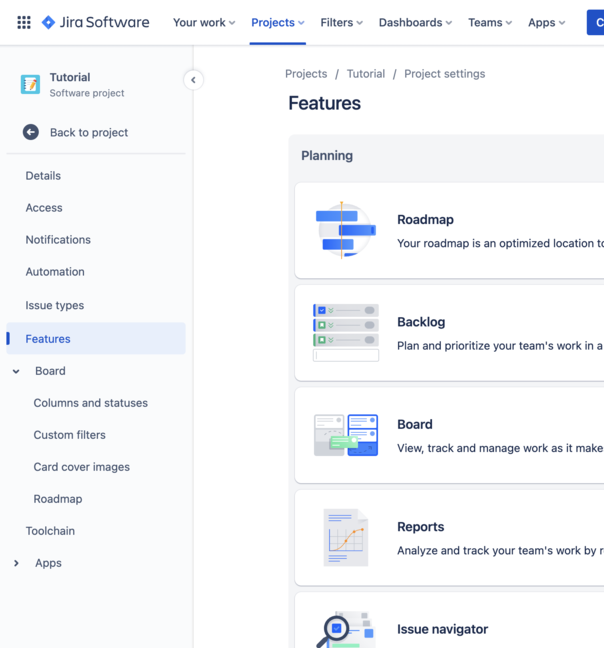
Go to the features tab from the sidebar, and enable the backlog option.
Go back to the project. The backlog tab should now be enabled.
Enabling Backlog in Company-Managed Projects
Follow these steps to enable backlog:-
Open the project board and navigate to the ‘board settings’ option.
Navigate to the column management page from the sidebar.
Click on the add column button and add the backlog column.
The backlog column should be visible on the project board.
Once you have enabled backlog in your project, issues can be added by dragging and dropping them from any column to the backlog column.
Backlog in Scrum Projects
Scrum is an agile methodology that emphasizes iterative development and frequent delivery. In Jira, backlog is enabled by default for Scrum project boards. Creating backlogs in Jira for Scrum projects is simple as it only involves dragging and dropping issues from your sprint to the backlog list.
Frequently Asked Questions
What is Agile Methodology?
It is a flexible and interaction-based method in project management. It is commonly used by software engineering teams as this technique prioritizes collaboration and continuous improvement.
What is an issue in Jira?
It is a unit of work that is assigned to people in a team. Each issue has a type such as bug, story, epic, sub-task, etc.
What is a Sprint in Scrum projects?
A Sprint is a fixed-duration iteration during which your team has to complete a set of predefined issues. The time duration is consistent throughout the project to establish a rhythm.
Conclusion
In this article, you learned about the backlog list in Jira and adding issues to it for Scrum and Kanban projects.
Hope this article helped you in creating backlogs in Jira.








 1+ registered

