




Introduction
Error handling features are not directly supported by the C Programming language, known as exception handling in C++ or other Object Oriented Programming languages. However, there are few methods and variables defined in error.h header file that is used to locate errors using return values of the function call. Most of the C function calls return -1 or NULL in case of any error and sets an error code errno. So the return value can be used to check errors while programming.
Recommended Topic, Sum of Digits in C, C Static Function
Also read, odd or even program in c
Methods of Error Handling in C
In the C program, there are different functions or methods of error handling are given below:
Global variable errno
Whenever a function is called in C, a variable named errno is automatically assigned a code (value) that is used within the program to identify the type of error. It is a global variable indicating the error that occurred during any function call and defined in the errno.h header file. There are different codes (values) for different types of errors. Here is a list of errno values, and their corresponding meaning is given below:
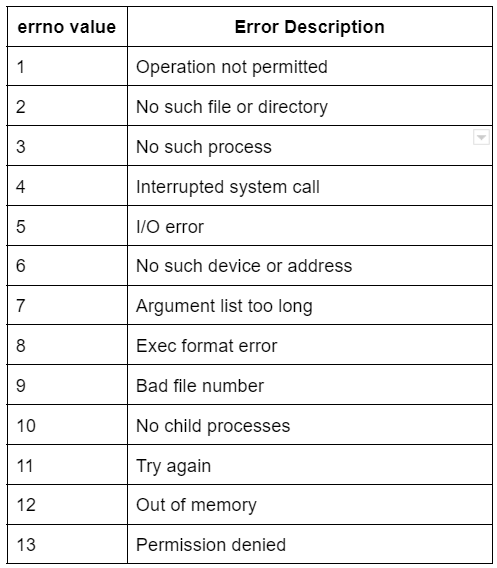
Here is a C program to see how errno value is set in the case of any error.
#include<stdio.h>
#include<errno.h>
int main()
{
    FILE *fptr;
    fptr= fopen("test.txt", "r");
    printf("The value of errno: %d\n", errno);
    return 0;
}
Output
The value of errno: 2In the above program, the value of errno is set to 2, which means the file we are trying to open that does not exist.
perror() and strerror()
If we want to show the error description or error message instead of just showing the errno, we must use two functions to display a text message associated with errno. These functions are given below.
- perror()
- strerror()
perror(): This function displays a message supplied by the user along with the error message generated by the system. It prints the string we pass to it and a colon, then the message related to the current value of errno.
Syntax:
void perror (const char *str)Here in the above syntax, str is a string containing a message to be printed before the error message.
strerror(): This function returns a pointer to the textual representation of the current errno value. It is defined in string.h library.
Syntax:
char *strerror (int errnum)Here in the above syntax, errnum is the error number i.e. errno.
Also read about “strcat() function in C and Short int in C Programming
Here is a C program to see how perror() and strerror() functions are used to print the error messages.
#include <stdio.h>
#include <errno.h>
#include <string.h>
int main ()
{
    int Errornum;
    FILE *fptr;
    fptr=fopen("test.txt", "r");
    if(fptr==NULL)
    {
        Errornum=errno;
        printf("The value of errno: %d\n", errno);
        perror("The error message from perror");
        printf("The error in opening file: %s\n", strerror(Errornum));
    }
    else
    {
        fclose(fptr);
    }
    return 0;
}Output
The value of errno: 2
The error in opening file: No such file or directory
The error message from perror: No such file or directory
In the above program, if we try to open a file that does not exist, then the perror() and strerror() function will print the error message along with errno and a customized error message.
You can also read about C dynamic array.
You can also read about the jump statement.
Program Exit Status
There are two macros, EXIT_SUCCESS and EXIT_FAILURE, available in C language, which may be passed to exit() function to indicate successful or unsuccessful termination.
- EXIT_SUCCESS is used to indicate the exiting after successful operation of the program, and the value of this macro is 0.
- EXIT_FAILURE is used to indicate the exiting with an error condition, and the value of this macro is -1.
Here is a program to demonstrate the above concept.
#include <stdio.h>
#include <stdlib.h>
#include <errno.h>
#include <string.h>
int main ()
{
    int Errornum;
    FILE *fptr;
    fptr=fopen("test.txt", "r");
    if(fptr==NULL)
    {
        Errornum=errno;
        printf("The value of errno: %d\n", errno);
        perror("The error message from perror");
        printf("The error in opening file: %s\n", strerror(Errornum));
        exit(EXIT_FAILURE);
    }
    else
    {
        fclose(fptr);
        exit(EXIT_SUCCESS);
    }
    return 0;
}Output
The value of errno: 2
The error in opening file: No such file or directory
The error message from perror: No such file or directory
Divide by Zero Error
The most common error we face in C is 'divide by zero' error, which we are often stuck in while programming. There is no C language particular function or class to deal with such type of error. We can overcome this error by checking the denominator before the division.
Here is a C program to handle a division by zero condition.
#include <stdio.h>
#include <stdlib.h>
int main()
{
   int x=60;   //divident
   int y=0; //divisor
   int res;
   if(y==0)
   {
       printf("Zero divisor is not allowed");
       fprintf(stderr, "Zero divisor case! Exiting...\n");
       exit(EXIT_FAILURE);
   }
   else
   {
       res=x/y;
       printf("Result is: %d", res);
       exit(EXIT_SUCCESS);
   }
   return 0;
}Output
Zero divisor is not allowed
Zero divisor case! Exiting...
Also see, Tribonacci Series


 1+ registered

