Get a skill gap analysis, personalised roadmap, and AI-powered resume optimisation.
Introduction
In Python programming, data structures play a crucial role in organizing and managing information efficiently. Among these structures, tuples stand out as a powerful and versatile option. A tuple is a collection type that allows you to store an ordered sequence of elements, which can be of different data types, including numbers, strings, and even other collections. Unlike lists, tuples are immutable, meaning once created, their contents cannot be altered. This characteristic not only ensures data integrity but also enhances performance in certain scenarios. In this blog, we will explore the fundamentals of tuple in Python.
What are Tuples in Python?
Tuples in Python are immutable sequences that can hold a collection of heterogeneous items. Defined by enclosing elements in parentheses, tuples allow for data storage without modification, making them useful for fixed data sets and as dictionary keys due to their hashability.
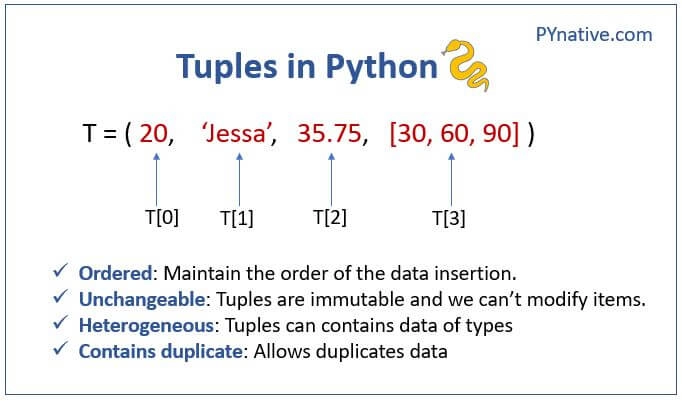
Tuples store multiple items separated by commas in a single variable. Items are written with round brackets. There are various properties of tuples that should be considered while creating or performing the operations.
Unchangeable- Tuples are immutable, which means we cannot change or add items after creating the tuple.
Ordered- means that items are defined in an order that will not change after the insertion operation.
Heterogeneous- A single tuple variable can contain different data types.
Contains Duplicates- Allows to storage of duplicate data items.
Characteristics of Tuples
Immutability of Tuples
Python Tuples are immutable, which means you cannot change their values once you create them. This is different from Python lists, which are mutable and allow updates. Because tuples cannot be changed, they are safer to use when you want to protect data from accidental changes.
For example:
my_tuple = (1, 2, 3)
my_tuple[0] = 10  # This will give an error
You can also try this code with Online Python Compiler
In the above code, Python throws an error because we tried to change the first element of the tuple. The immutability of Python Tuples makes them useful in situations where data must stay constant, like storing fixed settings or using them as keys in dictionaries. They are also faster and use less memory than lists in many cases.
Ordered Nature and Allowance of Duplicate Elements in Tuples
Python Tuples keep the order of the items as they were added. This means you can access items by their position, just like in a list. Each element has a fixed index, starting from 0.
Because of their ordered nature and support for duplicates, Python Tuples are great for storing related data where position matters and repeated values are allowed.
How to create a tuple?
To create a tuple in Python, enclose elements in parentheses, separating them with commas. For example: my_tuple = (1, 'apple', 3.14) creates a tuple with three elements.
We can create an empty tuple in python by writing nothing in the parentheses.
Example 1
Input:
Python
Python
tup1 = ()
print(tup1)
You can also try this code with Online Python Compiler
Returns the number of occurrences of the specified value in the tuple.
index(value)
Returns the first index of the specified value in the tuple. Raises an error if the value is not found.
len(tuple)
Returns the number of elements in the tuple.
max(tuple)
Returns the maximum value from the tuple.
min(tuple)
Returns the minimum value from the tuple.
tuple(iterable)
Converts an iterable (like a list or string) into a tuple.
Key Differences Between Tuples and Lists
In Python, tuples and lists are both used to store collections of items, but they have some key differences. The most important difference is mutability. Python Tuples are immutable, which means you cannot change their values after creation. Lists are mutable, so you can add, remove, or update items freely.
Syntax also differs.
Tuples use parentheses () while lists use square brackets [].
Tuples usually offer better performance than lists because they take up less memory and are faster for fixed-size data.
Use cases vary too. Use lists when you need to modify data, like adding user input. Use tuples for fixed values like days of the week.
Example:
my_list = [1, 2, 3]
my_list.append(4)

my_tuple = (1, 2, 3)
# my_tuple[0] = 10 → This will raise an error
You can also try this code with Online Python Compiler
You should use Python Tuples when your data should not change. Tuples are ideal for storing constant values such as coordinates, color codes, or fixed settings. Because of their immutability, they are safer and can be used as dictionary keys or in sets.
Tuples also offer better performance in terms of speed and memory usage. So, when you're working with large amounts of fixed data, tuples can improve efficiency.
They are also a good choice when returning multiple values from a function.
In this example, we return a tuple from the function because the user’s name and age should not change.
What is a Nested Tuple?
A nested tuple is a tuple that contains another tuple as one of its elements. This allows you to store complex and structured data in a single tuple. Python Tuples support nesting just like lists do.
In the example above, the tuple (3, 4) is inside the main tuple. You can access nested items using multiple indices. Nested tuples are useful when working with multidimensional data or grouped records.
Because tuples are immutable, even their nested elements cannot be changed if they are also tuples.
How Tuple Unpacking Works
Tuple unpacking is a feature in Python where values in a tuple can be assigned to multiple variables in a single line. This makes your code cleaner and easier to read.
Basic unpacking:
person = ("Alice", 25)
name, age = person
print(name)  # Output: Alice
print(age)   # Output: 25
You can also try this code with Online Python Compiler
Tuple unpacking works well when you return multiple values from functions or when iterating over items in a list of tuples.
Python Tuples make unpacking intuitive and help keep code simple and readable.
Frequently Asked Questions
How are lists different from tuples?
Both lists and tuples are the collection data types of the python language, but the main difference is that tuples are immutable and lists are mutable.
What is the performance difference between lists and tuples?
Tuples are generally faster than lists when it comes to iteration and access due to their immutability, which allows for optimized memory usage. Lists, being mutable, require additional overhead for dynamic resizing and element modification, impacting performance.
Why use tuples in Python?
Tuples are used in Python for their immutability, which ensures data integrity and prevents accidental changes. They are also more memory-efficient than lists, making them ideal for fixed collections of items, such as coordinates or records.
What are tuple methods in Python?
Tuple methods in Python include count(value), which returns the number of occurrences of a specified value, and index(value), which returns the first index of a specified value. These methods facilitate efficient data retrieval within tuples.
Conclusion
In this article, we explored Python tuples, a versatile data structure known for immutability, memory efficiency, and ease of use. Their ability to store ordered collections of diverse data types makes them useful in many applications, from simple records to dictionary keys. Mastering tuples and their built-in methods can boost both your programming skills and application performance.









 7+ registered

