Do you think IIT Guwahati certified course can help you in your career?
Introduction
Java 8, released in March 2014, is one of the most significant upgrades in the history of the Java programming language. It introduced a variety of powerful features that revolutionized the way developers write Java code, making it more concise, readable, and efficient. With a strong focus on functional programming, parallel processing, and improved API design, Java 8 addressed many long-standing limitations and modernized the language to meet contemporary development needs.
Key features like Lambda Expressions, Streams API, Functional Interfaces, and the new Date and Time API not only enhanced Java’s capabilities but also improved developer productivity by simplifying complex coding patterns.
This article will look at these features in detail to make you understand the JAVA 8 programming language.
What is Java 8?
JAVA 8 is a significant release of the JAVA programming language. It supports functional programming, a new JavaScript engine, and new APIs for time manipulation. This version of Java is the upgrade that provides many changes and new features for a Java programmer.
Some benefits of JAVA 8 are -
It provides many improvements to JAVA IO and APIs.
Java 8 provides the packages to deal with date and time, even in a particular zone.
It also offers many features that help decrease and optimize the code's size.
Java 8 provides automatic resource management.
Java 8 provides functional programming and supports a new JavaScript engine.
Features of Java 8
Java 8 introduced several groundbreaking features that made Java more modern, efficient, and developer-friendly. It brought functional programming concepts, improved APIs, and enhanced performance through parallelism.
Default and Static Methods in Interfaces
Functional Interfaces and Lambda Expressions
Java Stream API for Bulk Data Operations on Collections
forEach() method in the Iterable interface
Java IO improvements
Java Time API
Collection API improvements
Concurrency API Improvements
1. Default and Static Methods in Interfaces
Default and Static methods are the JAVA 8 features used to add a method in each project class by creating a single method in an interface implemented in the class by the 'implements' keyword.
The difference between these keywords is that in the default method, we can override a method's functionality in a particular class. In contrast, static keywords apply the same method in all the classes with an implemented interface.
Below is the implementation of both the methods.
Code in Java
Java
Java
import java.util.Optional;
interface School { default void classStudents() { System.out.println("This class is shouting."); } static void classTeachers() { System.out. println("There are good teachers in this class."); } }
class ClassA implements School { }
class ClassB implements School { }
class ClassC implements School { @Override public void classStudents() { System.out.println("This class is quiet."); } }
class Main { public static void main(String[] args){
ClassA classAObj = new ClassA(); classAObj.classStudents(); // Calling default method
ClassB classBObj = new ClassB(); classBObj.classStudents(); // Calling default method
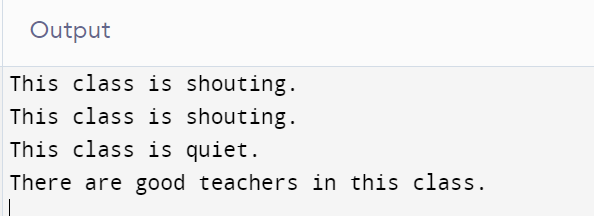
The above code shows the interface implementation in the classes, and we override the default method in ClassC while we cannot change the static method. Then in the Main class, we call both the methods in the different classes by creating it the Main class.
2. Functional Interfaces and Lambda Expressions
Functional Interfaces are interfaces that contain one function inside it and the lambda expression is a short block of code that takes the parameter as input and returns the value.
These JAVA 8 features are used to define the abstract method inside the interface in lesser code.
Let's see the implementation of Lambda Expressions in the Functional Interface of this JAVA 8 feature.
Code In Java
Java
Java
@FunctionalInterface	// It is optional
interface School {
	    public void students();
}

public class Main {
	    public static void main(String[] args)
    {
        String s = "Students in schools are lucky";
        School sch=()->
        {
            System.out.println(s);
     	};
        sch.students();
	}
}
You can also try this code with Online Java Compiler
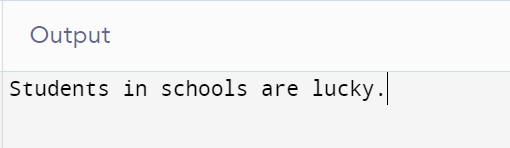
In the above code, we created a functional interface and a class. In our Main class, we define the class with Lambda's help and print the result in it.
3. Java Stream API For Bulk Data Operations On Collections
Streams API are Collections Framework related and used to perform bulk operations. These are used to reduce the code. It allows both sequential as well as parallel execution. We use import java.util.stream to use JAVA Stream API.
public class Main { public static void main(String[] args) { List<Integer> NaturalNumbers = new ArrayList<>(); for (int i = 0; i <= 20; i++) { NaturalNumbers.add(i); } //List to sequential stream Stream<Integer> seqStream = NaturalNumbers.stream();
//List of parallel stream Stream<Integer> parallelStream = NaturalNumbers.parallelStream();
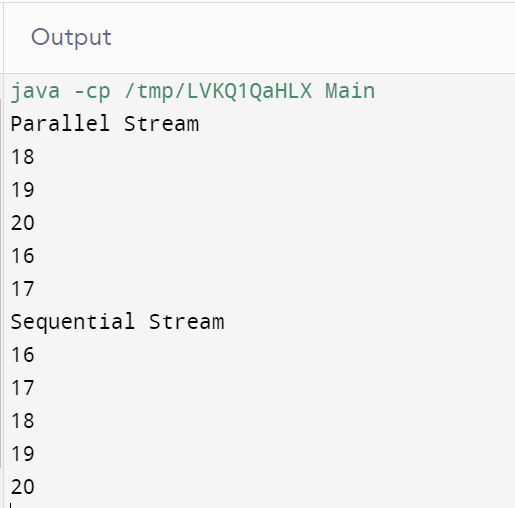
The above code is written in Java in which we created a list of natural numbers from 1 to 20, then created a list of Parallel and Sequential streams and printed both the list with the help of Lambada.
We observe the sequence in the parallel stream is random, while in the sequential stream, the printed numbers are in a particular series.
4. forEach() method in the Iterable interface
JAVA 8 provides a new feature to traverse the elements. The forEach loop is used in the Iterable and Stream interface. Below is the code which shows the implementation of forEach loop.
Code In Java
Java
Java
import java.util.*;
public class Main
{
    public static void main(String[] args)
    {
        List<String> ClassA = new ArrayList<String>();
        ClassA.add("Shivam");
        ClassA.add("Shristy");
        ClassA.add("Vardaan");
        ClassA.add("Utkarsh");
        ClassA.forEach(Students -> System.out.println(Students));
    }
}
You can also try this code with Online Java Compiler
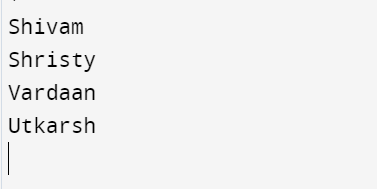
In the above we create a list in which we add some elements, and then we use a forEach loop to print the name of all the elements added to the list.
5. Java IO improvements
JAVA 8 improves the performance of input-output packages like java.lang.String.getBytes() and the constructors like java.lang.String.
Some IO improvements are Files.list(Path dir) that returns a lazily populated Stream, Files.lines(Path path) which help to read all the lines from the file, Files.find() that searches for files in a file tree and BufferedReader.lines() which helps to read the lines from the BufferReader.
The size of the charsets.jar in <JDK_HOME>/jre/lib/ is decreased compared to the previous version.
6. Java Time API
Previously it was challenging to work with date and time in the Java project, as there were no standard approach to deal with it but there is an introduction to java.time package, which helps to work with the time in a project.
Packages like java.time.zone are used to work according to the time zones and java.time.format provides the class to print and parse the dates and time.
This is one of the most important JAVA 8 features. Below is the example to learn the implementation of this package.
Code In Java
Java
Java
import java.time.*; class Main { public static void main(String[] args) { LocalDate TodayDate = LocalDate.now(); System.out.println("Today's Date is: " + TodayDate);
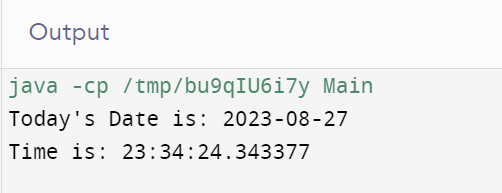
In the above code, we import the java.time.* package and print the current date and time as the output.
7. Collection API Improvements
We had already seen the forEach() methods for collections. Similarly, many methods are introduced in JAVA 8 features.
Some of them are default method removeIf(Predicate filter) collections to remove the elements based on some conditions, and some more are Map replaceAll(), compute(), and merge() methods.
This version also improves the performance of the HashMap class with Key Collisions.
Let’s take an example of removeIf() method to remove some of the elements from a list.
Code In Java
Java
Java
import java.util.*;
class Main
{
    public static void main(String[] args)
    {
    List<Integer> List = new ArrayList<>();
    List.add(17);
    List.add(23);
    List.add(9);
    List.add(21);
    List.add(15);


    List.removeIf(n -> (n > 20));
    for (int marks : List)
    {
            System.out.println(marks);
    }
  	}
}
You can also try this code with Online Java Compiler
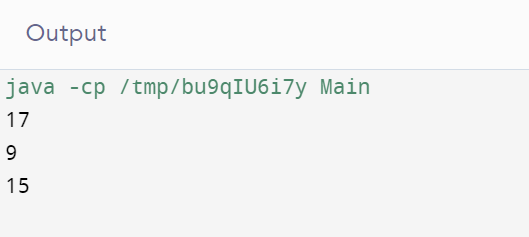
The above code creates a list, adds some elements, then removes some elements satisfying the particular condition, and prints the resulting list.
8. Concurrency API Improvements
There are some inbuilt methods made to enhance API. Some of these methods are compute(), forEachEntry(), forEachKey(), forEachValue(), merge(), reduce(), search(), forEach() etc. Other methods, like mappingCount and newKeySet, have also been added.
Two new interfaces are also introduced by java.util.concurrent package in which one creates a stage of asynchronous computation while others identify asynchronous tasks produced by async methods.
Let’s see a code in java to implement forEachKey() for concurrentHashMap.
Code In Java
Java
Java
import java.util.concurrent.ConcurrentHashMap;
class Main {
    public static void main(String[] args) {
    ConcurrentHashMap<String, Integer> map = new ConcurrentHashMap<>();
    map.put("Utkarsh", 1);
    map.put("Sri", 2);
    map.put("Shiv", 3);
    map.put("Varda", 4);
    map.put("Varnit", 5);

    map.forEachKey(1, k -> k.length(), System.out::println);
  }
}
You can also try this code with Online Java Compiler
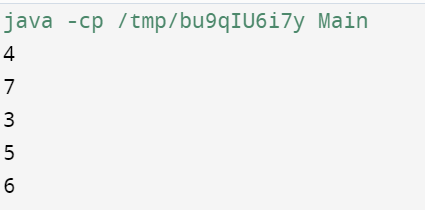
The above code shows the use of forEachKey() in HashMap, in which we created a concurrentHashMap and the length of each key in the map.
Frequently Asked Questions
Why is Java 8 better?
Java 8 is better because it simplifies coding with functional programming, enhances performance with streams and parallelism, and modernizes APIs for improved productivity.
What are the main features of Java 8?
Lambda expressions, the Stream API for functional-style operations on collections, the Java.time package for date and time handling, default methods in interfaces, and the Optional class for more robust null handling are just a few of the notable features introduced by Java 8.
What is Java 8 features and why we need it?
Lambda expressions, Stream API, Java.time for date handling, default interface methods, and Optional classes are among the Java 8 features. These improve Java programming's readability, conciseness, and performance, increasing developer productivity.
What is the difference between Java 7 and 8?
Modern programming features were added to Java 7 by introducing lambda expressions, the Stream API for functional programming, java.time for date handling, default methods in interfaces, and the Optional class in Java 8.
What are the advantages of Java 8?
The Stream API for functional-style operations, Java.time for better date handling, default methods for interface evolution, and Lambda expressions for concise code are some benefits of Java 8.
Conclusion
Java 8 marked a major turning point in the evolution of the Java language. With features like Lambda Expressions, Streams API, and the new Date and Time API, it significantly simplified code, improved performance, and introduced modern programming paradigms.
To learn more about JAVA 8, go through the below topics







 1+ registered

