Do you think IIT Guwahati certified course can help you in your career?
Introduction
JDK(Java Development Kit) is one of the three core technology packages along with JRE(Java Runtime Environment) and JVM(Java Virtual Machine). It provides the tools and services required to develop software applications with ease.
What is Java Development Kit?
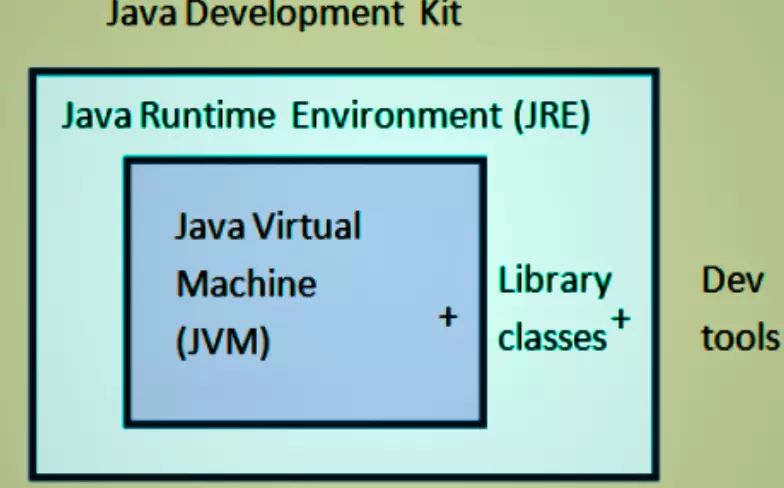
The JDK plays an essential role in the Java application development lifecycle. In short, it is a software package that contains the compiler and class libraries to create Java-based applications. The JDK consists of a JRE, a compiler, an interpreter, and an archiver. The JRE contains tools to run Java programs, so the JDK requires it.
The packages part of the JDK are kits targeted to work on different types of development. The Enterprise Edition (Java EE) contains tools for Enterprise application development and Object-relational mapping. It focuses on web-based applications with servlet specifications. Usually, all JDK versions include a Standard Edition(Java SE). The Micro Edition, Java ME is also an available JDK package.
Importance of JDK in Java Development
The Java Development Kit (JDK) is a vital component for every Java developer, playing a central role throughout the entire Java application development process. It provides the necessary tools, libraries, and environments to build, test, and run Java programs efficiently.
1. Development Toolset
JDK offers essential tools that Java developers use daily. The javac compiler translates Java source code into bytecode, which is then executed by the JVM. Additionally, tools like the debugger (jdb) help identify and fix errors during development. The rich set of pre-built Java libraries provided by JDK simplifies coding by offering ready-to-use functionalities, from data structures to network handling. Without the JDK, writing and compiling Java applications would not be possible.
2. Execution Environment
The JDK includes both the Java Runtime Environment (JRE) and the Java Virtual Machine (JVM), which are crucial for running Java applications across different platforms. This setup ensures Java’s core promise of “write once, run anywhere”. Developers can confidently build applications on one system and expect them to work seamlessly on another, thanks to the JVM's platform independence.
3. Support for Application Lifecycle
Beyond coding and execution, JDK provides tools that support the entire application lifecycle. The javadoc tool helps generate project documentation automatically, while jar packaging simplifies deployment by bundling all files into a single archive. Monitoring tools further assist in performance tracking and troubleshooting, making the development, testing, and deployment cycles smooth and efficient.
How to Download and Install JDK?
The Java SE JDK can be downloaded from the official Oracle site. There are many types and versions of JDKs available. Choose the most suitable one for your use.
The JDK you install determines the Java version you will use to code. This means that to compile a Java 8 code, you may require at least a Java 8 JDK.
On running the JDK installer, you will be prompted to select the Development Tools, Source Code, and Public JRE. These are optional. Installing Development tools provides services for monitoring, troubleshooting, security, and deployment for Java applications. The Source code contains the public classes of the core Java API. Public JRE allows other programs to execute Java Programs.
You can verify installing JRE and JDK by running "java -version" on the command prompt after navigating to the default locations of your OS.
JDK 8 (March 2014): Introduced lambda expressions, Stream API, and new Date/Time API.
JDK 11 (September 2018): Long-Term Support (LTS) release. Features: var for local variables, HTTP Client API.
JDK 17 (September 2021): LTS release. Added sealed classes, pattern matching for switch, and improved random number generators.
JDK 21 (September 2023): Latest LTS release with performance and security improvements.
JDK 23 (September 2024): Focuses on modern APIs, performance optimizations, and language enhancements.
Working with Java Development Kit
Create a file using a text editor with .java as its extension. Open the file and type your java code in it.
Use the JDK to convert this file into an executable file. This can be done by using the javac command in the command prompt. Now, the file’s extension would be .class. This compiled code is the Java bytecode.
The above command will create the Program.class file in the same directory.
Run the file using the java command
"C:\Program Files\Java\jdk-10.0.1\bin\javac.exe"Program.java
C:\Users\Documents>java Program
The javac command is stored in the /bin directory that contains many other useful tools. One such tool is the jar tool. A jar file contains a set of Java classes generated by the compiler. Compressed and arranged in a specific way.
We can convert .class file to .jar by using the following command.
Add .jar to the classpath using the -cp option and run it. To execute the program inside it.
java -cp Program.jar Program
Difference Between JDK, JRE, and JVM
Understanding the difference between JDK, JRE, and JVM is essential for mastering Java development. Each plays a specific role in the Java ecosystem, but they work closely together to enable seamless development and execution of Java applications.
What is JVM?
The Java Virtual Machine (JVM) is the core part of the Java runtime system. It is responsible for executing Java bytecode, which is the compiled version of Java source code. The JVM acts as an interpreter between the Java program and the underlying hardware.
One of the most important features of the JVM is platform independence. When Java code is compiled, it is transformed into bytecode, which the JVM can execute on any machine, regardless of its operating system. This is why Java follows the “write once, run anywhere” principle.
For example, a Java program compiled on Windows can run on Linux or Mac without any changes, as long as the system has a compatible JVM.
What is JRE?
The Java Runtime Environment (JRE) provides the libraries and components required to run Java applications. It includes the JVM and essential Java class libraries but does not contain development tools like compilers or debuggers.
Think of the JRE as the minimum package needed to execute Java programs. It is ideal for users who only need to run Java applications but don’t intend to write or compile Java code.
For example, when you install Java just to run a Java-based game or a business application, you’re typically installing the JRE.
What is JDK?
The Java Development Kit (JDK) is the complete software suite required for Java development. It includes everything in the JRE (the JVM and Java libraries) plus additional tools such as the javac compiler, debugger (jdb), and packaging tools (jar).
In short, the JDK is what Java developers need to write, compile, debug, and package Java applications. Without the JDK, you can’t develop Java programs — you can only run them.
For example, when developers install Java on their systems to build applications, they install the JDK.
How JDK, JRE, and JVM Work Together
The relationship between these three can be easily understood as a layered structure:
JDK includes the JRE.
JRE contains the JVM.
JVM executes the bytecode.
You write Java code using tools in the JDK → compile it into bytecode → the JVM (inside the JRE) executes it.
Analogy
JDK is like a factory that makes cars (Java applications).
JRE is like a test track where cars can be driven (Java apps can be run).
JVM is like the driver who drives the car (executes the app).
Without the factory, you can’t build cars. Without the test track, you can’t safely run cars. Without the driver, the car won’t move.
Comparison Table
Feature
JDK
JRE
JVM
Full Form
Java Development Kit
Java Runtime Environment
Java Virtual Machine
Purpose
Develop, compile, and run Java apps
Run Java apps only
Execute Java bytecode
Includes
JRE + Compiler, Debugger, Tools
JVM + Java Libraries
Execution Engine Only
User Type
Developers
End-users running Java apps
Runs internally in the system
Frequently Asked Questions
What is the role of the javac command in the JDK?
The javac command is the Java compiler in the JDK. It translates Java source code (.java files) into bytecode (.class files), enabling the Java Virtual Machine (JVM) to execute the program.
How does the JDK support platform independence?
The JDK supports platform independence through the JVM, which executes Java bytecode. Bytecode is platform-neutral, and the JVM interprets or compiles it into machine code specific to the underlying operating system.
Can I use the JDK for Android development?
Yes, the JDK is essential for Android development. It provides tools like javac for compiling Java code, which is later converted into Dalvik bytecode by the Android SDK's tools to run on Android devices.
Is the JDK the same as the JVM?
No, the JDK is a development kit that includes the JVM, development tools (e.g., javac), and libraries. The JVM is part of the JDK and is responsible for executing Java bytecode on specific platforms.
What is the difference between JDK and JRE?
The JDK is a complete development environment, including tools like javac, jar, and the JRE. The JRE is a subset of the JDK containing only the JVM and libraries needed to execute Java programs.
Conclusion
To build scalable and reliable Java-based applications, a deep understanding of JDK is essential. This blog highlights the basics of JDK, its components, and its uses. It also explains how to install and work with JDK to compile and execute Java application programs.







 1+ registered

