Components of a Java class
The diagram below shows the components present in a Java class.

Creating a Java Class
We can use the class keyword in Java to construct a class. As an example,
class xyzclass {
  // fields, constructors, blocks, etc.
  // methods
}

You can also try this code with Online Java Compiler
Java Long Class
Now that we have learned about packages and classes in Java, we can now move on to the Java Long class. The Java Long class is a part of the wrapper class, which means this type of class can wrap or contain primitive data types in its object.
So, what are the advantages of wrapping a primitive data type into an object? Basically, we will be able to access all of the methods accessible in the Long class, which is quite handy.
The Java.Lang.Long class wraps a value of the primitive type long in an object. We can store a single long value in a Long object.
Long Class Declaration
Here, we will see how a Long class is implemented in Java. Below is the sample Long class declaration code:
public final class Long extends Number
      implements Comparable<Long>
You can also try this code with Online Java Compiler
Long Class Basic Implementation
You must be curious to learn how we can implement our first Long class implementation in Java. So, here we provide below the basic implementation of the use of the Long class.
//java lang Long class implementation
import java.lang.Long;
public class LongClassDeclaration {
    public static void main(String[] args) {
        Long l = new Long(1234567890123456789L);
        System.out.println(l);
    }
}
You can also try this code with Online Java Compiler
Output

Practice by yourself on online java compiler.
Fields in Long Class
Let’s understand what we mean by a field of a Java class. A Java field is a data container that holds data. It gives dynamic access to and information about a single field of a class or interface. In simple words, a field acts as a class's descriptive properties.
The fields for java.lang.long class, along with their descriptions, are listed below:
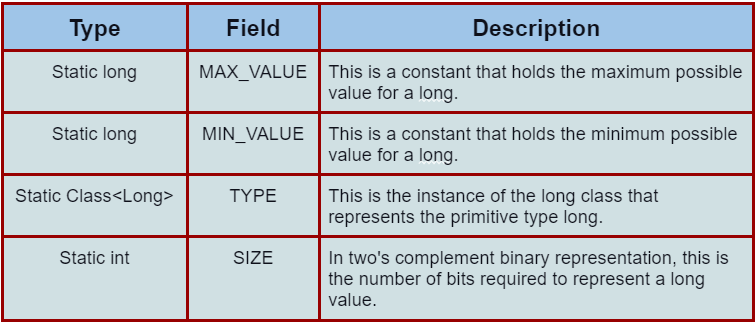
Constructors in Long Class
In Java, there are two types of class constructors in Long class. One constructor uses a long value as a parameter, and the other uses a string.
- Long (long value): This creates a new Long object corresponding to the supplied long parameter.
- Long (String s): This creates a new Long object that corresponds to the long value specified by the String parameter.
Methods in Long Class
Now we will learn different available methods in the Long class. The Long class contains a lot of methods that are used to manipulate Java objects. This includes creating, reading, writing, and deleting them.
Various methods in the Java Long class, along with their descriptions, are listed below:
1. static int bitCount (long I)
This method returns the number of one-bits in the two's complement binary representation of the provided long value.
2. byte byteValue()
After the conversion, it returns the value of Long as a byte.
3. int compareTo(Long SecondLong)
This method numerically compares two Long objects.
4. static Long decode(String stringname)
This method converts a String to a long value.
5. double doubleValue()
The value of Long is returned as a double.
6. float floatValue()
This method returns the float value of the Long.
7. boolean equals(Object objectname)
This method compares this object to the object passed in as a parameter.
8. static Long getLong(String nm)
The long value of the system property with the supplied name is determined by this method.
9. static Long getLong(String nm, long val)
This method determines the long value of the provided system attribute.
10. static Long getLong(String nm, Long val)
This method returns the long value of the specified system attribute.
11. boolean equals(Object objectname)
The long value of the system property with the supplied name is returned by this method.
12. static long parseLong(String s)
The string parameter is parsed into a signed decimal long by this method.
13. static long parseLong(String s, int radix)
The string input is parsed into a signed long in the radix indicated by the second parameter by this method.
14. static long reverse(long I)
This function returns the value obtained by reversing the order of the bits in the supplied long value's two's complement binary representation.
15. static long reverseBytes(long I)
This function returns the result of reversing the order of bytes in the two's complement representation of a long value.
16. static long rotateRight(long i, int distance)
This function returns the result of rotating the two's complement binary representation of the provided long value right by the number of bits specified.
17. static long rotateLeft(long i, int distance)
This function returns the result of rotating the two's complement binary representation of the provided long value left by the number of bits specified.
18. static long lowestOneBit(long I)
This method returns a single-bit long value in the lowest-order ("rightmost") one-bit place in the provided long value.
19. int hashCode()
This function returns the Long object's hash code.
20. int intValue()
This method returns Long's value as an int.
21. long longValue()
This method returns a long value as the value of this provided Long.
22. short shortValue()
This method returns a short value for the value of this provided Long.
23. static int signum(long I)
This method returns the signum function of the long value supplied. In simple words, the signum function returns the sign for the given x value. It can be +1 or -1.
24. static String toBinaryString(long I)
This method returns the long input as a string representation of an unsigned integer in base 2.
25. String toOctalString(long I)
This method returns an unsigned integer in base 8 as a string representation of the long parameter.
26. static String toHexString(long I)
This method returns an unsigned integer in base 16 as a string representation of the long parameter.
27. String toString()
This function returns a String object that represents the value of this Long.
28. static String toString(long I)
This function returns a String object with the supplied long as its value.
29. static String toString(long i, int radix
This method returns the first argument as a string in the radix given by the second parameter.
30. static Long valueOf(long l)
The provided long value is represented by a Long object which is returned by this method.
31. static Long valueOf(String s)
The given String value is returned by this method as a Long object.
32. static Long valueOf(String s, int radix)
When processed using the radix provided by the second parameter, it returns a Long object that contains the value of the specified string
Frequently Asked Questions
What is the difference between long and int?
Programming languages like Java offer both int and long as predefined data types. The main difference is that integers are 32 bits wide, whereas longs are 64 bits wide.
What is the difference between “Long” and “long” in Java?
A Long is a reference type or a class defined in the standard library. It keeps track of a reference to an object with a value. On the other hand, a long is a basic data type that is built into the language.
Can a long value be null in Java?
Only Object data types are allowed to be null. Integers, longs, and other types of data can't be null. Yes, you may check for null values if the longValue variable is of type Long. Note: “Long” is the wrapper class, not the basic data type “long.”
What are precisely the maximum and minimum value of long data type?
The long data type is nothing but a signed two's complement integer of 64 bits.
→Minimum Value of long data type: -9,223,372,036,854,775,808
→Maximum Value of long data type: 9,223,372,036,854,775,807
Conclusion:
In this post, we discussed the basics of Java Classes and Java Packages. Then we discussed Java Long Class and its implementation. Different fields, methods and constructors of the Java long class have been extensively discussed.
Recommended Readings:
How to Convert String to Long in Java
Converting Long to String in Java
Converting Long to Int in Java





 1+ registered

