

Table of contents
1.
Introduction
2.
Class Declaration in JTable class 
2.1.
Commonly used Constructors of JTable class 
2.2.
Commonly used Functions of JTable class 
3.
JTable Example
3.1.
Code implementation
4.
Java JTable Example with ListSelectionListener
5.
Frequently Asked Questions
5.1.
What is the package for JTable in Java?
5.2.
What is the superclass of JTable?
5.3.
How can JTable be sorted using a column?
5.4.
What is a JTable in Java?
5.5.
How can we create a JTable using JList?
6.
Conclusion
Last Updated: Dec 9, 2024
Easy

JTable In Java

Author Ayushi Goyal
0 upvote
Career growth poll
Do you think IIT Guwahati certified course can help you in your career?

Introduction

The JTable in Java is a class part of the Java Swing components Package. It is used to display or edit two-dimensional data composed of both columns and rows. It is similar to a database or spreadsheet. JTable arranges data in a tabular form.
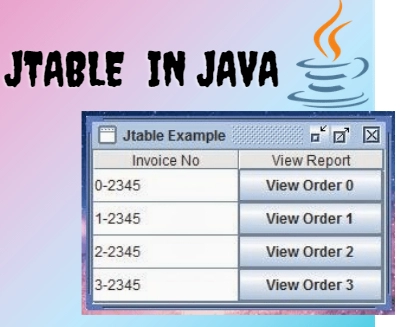
JTable in Java is used to create a table using the information displayed in multiple rows and columns. When a value is selected from JTable, an event named TableModelEvent is generated and handled using the TableModelListener interface. JTable extends JComponent class.

For example: Say you want to display a list of students belonging to a particular class, including details like roll number, name, address, contact, etc. Then you would represent this data in a tabular format using details as columns and the number of rows depending on the number of students data we have. As shown in the image below:

Roll No.NameContactAddress
1ABC4578956124…….
2XYZ7845895612…….
3PQR8659234578…….

Class Declaration in JTable class 

Class declaration include Constructors and methods. So, let's see the class declaration for javax.swing.JTable class. 

Commonly used Constructors of JTable class 

Constructor

Purpose

JTable()

An empty cell table is created and initialized with the default data model.

JTable(Object[][] data, Object []col)

A table is created with the specified name where []col represents the column names.

JTable(int row, int col)

A table is created of size rows x cols.

JTable(TableModel tm)

Creates a JTable that is initialized by tm as the data model, default section model, and default column model.

Commonly used Functions of JTable class 

Method

Description

getModel()

Gets the TableModel whose data is displayed by JTable.

setValueAt(Object value, int row, int col)

Sets the cell value as ‘value’ for the position row and column in the JTable.

getRowCount()

Gets the current total number of rows in the JTable.

addColumn(TableColumn []column) 

Adds a column at the end of the JTable.

getColumns()

Gets the current total number of the columns in the JTable.

editCellAt(int row, int col) 

Edits the intersecting cell of the column number ‘col’ and row number ‘row’ programmatically if the given indices are valid and the corresponding cell is editable.

setDefaultRenderer(Class <?>class,TableCellRenderer renderer)

Sets the default cell renderer to be used to set the values, alignment, background of a cell in JTable.


JTable Example

In this example, we have created a JTable for displaying the data of "Top 10 employees of the company". Here we will see how to create a JFrame, JTable and JLabel. Further, how to add data to JTable and lastly, specify the size and visibility of frame. Let's discuss the code for the same.

Code implementation

// Example of JTable in Java

package assignment2;
import javax.swing.JFrame;
import javax.swing.JLabel;
import javax.swing.JScrollPane;
import javax.swing.JTable;

public class Table1 {

	// Creating frame
	JFrame f;

	// Creating Table
	JTable j;
	
	// Creating label
	JLabel label1;

	// Declaring Constructor
	Table1()
	{
		// Initializing Frame
		f = new JFrame();
		
		// Setting Frame Title
		f.setTitle("JTable Example");
		
		//Setting label
		label1 = new JLabel("Top 10 Employees");
		
		// Adding Data to be displayed 
		String[][] data = {
		{"1","Tom","Manager","40"},
		{"2","Peter","Programmer","25"},
		{"3","Paul","Leader","30"},
		{"4","John","Designer","50"},
		{"5","Sam","Analyst","32"},
		{"6","David","Developer","28"},
		{"7","Ninja","Programmer","21"},
		{"8","Kelvin","Developer","26"},
		{"9","Jerry","Designer","29"},
		{"10","Joshep","Analyst","25"}
		};

	// Column Names
	String[] columnName = { "#No.","Name","Designation","Age"};

	// Initializing  JTable
	j = new JTable(data, columnName);
	j.setBounds(40, 50, 300, 400);
	
	// Adding Jtable to JScrollPane
	JScrollPane sp = new JScrollPane(j);
	f.add(sp);
	
	// Setting Frame Size
	f.setSize(600, 250);

	// Set Frame Visible as true
	f.setVisible(true);
	}

	// Main method
	public static void main(String[] args)
	{
     	new Table1();
	}
}

Output


Java JTable Example with ListSelectionListener


In a Java application, a JTable is a graphical component used to display tabular data in rows and columns. To enhance its functionality, you can implement a ListSelectionListener to respond to user interactions such as selecting rows in the table.

Here's an example:

import javax.swing.*;
import javax.swing.event.ListSelectionEvent;
import javax.swing.event.ListSelectionListener;
import javax.swing.table.DefaultTableModel;

public class JTableExample {
    public static void main(String[] args) {
        JFrame frame = new JFrame("JTable Example");
        frame.setDefaultCloseOperation(JFrame.EXIT_ON_CLOSE);

        // Create sample data for the table
        Object[][] data = {
                {"John", 25},
                {"Alice", 30},
                {"Bob", 35}
        };
        String[] columnNames = {"Name", "Age"};

        // Create a JTable with sample data
        JTable table = new JTable(new DefaultTableModel(data, columnNames));

        // Add a ListSelectionListener to the table
        table.getSelectionModel().addListSelectionListener(new ListSelectionListener() {
            public void valueChanged(ListSelectionEvent event) {
                if (!event.getValueIsAdjusting()) {
                    int selectedRow = table.getSelectedRow();
                    System.out.println("Selected Row: " + selectedRow);
                    // You can perform actions based on the selected row here
                }
            }
        });

        // Add the table to a JScrollPane
        JScrollPane scrollPane = new JScrollPane(table);
        frame.add(scrollPane);

        frame.setSize(400, 300);
        frame.setVisible(true);
    }
}

Explanation:

In this example, we create a JTable object with sample data using a DefaultTableModel. We add a ListSelectionListener to the JTable's selection model to listen for row selection changes. When a row is selected, the valueChanged method of the ListSelectionListener is invoked. Inside the valueChanged method, we retrieve the selected row index using getSelectedRow() and perform actions based on the selected row.

Frequently Asked Questions

What is the package for JTable in Java?

The Java swing package provides classes for various java swing APIs (Application Programmable Interface) such as JButton, JTextArea, JTextField, JCheckbox, JRadioButton, JColorChooser, JMenu, etc.

What is the superclass of JTable?

The superclass of JTable in Java Swing is javax.swing.JTable itself, as it directly extends javax.swing.JTable without inheriting from another class.

How can JTable be sorted using a column?

JTable can be sorted using a particular column using the setAutoCreateRowSorter() method and set its value as true, i.e., table.setAutoCreateRowSorter(true).

What is a JTable in Java?

The JTable is a class used to create a table using the information displayed in multiple rows and columns. It is similar to a database or spreadsheet. JTable arranges data in a tabular form.

How can we create a JTable using JList?

Firstly, create the implementation of AbstractTableModel and finally create the table using code:  JTable tab = new JTable(new MyAbstractTableModel(myJList));

Conclusion

In this article, we have discussed JTable In Java. The data available in tabular form is much easier to analyze, and JTable is a handy feature for arranging the data in rows and columns.

recommended articles:

Live masterclass


