Two-Dimensional Array (2d Array in Java)
As previously stated, a two-dimensional array is the most basic sort of multi-dimensional array. A multidimensional array of size m x n can be represented as a table with n rows and m columns.
The syntax for declaration of a Two-Dimensional Array is:
data_type[ ][ ] array_name = new data_type[size1][size2];

You can also try this code with Online Java Compiler
Example
Int[ ][ ] rank = new int[4][4];
You can also try this code with Online Java Compiler
Number of elements= 4 *4= 16.
Initialization of a Two-dimensional Array
One method of initialization is to assign all the values at the time of declaration of the array.
For example
Int[ ][ ] rank = { {2, 1, 3}, {4, 5, 6}, {7, 8, 9} };
You can also try this code with Online Java Compiler
Other way to initialize the array first and then assign values.
Int[ ][ ] rank = new int[3][3];
rank[0][0]=1; rank[0][0]=2; rank[0][0]=3;
rank[0][0]=4; rank[0][0]=5; rank[0][0]=6;
rank[0][0]=7; rank[0][0]=8; rank[0][0]=9;
You can also try this code with Online Java Compiler
Accessing Elements in a Two dimensional Array
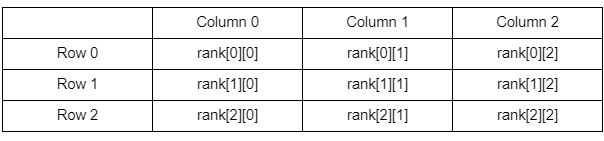
Let the above table represent the above-defined array. The first element in the array is generally referenced as rank [0][0], the next element in the same row is referenced as rank [0][1]. The elements of the next row can be accessed as rank[1] [0], rank [1][1].
Hence, we reference it using the index to access a particular element.
The syntax for it can be defined as:
array_name [number of row] [number of column]
You can also try this code with Online Java Compiler
Example
rank [1] [2]; // gives us the value of the first row and second column
You can also try this code with Online Java Compiler
Let us now look at a code segment that helps us understand how the elements of a two-dimensional matrix are accessed.
Example
public class Array1 {
    public static void main(String args[]) {


        int[][] rank = { {1, 2, 3}, {4, 5, 6}, {7, 8, 9} };
        for (int i = 0; i <= 2; i++) {
            for (int j = 0; j <= 2; j++) {
                System.out.print(rank[i][j] + " ");
            }

            System.out.println();
        }
    }
}
You can also try this code with Online Java Compiler
Output:
1 2 3
4 5 6
7 8 9
You can also try this code with Online Java Compiler
Three-Dimensional Array
A three-dimensional array is made up of three arrays joined together. As a result, it can be represented as an array of two-dimensional arrays. A three-dimensional array is a more complicated type of multidimensional array.
The syntax for declaration of a three-dimensional array is:
Data_type[ ][ ][ ] array_name=new data_type[size1][size2][size3];
You can also try this code with Online Java Compiler
Example
Int[ ][ ][ ] matrix = new int[2][3][4];
You can also try this code with Online Java Compiler
Hence, the total elements will be 2*3*4= 24.
Initialization of a Three-Dimensional Array
One method of initialization is to assign all the values at the time of declaration of the array.
Int[ ][ ][ ] rank = { { {2,1}, {3,4}, {5,6} },{ {7,8}, {9,10}, 11,12} } };
You can also try this code with Online Java Compiler
Another way to initialize the array first and then assign values.Just as in the case of Two-Dimensional Array.
Int[ ][ ][ ] rank = new int[2][2][2];
rank[0][0][0]=1; rank[0][0][1]=2; rank[0][1][0]=3; rank[0][1][1]=4;
rank[1][0][0]=5; rank[1][0][1]=6; rank[1][1][0]=7; rank[1][1][1]=8;
You can also try this code with Online Java Compiler
Accessing Elements in a Three-Dimensional Array
The elements of a three-dimensional array can be accessed just as we accessed the elements in the two-dimensional arrays.
For example:
int matrix [1][1][1];
You can also try this code with Online Java Compiler
The element in the first row and first column of the first array in the stated 3D array is represented by the example above.
Lets look at an example.
Example
public class Array1 {
    public static void main(String args[]) {


        int[ ][ ][ ] rank = new int[2][2][2];
        rank[0][0][0]=1; rank[0][0][1]=2; rank[0][1][0]=3; rank[0][1][1]=4;
        rank[1][0][0]=5; rank[1][0][1]=6; rank[1][1][0]=7; rank[1][1][1]=8;


        for (int i = 0; i < 2; i++) {
            for (int j = 0; j < 2; j++) {
                System.out.print("[ ");
                for (int k = 0; k < 2; k++) {
                    System.out.print(rank[i][j][k] + " ");
                }
                System.out.print("]");
            }

            System.out.println();
        }
    }
}
You can also try this code with Online Java Compiler
Output
[ 1 2 ][ 3 4 ]
[ 5 6 ][ 7 8 ]
Practice it on online java compiler.
Application of 3D Array in Java
Game Development
Used to represent 3D game worlds, multi-level maps, or environments with height, width, and depth.
Image and Video Processing
Stores RGB values across multiple frames, making it useful for handling colored image sequences or video data.
Scientific Simulations
Helps simulate physical phenomena like temperature changes, fluid dynamics, or environmental models across three dimensions.
Data Organization
Efficient for storing multiple 2D tables or grids in a single structure, especially when the data spans across layers or time intervals.
Medical Imaging
Used to represent 3D scans such as MRI or CT images, where each layer of the scan is stored in a structured format.
Frequently Asked Questions
Can we access elements outside the scope of an array?
JVM will give an ArrayIndexOutOfBoundsException, indicating that the array has been accessed with an illegal index
Can we use an array to store data items of different types?
Not only data items that correspond to data items of which the array was declared can only be inserted in the array.
Can we store any Number of items ina Multidimensional Array?
The number of items to be stored in Multi-dimensional arrays should be known in advance.
Key Takeaways
In this blog, we examined multidimensional arrays and related concepts. Two forms of multi-dimensional arrays, Two-Dimensional Arrays (2d array in Java) and Three-Dimensional Arrays, were thoroughly explored, including methods for accessing and publishing the values of their various elements.
Recommended Readings:





 7+ registered

