Get a skill gap analysis, personalised roadmap, and AI-powered resume optimisation.
Introduction
MySQL is a database management system. It stands for My Structured Query Language. It is used to store data in its relational database model. Strings are a necessary data type in a database. And often, it is seen that multiple strings need to be joined together one after another to form a new one. It is achieved by concatenating the two strings.
This article will detail the MySQL CONCAT() Function with its implementation.
What is MySQL?
MySQL(My Structured Query Language) is a relational database management system. It is an open-source management system and free. A relational database is one in which data is stored as tables, i.e., rows and columns. Structured Query Language(SQL) is a language to create, manage, control, and query the data in the database. It is developed in C and C++. It can run on different operating systems like Linux, MacOS, Windows, etc. It is easy to use, customizable, adaptable, compatible, secured, and scalable.
What is MySQL CONCAT() Function?
Now, let us understand the MYSQL CONCAT() function. As discussed, strings are an essential data type in the database management system. And this Function helps in joining multiple strings one after the other. But to widen its use, it can also be used to concatenate numerous numeric strings. It achieves this by converting the numeric strings into non-binary strings.
The syntax of this function is as follows:
SELECT CONCAT(s1, s2, s3, s4, …….)
Here, (s1, s2, s3, s4) denote the multiple strings.
Example 1
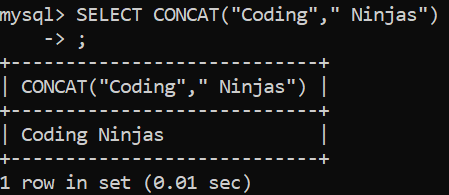
Let us understand it with a simple example below:
SELECT CONCAT(“Coding”, “ Ninjas”);
OUTPUT
We can see that the two strings have been joined together.
Example 2
Let us see what happens when we try to concatenate different numbers. The command is as follows:
SELECT CONCAT(1,2,3,4);
OUTPUT
We can see that the numbers are joined one after the other in the final output.
Example 3
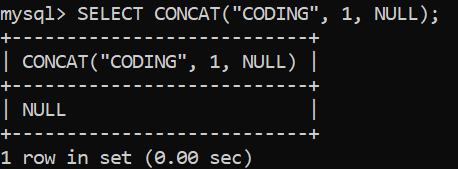
Let us see what happens when we pass a NULL string as one of the parameters using the following code:
SELECT CONCAT(“CODING”, 1, NULL);
OUTPUT
We can see that the final output becomes NULL. So, if NULL is passed even as one of the parameters, the whole concatenated result becomes NULL.
Example 4
Let us see its functionality on a table.
Let us create a table named CLASS in MySQL with the following entries using the following commands:
CREATE TABLE CLASS(
    -> ROLLNO INT,
    -> FNAME VARCHAR(20),
    -> LNAME VARCHAR(20),
    -> RESULT VARCHAR(5),
    -> MARKS INT
    -> );
INSERT INTO CLASS
    -> VALUES
    -> (1, "ROHAN", "SINGH", "PASS", 90),
    -> (2, "ASHISH", "THAKUR", "PASS", 80),
    -> (3, "RIYA", "GARG", "PASS", 99),
    -> (4, "JATIN", "SINGH", "PASS", 80),
    -> (5, "SONIYA", "NEHRA", "FAIL", 20);
SELECT * FROM CLASS;
OUTPUT
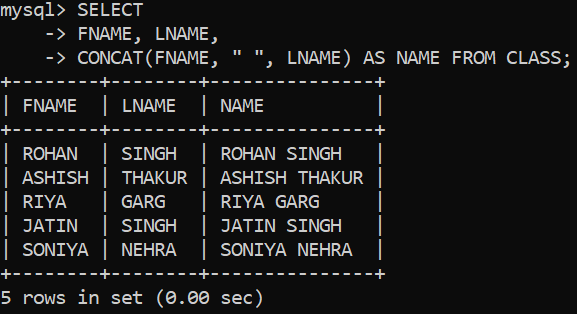
Now, let us write the following code to join the first and last names of the students to get their full names.
SELECT
    -> FNAME, LNAME,
    -> CONCAT(FNAME, " ", LNAME) AS NAME FROM CLASS;
OUTPUT
We can see that the students’ first and last names are concatenated to form the full names.
Example 5
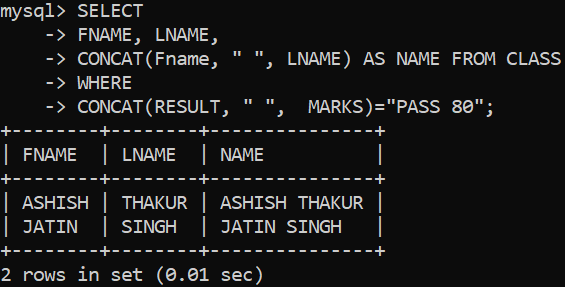
We can also use it with a table using the WHERE clause for specifying the concatenated conditions. Try the following commands for it.
SELECT
    -> FNAME, LNAME,
    -> CONCAT(Fname, " ", LNAME) AS NAME FROM CLASS
    -> WHERE
    -> CONCAT(RESULT, " ",  MARKS)="PASS 80";
OUTPUT
Thus, we can see that only those students who passed and scored 80 marks had their names concatenated.
Frequently Asked Questions
What is MySQL?
MySQL(My Structured Query Language) is a relational database management system. The data is stored as tables, i.e., rows and columns. It is developed in C and C++. It can run on different operating systems like Linux, MacOS, Windows, etc.
What is MySQL CONCAT() Function?
MySQL CONCAT() function helps join multiple strings one after the other. It can also be used to concatenate various numeric strings. It achieves this by converting the numeric strings into non-binary strings.
Can MySQL CONCAT() function be applied to data entries in a table?
Yes, MySQL CONCAT() function can be used to concatenate different column entries into one string when applied correctly. We can also use it using the JOIN and wildcard characters. But, it displays NULL if any of the parameters is NULL.
Can I pass only one parameter in the MySQL CONCAT() Function?
Yes, the functionality of the MySQL CONCAT() function allows the users to display the result even if only one parameter is passed into it. In this case, the passed parameter is as it is displayed in the output.
Conclusion
Strings are a crucial part of any database system. And multiple operations can be applied to them. Concatenation of strings is one such operation, and the MySQL CONCAT() function helps us achieve this functionality. In this article, we studied the MySQL CONCAT() function with its implementation in different scenarios.
If you are eager to learn more about it, take a look at the following articles:-











 7+ registered

