Do you think IIT Guwahati certified course can help you in your career?
Introduction
Hello Ninjas!! Have you ever written a code with no error in one go? Of course, not the Hello world program😂. We make many mistakes when we write code. Unit testing comes into the picture when we need to test a piece of code to check the program's functionality.
In this article, we will learn about the JUnit and Jelly tools in Apache Netbeans and examples for unit testing in Netbeans. Before moving further into this topic let us discuss about NetBeans.
NetBeans
NetBeans is the integrated development environment for Java programming language. It can be run on Windows, macOS, Linux, and Solaris systems.
The Apache Software Foundation and Oracle Corporation in Java created NetBeans. Any web, corporate, desktop, or mobile application development is possible in the NetBeans IDE. It supports C, C++, XML, HTML, PHP, Groovy, scripting languages, and Java.
JUnit Tests in NetBeans
The development cycle includes testing an app, and developing and maintaining unit tests can guarantee that the various methods in your code are functionally suitable. JUnit is a unit testing framework in the Java programming language. It is used to write and run tests(as well as repeatable tests) for your Java code. With JUnit, you can test your code by writing test methods that verify the correctness of your code under different conditions. Let us understand what unit testing is.
Unit Testing
Unit testing involves testing each unit or an individual component of an application. The main focus of unit testing is to test the performance of unit components (involves testing each object or part of the software separately, like different functions).
In unit testing, a unit is a single piece of testable part of the software that is tested during the software development phase. The purpose of unit testing is to verify the correctness of the code. A unit component is an individual application function or code. White box testing(The tester analyzes the application's internal design while testing because they are knowledgeable about it) is a method of unit testing typically done by developers.
Once the application is ready and handed over to the test engineer, they will start testing the application module or each component of the module individually or one by one. This process is known as unit testing.
Netbeans Jelly Tools
Here are some of the NetBeans Jelly tools are mentioned below in the table with their tool class and description:
Let us look at the implementation.
Implementation
Code implementation with JUnit in Apache Netbeans.
1️⃣ Open NetBeans and click on File > New Project.
2️⃣ Now select Java Class Library and click on Next.
3️⃣Now input the project name and click on Finish.
4️⃣ Now right-click on Test Packages and create a new java class.
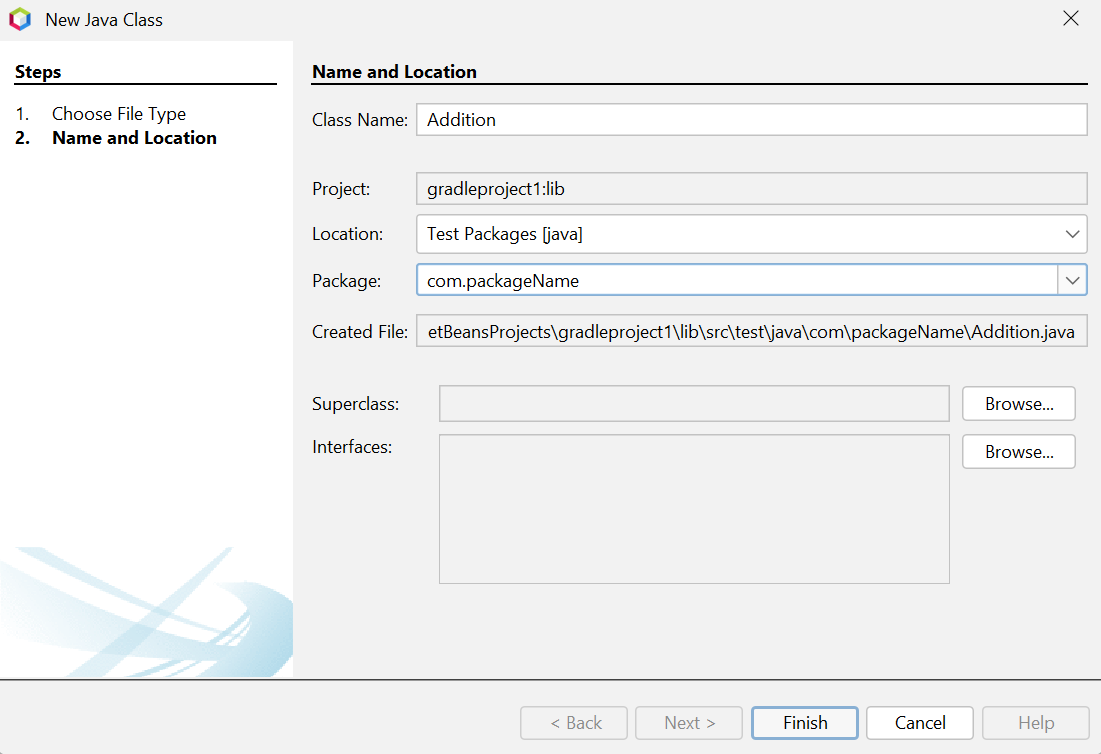
5️⃣ Now input the class name and package name and click on Finish.
6️⃣ Write the following code in the Addition.java file.
package com.packageName;

import org.junit.jupiter.api.Test;
import static org.junit.jupiter.api.Assertions.assertEquals;

public class Addition {
    public int add(int x, int y) {
        return x + y;
    }

    @Test
    public void main(){
        assertEquals(20, add(10, 10), "10 + 10 should equal 20");
    }
}
Code Explanation
In the above code, we created add method. Then we annotated the main method with Test. For annotation, we used @Test, which tells the JUnit that whichever public void method it is attached to can be run as a test case. The above code is written to show how we can use Junit.
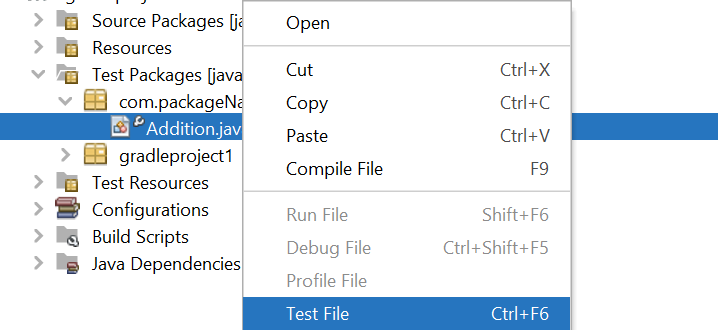
7️⃣Now right-click on the Addition.java file and select Test File to test.
NetBeans IDE is a free, open-source, integrated development environment for developing Windows, Mac, Linux, and Solaris applications.
What is the difference between JDK and NetBeans?
Installing Java. NetBeans is an IDE; you can replace it with any other IDE you like. On the other hand, developing things in Java requires installing the JDK (Java Development Kit).
Can we download NetBeans for free?
NetBeans IDE is a free and open-source combined development environment to develop applications on the Windows, Mac, Linux, and Solaris operating systems.
What is Apache Jelly?
Apache Jelly is a Java and XML-based scripting and processing engine for converting XML into executable code. Jelly is part of Apache Commons.
Conclusion
In this article, we have discussed NB JUnit and Jelly Tools in Apache Netbeans. We have covered Unit testing in this article with stepwise implementation, and we hope this article helps you enhance your knowledge of JUnit, Jelly tools, and Netbeans IDE. For more such articles, visit the following links:









 1+ registered

