




Introduction
As Web Developers, we must understand the internal working of Vue’s rendering engine. This helps identify and understand problems during code development and even comes in handy while solving them. As our understanding of Vue’s rendering process grows, it will help us optimize the performance of an application.
Vue makes coding much more accessible and enjoyable, which is possible due to its smooth rendering. This blog focuses on Dom, Virtual DOM, and its working to understand rendering.
What is DOM?
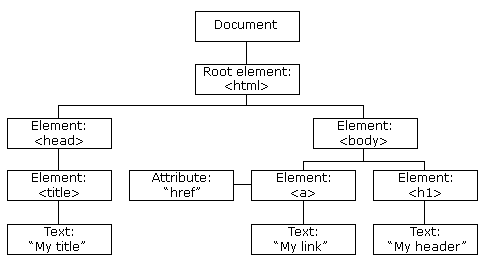
The DOM or a Document Object Model is an object that represents all the data elements of the web. These elements contain the structure and content-related information and can be manipulated by the programmer. In other words, a DOM is a tree-based representation of an HTML document.
Source: W3Schools
The above image shows what an HTML DOM tree looks like. The document’s root is divided by the head and body elements. The body element contains all the content, whereas the head element contains all the functional behavior information.
Index.html
<!DOCTYPE html>
<html>
<head>
  <title>Parcel Sandbox</title>
  <meta charset="UTF-8" />
</head>
<body>
  <div id="app"></div>
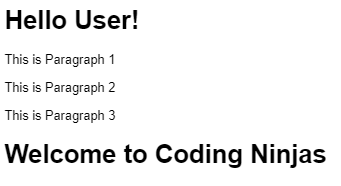
  <h1>Hello User!</h1>
  <p>This is Paragraph 1</p>
  <div>
    <p>This is Paragraph 2</p>
  </div>
  <p>This is Paragraph 3</p>
  <h1>Welcome to Coding Ninjas</h1>
  <script src="src/index.js">
  </script>
</body>
</html>
Output
Index.js
const paragraphs = document.querySelectorAll("p");
// paragraphs[0] is the first <p> element
// paragraphs[1] is the second <p> element
// paragraphs[2] is the third <p> element
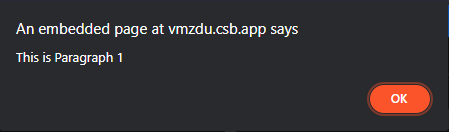
alert(paragraphs[0].innerHTML);
The index.js code helps us use the HTML DOM and access the index 0 in the paragraph array.
Output
All the properties, methods, and events are available for manipulation, and the changes are updated as a new DOM.
We use DOM to represent a document as nodes and objects. Also, it enables developers to add, delete and modify DOM elements while effortlessly navigating the tree.


 7+ registered

