Get a skill gap analysis, personalised roadmap, and AI-powered resume optimisation.
Introduction
In Python programming, understanding the sep() parameter is key to formatting output efficiently. sep() allows developers to control how elements are separated when they're printed or concatenated.
We've all written numerous print statements in Python, with and without parameters. But have you ever wondered why sep is used in the print statement? Or are you just hearing it for the first time?
This article will guide you through the working of sep in python. Also, it will clear all your doubts regarding the print statement.
So, let us start understanding the sep in python.
Sep parameter in Python
Whenever you try to print something using the print function in python, the result looks like this:
Python
Python
print("a", "b", sep = '.')
You can also try this code with Online Python Compiler
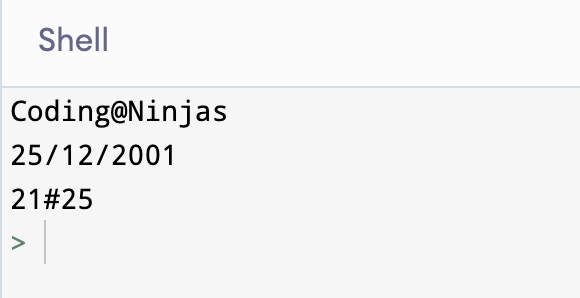
By default, there is a whitespace between the numbers. It is a soft space feature that can be modified to any character, integer, or String as per our choice. Now, how can we achieve this? We can accomplish this by using SEP in python, which can only be found in python 3.x or later. It is also used to format the output statement.
Let us now see the working of SEP in python:
Working of SEP in Python
Here we will discuss the syntax and some examples to illustrate the working of sep in python:
Syntax
Python
Python
print("something", "something", .., sep = "character to be inserted")
You can also try this code with Online Python Compiler
There are more parameters like sep which do exist in python. As we know, In python 3, print() is now a function and its output can be controlled by using arguments.
We have already studied about sep parameter, it's now time to discuss the end and flush parameters that format the output statement.
end and flush in Python
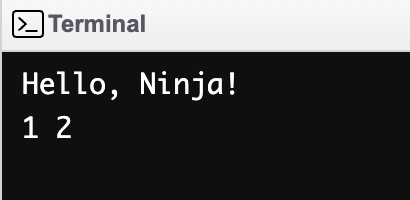
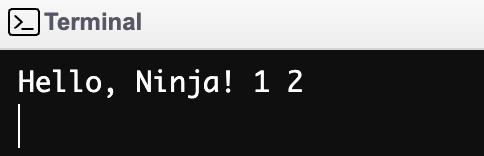
By default, print() appends a \n to the end of the output. The end parameter allows you to change this.
Example
Python
Python
print ("Hello, Ninja!")
print(1,2)
You can also try this code with Online Python Compiler
You can use sep and end together to generate lists, CSV output, bulleted lists, and more.
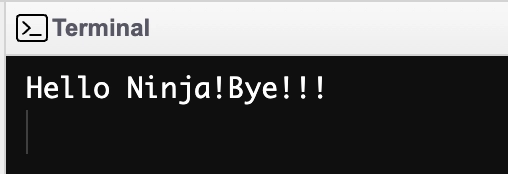
Note: The output of print() is saved in a buffer. When the end parameter is changed, the buffer is no longer flushed. You must also use the flush=True parameter to ensure that you get output as soon as print() is called.
The default value is "False," which means that if we don't use the flush parameter, then flushing of the stream will be False. If we specify "True," the stream flushes.
"flush" is available in Python 3.x and later versions.
Example
Python
Python
from time import sleep
# output is not flushed here
print("Hello Ninja!", end='')
sleep(5)
print("Bye!!!")
You can also try this code with Online Python Compiler
Let us note down the points of difference between sep and end as follows:
sep
end
It defines the separating character between the values when the user is printing multiple values.
It defines what is to be printed at the end of the print() function to control the line breaks.
Example: print("a", "b", sep = '.') will print: a.b
Example: print("a", "b", end=".")will print
Frequently asked questions
What does SEP =' mean in Python?
In Python, the sep parameter is actually an argument within the print() function. It specifies the separator between the values being printed in Python. By default, it is set to a space character, but you can customize it.
What is the default SEP value in the print command?
The default value of SEP in the print command is ' ' – a space.
What is the use of SEP in Python?
The sep parameter is primarily used to format and add a separator between strings that must be printed on the console. Python 3 is the first version to include this feature.
What does SEP \T mean?
"SEP \T" doesn't have a specific meaning in Python. It appears to be a string with the characters "SEP" followed by a backslash and a "T" character. In Python, backslashes are typically used for escape sequences, but "\T" isn't a recognized escape sequence.
What is the default value of SEP in Python?
In Python, the sep parameter determines the separator between the values passed to the print() function. By default, the sep parameter is set to a single space character (' '), meaning that elements passed to print() are separated by spaces unless otherwise specified.
Conclusion
In this article, we have discussed Sep() Parameter in Python. The sep() parameter in Python offers valuable flexibility in formatting output. By allowing developers to customize the separators between printed or concatenated elements, it enhances code readability and presentation.










 7+ registered

