Do you think IIT Guwahati certified course can help you in your career?
Introduction
In the realm of Java programming, the concept of static variables is pivotal, serving as one of the fundamental building blocks that seasoned developers leverage to craft efficient and scalable code.
This article delves into the intricacies of static variables, elucidating their purpose, usage, and the nuanced balance of their benefits and drawbacks. Our journey through static variables will be replete with concrete examples, ensuring that the theoretical knowledge is firmly anchored in practical application.
What is a Static Variable in Java?
A static variable, also known as a class variable, is associated with a class rather than instances of the class. Declared with the keyword static, this variable is created at the start of program execution and destroyed upon termination. It is a global variable within the class context, meaning that a single copy of the variable is shared among all instances of the class, preserving its value across function calls and instances.
Why Use Static Variables?
The use of static variables in Java provides several benefits when you want a variable to be shared across all instances of a class. Below are some practical reasons and real-world use cases:
Shared Across All Instances A static variable maintains a single copy across all objects of a class. For example, if you want to count how many objects of a class have been created, a static counter can track it efficiently.
Memory Efficiency Since static variables are created only once in memory (during class loading), they help reduce memory usage, especially when the same value is used by all instances.
Global Access Within Class Static variables can be accessed directly using the class name, even without creating an object. This makes them convenient for storing constants or utility values.
Useful in Counters or Configurations They're ideal for storing shared configurations or counters, such as AppConfig.VERSION or tracking user sessions in web applications.
By understanding these benefits, developers can use static variables effectively to write cleaner and more efficient Java code.
When to Use Static Variables
Static variables are typically employed when a common property is shared across all objects, such as a company name in an Employee class or configuration settings. They are also used to keep track of state information that can be accessed by static methods, which, like static variables, are class-level members.
Important Points for Static Variables
Scope and Lifetime: Static variables have the scope of the class they are defined in and their lifetime lasts as long as the program is running.
Memory Efficiency: Since there is only one copy regardless of the number of objects, static variables are memory efficient.
Initialization: They are initialized before any object of the class is created and even before any static method of the class runs.
Access: They can be accessed directly by the class name and don’t need any object reference.
How to Declare a Static Variable in Java
In Java, a static variable is declared using the static keyword. Static variables belong to the class rather than instances of the class, meaning they are shared among all instances.
Syntax
class Example {
    static int count = 0;  // Static variable declaration
}
Example
class Counter {
    static int count = 0;  // Static variable

    public void increment() {
        count++;
    }

    public static void displayCount() {
        System.out.println("Count: " + count);
    }

    public static void main(String[] args) {
        Counter obj1 = new Counter();
        obj1.increment();
        Counter.displayCount(); // Output: Count: 1
    }
}
Explanation: In this example, count is a static variable, so it is shared across all objects of the Counter class.
Declaration Scope of the Static Variable in Java
The scope of a static variable in Java is limited to the class in which it is declared. It can be accessed directly by the class name or through any instance of the class.
Example
class MyClass {
    static int staticVar = 10;

    public static void printStaticVar() {
        System.out.println("Static Variable: " + staticVar);
    }

    public static void main(String[] args) {
        System.out.println(MyClass.staticVar); // Accessing directly
        MyClass.printStaticVar();             // Accessing through method
    }
}
Explanation: Here, staticVar is accessible by both the class name MyClass and through a static method. The scope of the static variable is within the class.
Initialization of Static Final Variables in Java
A static final variable in Java is a constant variable that cannot be changed after it is initialized. Static final variables are typically initialized either at the time of declaration or in a static block.
Example
class Constants {
    static final int MAX_VALUE = 100;  // Initialization at declaration

    static final String MESSAGE;      // Declaration without initialization

    static {
        MESSAGE = "Hello, World!";   // Initialization in static block
    }

    public static void main(String[] args) {
        System.out.println(MAX_VALUE);
        System.out.println(MESSAGE);
    }
}
Explanation: In this example, MAX_VALUE is initialized at the time of declaration, while MESSAGE is initialized inside a static block. Both are static final variables, meaning their values cannot be changed once set.
Accessibility of the Static Variable in Java
Static variables in Java are accessible in different ways depending on their access modifiers. You can access static variables directly through the class name or via an instance, although the former is considered best practice.
Example
class Example {
    static int count = 5;

    public static void display() {
        System.out.println("Count: " + count);
    }

    public static void main(String[] args) {
        System.out.println(Example.count);  // Access via class name
        Example.display();                  // Access via static method
    }
}
Explanation: In this example, the static variable count is accessed both directly through the class name Example and via the static method display(). Static variables can be accessed from both inside and outside the class using their access level (public, private, etc.).
Java Program to Demonstrate Static Block and Variables
Let's consider a Java program that illustrates the use of static variables and blocks.
Java
Java
import java.util.*;

public class Counter {

    static int count = 0; // static variable

    static {

        System.out.println("Static block is executed before the main method.");

        count = 10; // can be initialized here

    }

    Counter() {

        count++; // increments the static variable by 1

        System.out.println("Count is: " + count);

    }

    public static void main(String[] args) {

        Counter c1 = new Counter();

        Counter c2 = new Counter();

        Counter c3 = new Counter();

    }

}
You can also try this code with Online Java Compiler
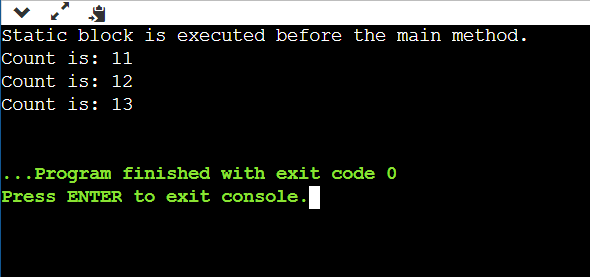
When this code is executed, the static block initializes the count variable before the main method is invoked, and the output will be a sequential increment of count with each new instance creation.
A Real-Life Example of Static Variable in Java
A real-life example of a static variable in Java can be a counter that tracks the number of instances of a class created. This static variable is shared across all instances of the class, as it is common to all objects.
Problem: Track the number of employees in a company.
Static Variable: employeeCount, which will store the total number of employees.
Why Static: It needs to be shared across all instances of the Employee class, so it is declared as static.
Example:
Java
Java
class Employee { static int employeeCount = 0; // Static variable to track number of employees String name;
public Employee(String name) { this.name = name; employeeCount++; // Increment employee count on new object creation }
Static Variable (employeeCount): It is shared across all instances of the Employee class. Each time a new employee is created, the count is incremented.
Static Method (displayEmployeeCount): This method is used to access the static variable and print the total number of employees.
Static vs Instance Variables in Java
Understanding the difference between static and non-static variables is essential for writing efficient and organized Java programs. In Java, variables can either belong to the class (static) or to an object (instance). This distinction affects how data is shared, stored, and accessed. Knowing when to use static and instance variables in Java helps in designing scalable and memory-efficient applications.
Comparison Table: Static vs Non-Static Variables
Feature
Static Variable
Instance Variable
Definition
Belongs to the class, shared among all objects
Belongs to each object of the class
Memory Allocation
Allocated once when the class is loaded
Allocated each time an object is created
Access Method
Accessed using the class name
Accessed using the object reference
Instance Dependency
Independent of any object
Exists only with the object
Default Values
Gets default values based on data type
Also gets default values based on data type
Use Cases
Used for constants, counters, configs
Used for storing individual object data
When to Use Static vs Instance Variables
Use Cases for Static Variables:
Use a counter to track how many objects of a class are created.
Store application-level configurations, like a default timeout value.
Define constants (e.g., MAX_LIMIT) shared by all instances.
Use Cases for Instance Variables:
Store user-specific details like name, email, or address.
Use in objects where data varies across instances (e.g., products, employees).
Represent state of the object, such as balance in a bank account class.
By knowing these use cases, you can better understand how to apply the static vs instance variables in Java for cleaner and more reliable code.
Advantages and Disadvantages of Static Variables
Advantages:
Memory Management: They help in memory management by saving memory space since no matter how many instances you create, there will only be one copy of the static variable.
Global Access: They can be accessed globally, which is useful for method counters or configuration variables.
Disadvantages:
Overhead: Static variables can introduce bugs if not handled carefully because they break encapsulation. Changing the value in one part of the program affects the entire program.
Lifetime: They stay in memory for the entire lifecycle of the program, which might lead to memory leaks if the program runs for an extended period.
Frequently Asked Questions
Can static variables be accessed by non-static methods?
Yes, static variables can be accessed by non-static methods because they belong to the class level, not the object level.
Are static variables thread-safe in Java?
No, static variables are not inherently thread-safe. Synchronization is needed to ensure thread safety when static variables are accessed by multiple threads.
How does a static variable differ from an instance variable?
A static variable is shared across all instances of a class, while each instance has its own copy of an instance variable.
Conclusion
Static variables in Java offer a powerful tool for managing state and sharing data across instances. However, with great power comes great responsibility. Developers must wield them judiciously, with a keen awareness of their implications on memory and design. When used appropriately, static variables can significantly enhance the efficiency and coherence of your Java applications.








 5+ registered

