





Introduction
Consider a situation where you have a large amount of employee data. Your task is to print the database table every 2 mins. But the problem in printing the whole table is that the number of rows present in the table is more than 1000. So to solve this problem, your task reduces to only printing the first few rows of the database table.
To solve this problem, you are thinking about any clause available in SQL that helps us get rows from the table which is precisely our topic for today's discussion.
In this article, we will be analyzing how to use TOP, LIMIT, or ROWNUM clauses.
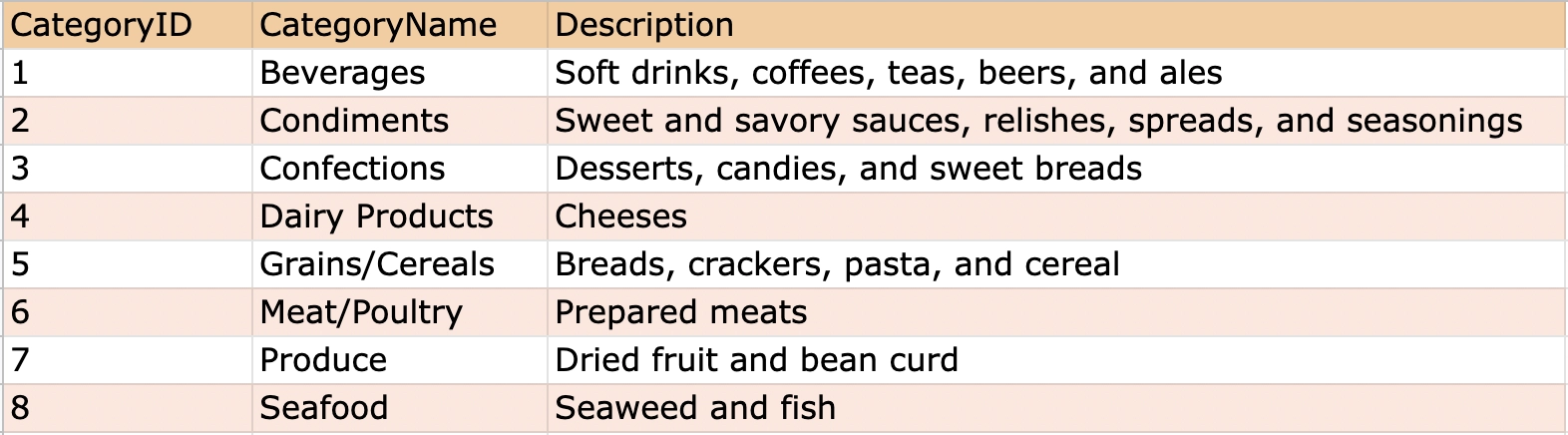
All the queries and questions apply to the following Database Table.
Consider the Categories table that incorporates the data for daily-use products consisting of columns like CategoryName, Description, CategoryID as the primary key( it is a set of values of the table, which uniquely defines each record in this table).
The number of entries in the Illustration database table is less so that it is easy to understand.
Before discussing the clauses an important thing to remember is,
The TOP clause only works with SQL servers, the LIMIT clause works with MYSQL, and the ROWNUM clause works with oracle. Before applying any clause, check which server the database table is being implemented on.
TOP, LIMIT, or ROWNUM clause
In this section, you will be learning about all the mentioned clauses by solving some real-world queries. Let us get started with each clause one by one:
TOP clause
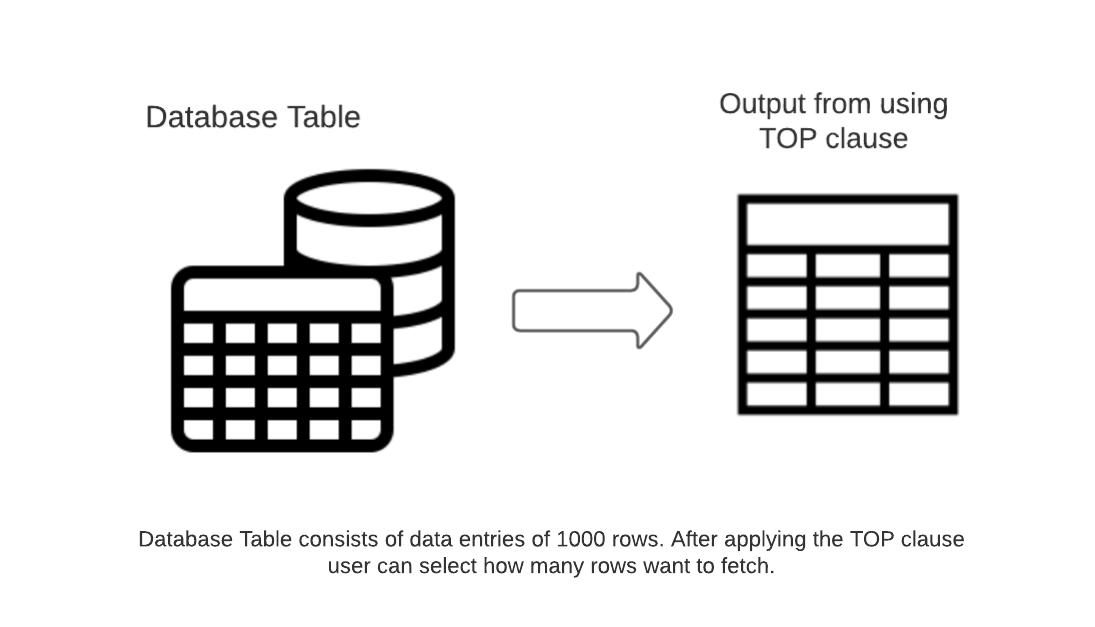
The TOP clause fetches a particular number of rows from the main table. Users can specify how many rows they want to fetch by passing a constant number of rows or the percentage of rows.
The below diagram demonstrates the usage of the TOP clause:
Syntax
| SELECT TOP number|percentage column[s] FROM TableName; |
Let's solve some queries.
We need to print the first 4 rows from the database table.
SQL Query:
| SELECT TOP 4 * FROM Categories; |
Result for the above query:

The above question can be asked differently as follows,
We need to print 40 percent of the row from the database table.
SQL Query:
| SELECT TOP 40 PERCENT * FROM Categories; |
Result for the above query:
How to use the TOP clause with other clauses? Let us discuss some.
TOP with WHERE:-
Let consider an example,
We need to print the first two rows from the database table, which belong to the Beverages category.
SQL Query:
|
SELECT TOP 2 * FROM Categories WHERE CategoryName='Beverages'; |
Result for the above query:

Even though we want to print the first two rows from the database table, there is only one entry available in the database table. It does not cause any error and only prints the available rows which satisfy the WHERE clause conditions.
Another example,
We need to print the first two rows from the database table belonging to the Beverages or Confections category.
SQL Query:
|
SELECT TOP 2 * FROM Categories WHERE CategoryName='Beverages' OR CategoryName='Confections'; |
Result for the above query:

All the AND & OR clause functionalities can be used with the TOP clause. To get more idea of the AND & OR clause, refer to this article.
Let us now have a look at the LIMIT clause:
LIMIT clause
The LIMIT clause retrieves records from one or more tables in a database and limits the number of records returned based on a limit value. If a user uses a MySQL server, then the LIMIT Clause will work fine. But with the Oracle server, it will give an error.
Syntax
| SELECT column[s] FROM TableName LIMIT number; |
Let consider an example,
We need to print the database table but only the first five rows(you cannot use the TOP clause to solve this question).
SQL Query:
| SELECT * FROM Categories LIMIT 5; |
Result for the above query:

How to use the LIMIT clause with the WHERE clause.
We need to print the rows from the database table belonging to the Grains/Cereals category but only the first four rows.
SQL Query:
|
SELECT * FROM Categories WHERE CategoryName = 'Grains/Cereals' LIMIT 4; |
Result for the above query:

Even though we want to print the first four rows from the database table, there is only one entry available in the database table. It does not cause any error and only prints the available rows which satisfy the WHERE clause conditions.
Another example,
We need to print the rows from the database table which belong to the Dairy Products category and the Description is equal to cheeses but only the first 2 rows.
SQL Query:
|
SELECT * FROM Categories WHERE CategoryName = 'Dairy Products' AND Description='Cheeses' LIMIT 2; |
Result for the above query:

LIMIT clause with ORDER BY clause:-
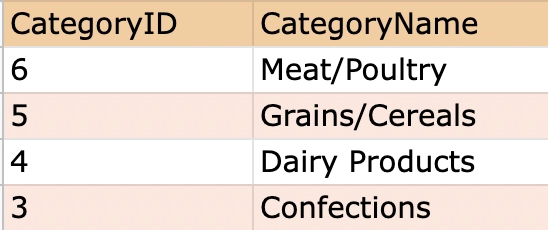
We need to print the row from the database table where CategoryID is greater than 2 and less than 7 in descending order of CategoryID. Only print CategoryID, CategoryName columns. Limit the row to 4 only.
SQL Query:
|
SELECT CategoryID, CategoryName FROM Categories WHERE CategoryID>2 AND CategoryID<7 ORDER BY CategoryID DESC LIMIT 4; |
Result for the above query:
ROWNUM clause
The Oracle server doesn't support the LIMIT clause, so we need to use the ROWNUM clause to solve this dilemma. The above-stated clause works precisely the same yet is differentiated by server compatibility.
Syntax
|
SELECT column[s] FROM TableName WHERE ROWNUM <= Number; |
Let consider an example,
We need to print the database table, but only the first 2 rows we use the Oracle SQL server (you cannot use the TOP/LIMIT clause to solve this question).
SQL Query:
|
SELECT * FROM Categories WHERE ROWNUM <= 2; |
Result for the above query:

ROWNUM with ORDER BY clause
Let consider an example,
We need to print the rows where the ROWNUM is <= 4 and reorder the rows by CategoryName in ascending order and print all the columns.
SQL Query:
|
SELECT * FROM Categories WHERE ROWNUM <=4 ORDER BY CategoryName; |
Result for the above query:

Also see, Tcl Commands in SQL and SQL EXCEPT


 7+ registered

