
 What is AI REX?
A glance
AI REX is Naukri’s agentic recruitment platform that automatically reaches out to relevant candidates, confirms their interest in the role, and screens them. This helps recruiters discover and engage relevant candidates faster.
It helps automate key hiring steps such as:

Finding candidates
who match your hiring requirement

Reaching out to candidates via multiple channels
- automated calling, WhatsApp, etc.

Screening candidates
using AI-powered questions

Organizing responses
in a single dashboard

Scheduling interviews
with shortlisted candidates
By combining candidate matching, automated outreach, and screening, AI REX helps recruiters reduce time spent on early-stage hiring tasks.
AI REX follows a simple hiring workflow. Once you define your hiring requirement, the system helps identify relevant candidates and manage responses efficiently.
Add details
The first step is to add the role you want to hire for
Provide details such as:
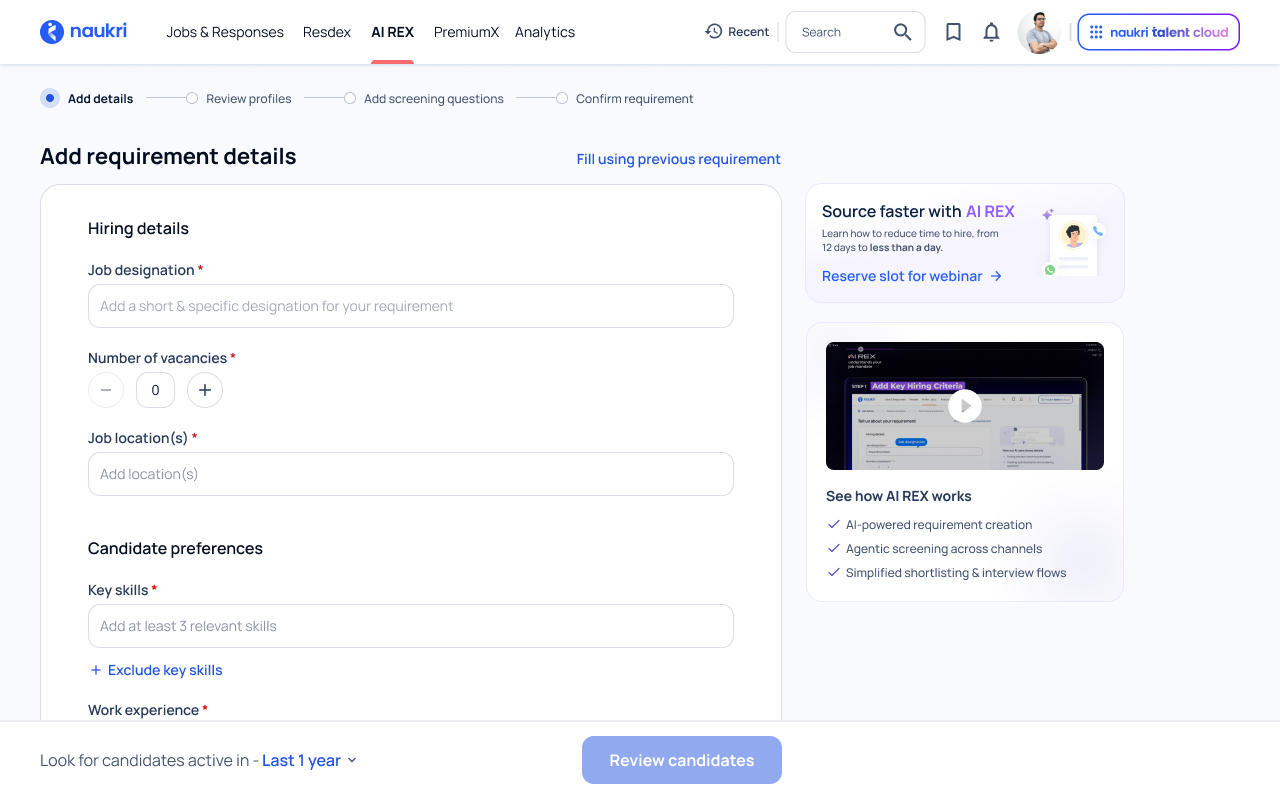
You can also refine the requirement using fields like notice period, candidate location, education, and industry preferences
These inputs help AI REX identify relevant candidates and determine the appropriate reach for your hiring requirement.

Want a live walkthrough of AI REX?
Join the “AI REX Accelerator Webinar” with our product experts
Reserve slot for webinar
Review sample matches
Once you add the details, AI REX identifies candidates who match your criteria.
You can review these profiles and provide feedback by marking candidates as:

Good fit

Maybe

Not a fit

Based on your feedback, AI REX refines its matching logic.
For example, when you mark a candidate as “Good fit”, AI REX identifies similar profiles with comparable skills, experience, or backgrounds and identifies more candidates like them.
This helps improve the relevance of recommendations and creates a stronger pool of matching candidates.

Tip:
Spend a few minutes reviewing the initial matches. Your feedback helps AI REX understand your preference and improves the quality of recommendations.
Add screening questions
Screening questions help filter candidates based on your most important hiring criteria.
AI REX automatically suggests AI-generated screening questions based on your requirement.
You can:

Candidates answer these questions when they respond, helping you quickly evaluate their suitability.
Tip:
Keep screening questions short and relevant. Simple questions like notice period, location preference, or key experience help you quickly shortlist candidates.
Enable automated calling
AI REX can automatically reach out to relevant candidates to check their interest in the role
You can enable automated calling, where AI REX contacts candidates on your behalf and shares details about the opportunity.
In addition to automated calls, AI REX can also engage candidates through multiple channels such as email, platform notifications, WhatsApp, job posts, and the Naukri inbox, helping you reach candidates through the channels they are most likely to respond to.
After enabling calling, you can:

Once done, you can confirm and your requirement will be created.
Tip:
Before confirming, check all the details in your requirement. The details can’t be edited after confirmation as it will be shared with candidates.
Use previous requirements
If you have hired for a similar role earlier, you can save time by filling details from an existing requirement.
Select a previous requirement, and the system will automatically populate the form with the same details. You can then edit any fields as needed before continuing.
This feature is especially useful when:
Tip:
Be specific with skills and experience. Clearly defined skills help AI REX identify better candidate matches and improve recommendations.
Requirements
All the requirements you create using AI REX are listed in the Manage Requirements section. This page gives you a complete view of your active, closed, and expired hiring requirements in one place.
To access this page:
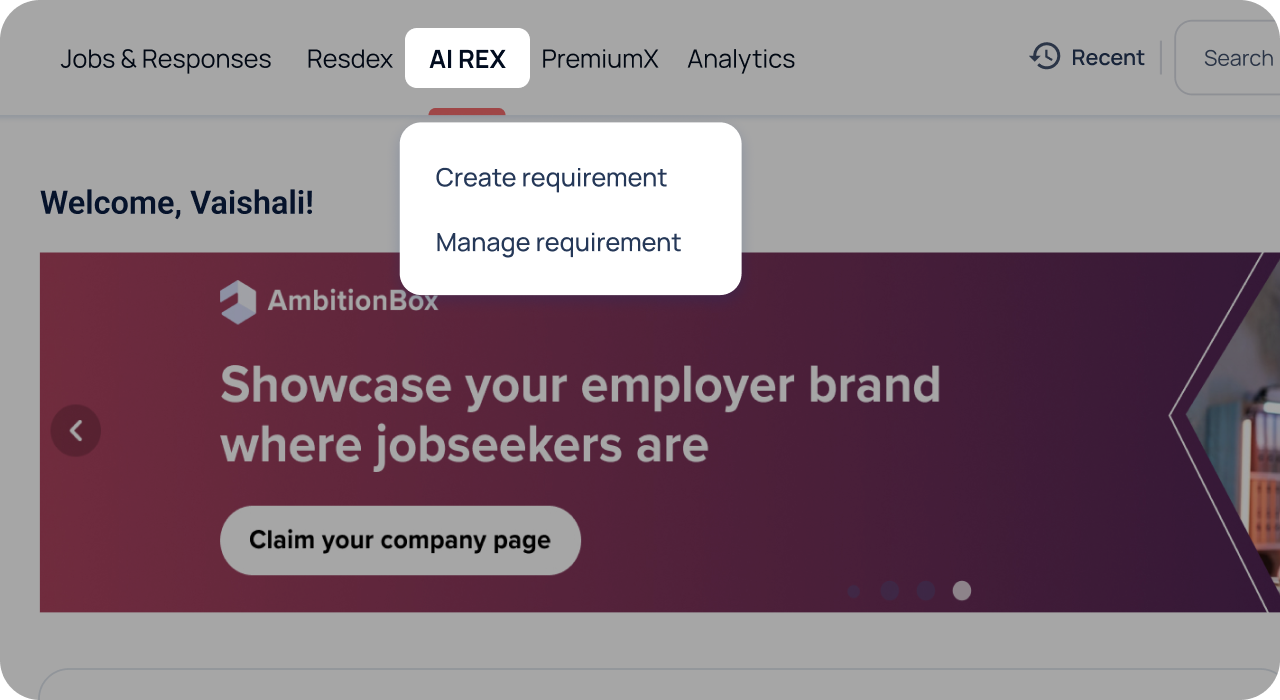
Here, you can:
View all your previously created hiring requirements
This page acts as your central dashboard to track and manage all hiring activities powered by AI REX.
Responses
Responses are organized into three sections:

“AI-screened applications”
These are candidates contacted by AI REX who have shown interest in your opportunity and have been screened using your screening questions.
You can review their responses directly on the candidate card, making it easy to evaluate fit without opening each profile. Use the “Questionnaire” and other filters to quickly identify the most relevant candidates.
You can also share candidates for review with your hiring team or schedule interviews directly from this tab, so you can move from screening to action, faster.

“AI-recommendations”
These are candidates identified by AI REX as the best matches for your requirement based on skills, experience, and your preferences. These candidates may not have applied to the job yet, but you can review their profiles and reach out to them directly.
To quickly narrow down the most relevant profiles, use filters like experience, salary, location, industry, or keywords to refine your results. This helps you focus only on candidates who closely match your hiring criteria.
See someone promising? Save them to “My List” to easily revisit, compare, and take action later—without losing track of top candidates.

“My list”
This is your shortlist workspace where you can move candidates you want to pursue further. It helps you focus on candidates who are both relevant and interested, making the hiring process faster and more organized.
Similar to the “AI-screened application” tab, you can share candidates for review with your hiring team or schedule interviews directly from this tab.

Tip:
Use “My List” to build your shortlist early. Move promising candidates here so you can easily track, review, and schedule interviews without losing them among other responses.
Share for review
You can share candidates’ profiles with hiring managers or other reviewers to gather feedback before moving forward with interviews. This helps teams collaborate on candidate evaluation without switching tools or sending profiles manually.
-
Step 1
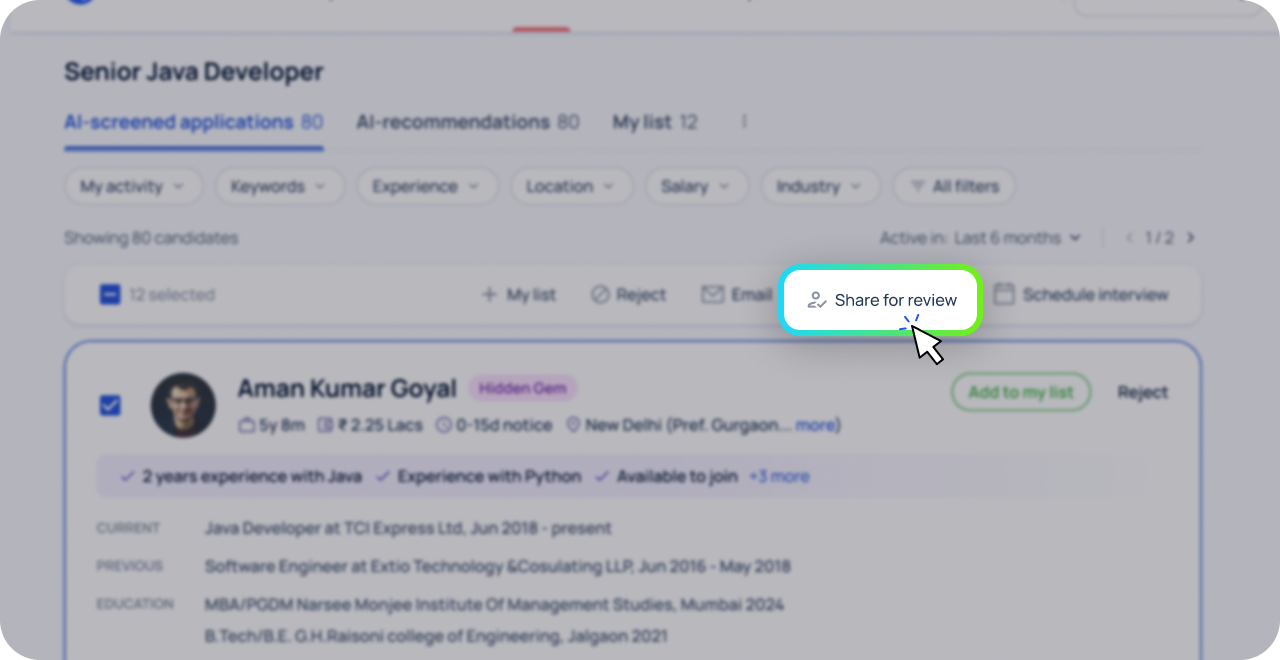
Select candidates to share
You can select one or multiple candidates that you want others to review. After selecting the profiles, click “Share for review” from the action bar.
-
Step 2
Add reviewer details
After selecting candidates, a panel opens where you can:
- Enter the reviewer’s email ID
- Review or edit the AI-generated message
- Choose whether to hide candidate salary details
The system automatically generates an email for the reviewer with a link to evaluate the candidates. -
Step 3
Send candidates for review
Once you click “Share”, the selected candidates are shared with the reviewer. The reviewer can then evaluate the candidates and provide feedback. AI REX also sends automated reminders to reviewers until the review process is completed, helping you collect feedback faster.
-
Step 4
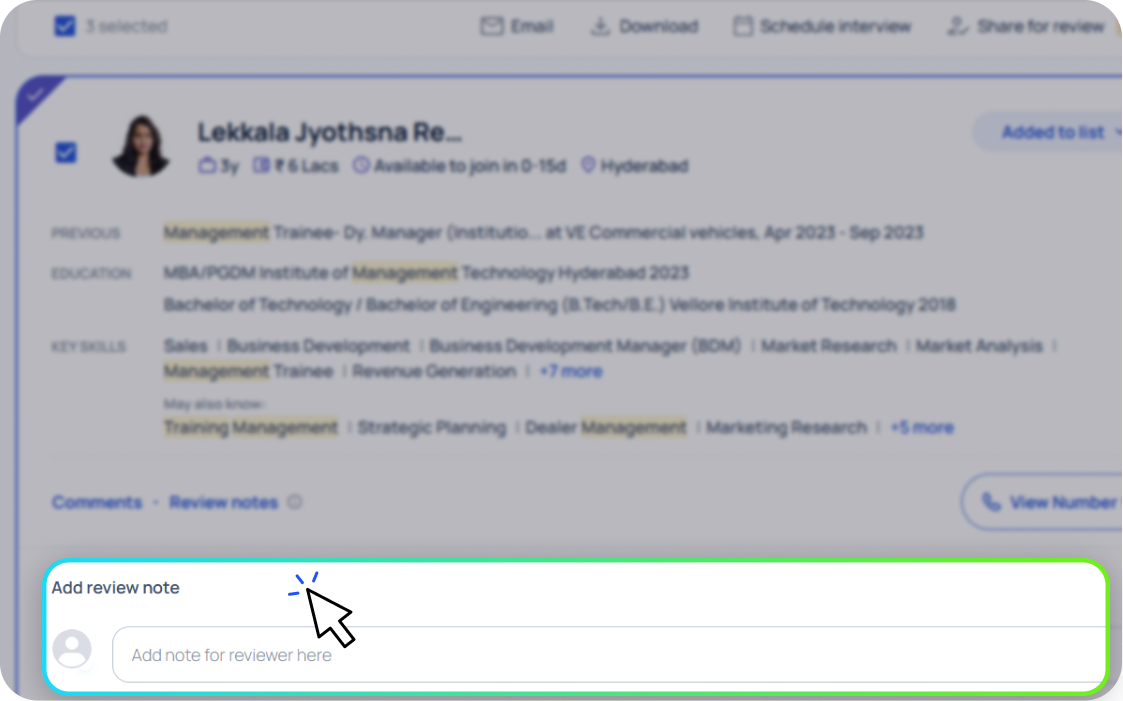
Add notes for reviewers
You can also add review notes directly on candidate profiles before sharing them. These notes help reviewers understand important observations about a candidate, such as relevant skills, concerns, or interview considerations.
Tip:
Instead of sending resumes manually, you can share shortlisted candidates directly and collect feedback in one place.
Review candidates (for reviewers)
When candidates are shared for review, reviewers receive a link via mail that opens the “Review candidates” page for the specific requirement.
For security, reviewers will need to complete a quick OTP verification before accessing the page. This ensures that only authorized reviewers can view candidate details and keeps candidate data protected.

On this page, reviewers can:

Reviewers can quickly evaluate candidates and take one of the following actions:

Approve
Candidate is suitable for the role

On-hold
Candidate may be considered later

Reject
Candidate is not suitable
They can also add review comments or notes to provide additional context for the recruiter.
All reviews are shared in real-time, allowing recruiters to track feedback and move candidates forward in the hiring process faster.
Schedule interviews
Once you’ve shortlisted candidates, you can schedule interviews directly from AI REX without switching tools.
-
Step 1
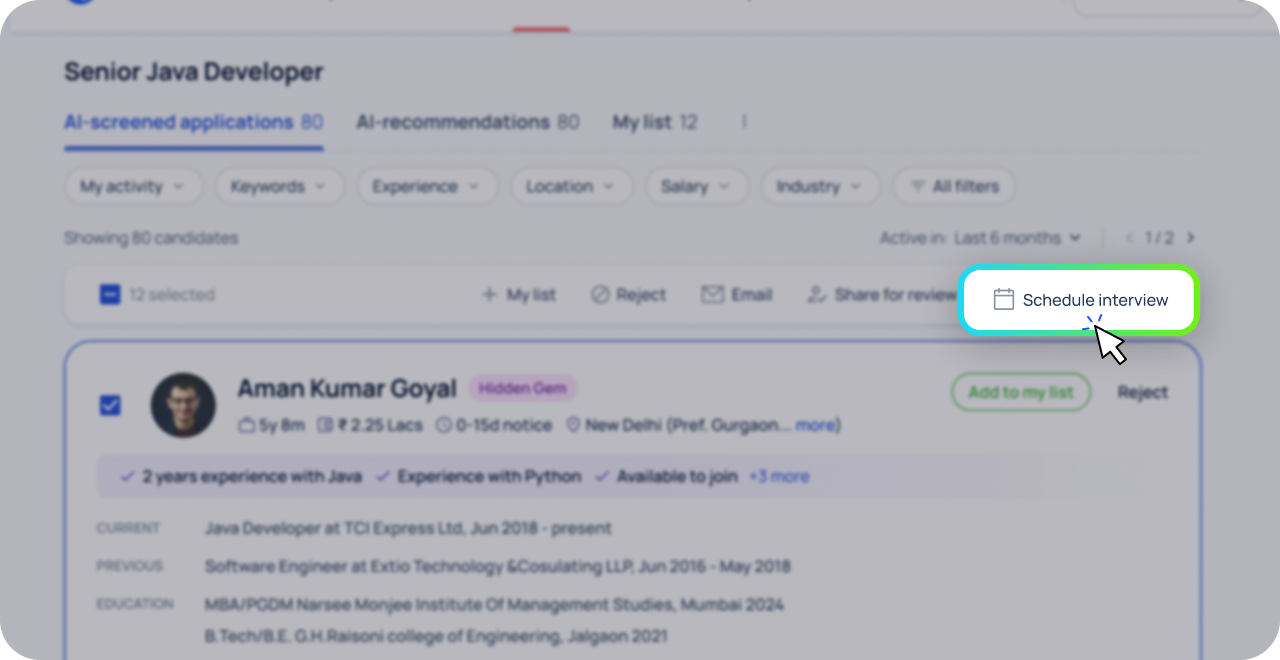
Select the candidates
From the candidate list, select the profiles you want to interview.
After selecting candidates, click Schedule interview from the action bar.
-
Step 2
Choose the interview format
AI REX allows you to schedule interviews in two ways:

- Recruitment drives
Use this when you want to invite multiple candidates to a hiring event or a common interview session. - 1-to-1 interviews
Use this option to share multiple interview time slots and allow candidates to select a time that works best for them.
- Recruitment drives
-
Step 3
Set interview details
After selecting 1-to-1 interviews, you can configure the interview schedule.
You can define:
- Interview dates: Select one or multiple dates
- Available timings: Set the time window for interviews
- Interview duration: Choose the duration (30 minutes, 45 minutes, 1 hour, etc.)
- Number of interview panels: Specify how many panels will conduct interviews
- Interview type: Select Online or In-person
- Review and edit interview slots before sending invitations to candidates.
-
Step 4
Track interview responses
After invitations are sent, you can track candidate responses directly within AI REX.
This includes:
- Accepted invitations
- Pending responses
- Declined invitations
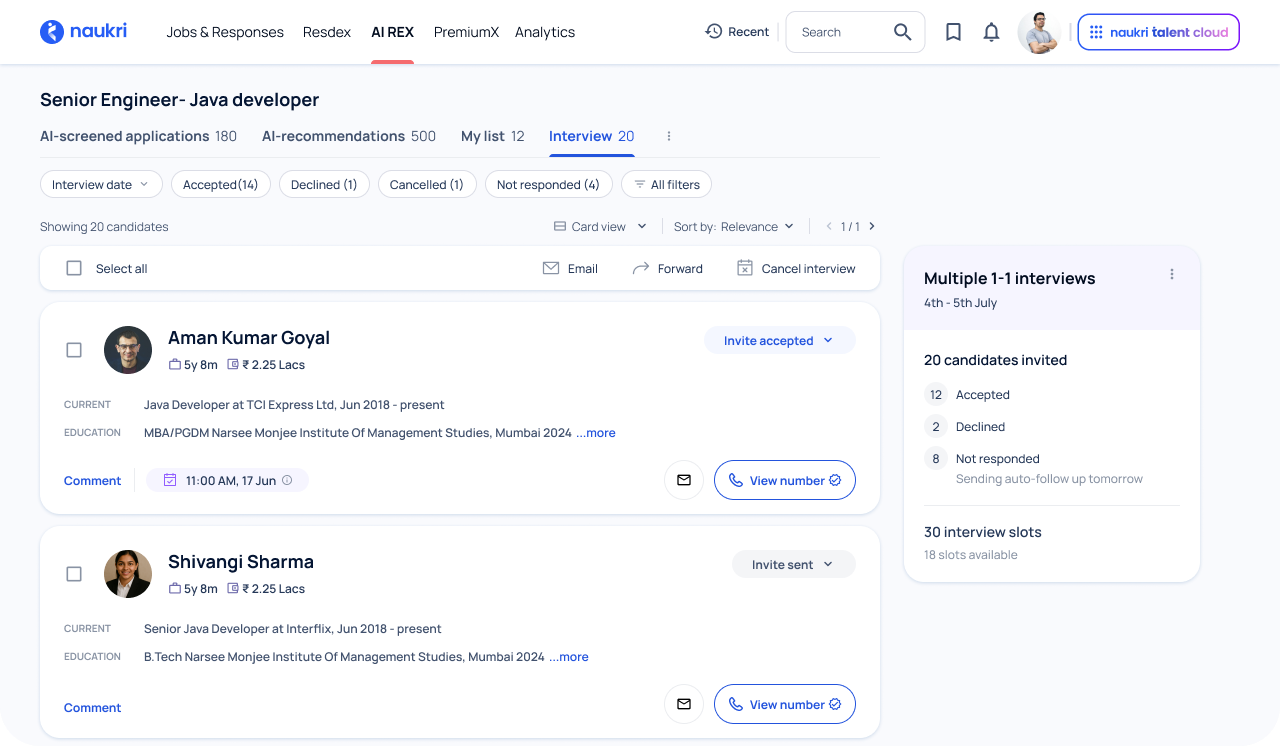
This helps you stay organized and manage your interview process efficiently.
Want a live walkthrough of AI REX?
Join the “AI REX Accelerator Webinar” with our product experts
Reserve slot for webinar