In this article, we’ll go over points on what certifications are, how to add them to your resume and examples of certifications on a resume based on different industries.
What are Certifications?
Certifications are professional documents that are awarded by recognized certifying bodies (boards, associations, organizations, etc.) These certificates are a proof of your proficiency in industry specific technical skills.
To obtain a certification, an individual needs to meet eligibility criteria, pay an application fee and appear for and pass an exam. Some certifications require a certain number of years of experience or regular updates via online certifications.
Why to Add Certifications on a Resume?
Adding certifications to your resume can significantly enhance your chances of landing an interview and advancing in your career. Here's why:
1. Proves Your Skills and Knowledge: Certifications validate your expertise in a specific area. They serve as concrete proof that you're competent in a subject, tool, technique, or methodology.
2. Increases Credibility: Certifications from recognized institutions (like Google, AWS, CompTIA, etc.) add weight to your resume, making you appear more credible to employers.
3. Shows Initiative and Commitment: Earning certifications shows that you’re committed to professional growth and willing to invest time and effort to improve yourself.
4. Sets You Apart from Other Candidates: When multiple candidates have similar backgrounds, a relevant certification can give you the edge by demonstrating specialized knowledge or dedication to your field.
5. May Be Required for the Role: Some jobs require certain certifications (e.g., CPA for accounting, PMP for project management, AWS for cloud roles). Not having them could automatically disqualify you.
6. Can Lead to Higher Salary Potential: Certifications can qualify you for more advanced roles or higher pay brackets, especially in tech, finance, healthcare, and project management.
7. Demonstrates Up-to-Date Knowledge: Especially in fast-changing fields like IT, marketing, or healthcare, certifications indicate that your knowledge is current with industry standards.
How to List Certifications on a Resume
Listing certifications on your resume can be done effectively in a few structured ways. The goal is to present them clearly, professionally, and in a way that highlights their relevance to the job you're applying for. Here's a detailed breakdown of how to do this:
1. A Dedicated “Certifications” Section
In your resume format, create a dedicated certifications section. This section should be placed near the top of your resume, if they are critical to the job you are applying for. This is particularly important if the certifications are highly relevant or required for the role.
Format:
- Title: Clearly label this section as "Certifications."
- Bullet Points: List each certification on its own line for clarity.
- Information to Include: The name of the certification, the issuing organization, and the date you obtained it (or the expiration date, if applicable).
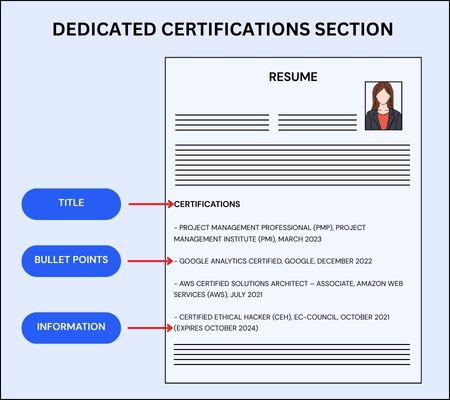
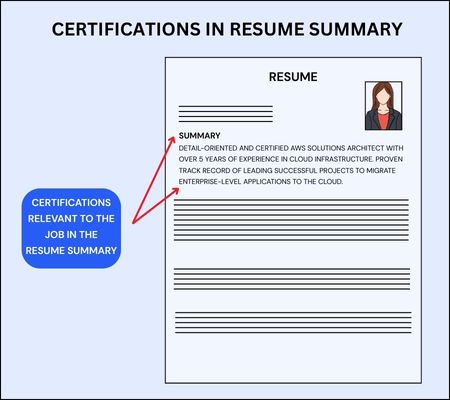
2. Include Certification Details in Resume Summary
If the certification is particularly relevant to the position you’re applying for, you could briefly mention it in the resume summary. This highlights that you are highly qualified for the specific job and gives context to your certifications.
Format:
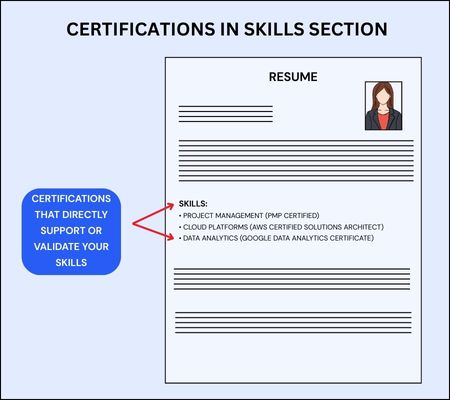
3. Certifications in Skills Section
In the Skills section of your resume, you can include certifications that directly support or validate your skills. This is useful when the certification proves your expertise in a specific tool or area (e.g., Excel, AWS, PMP) or if you don’t have enough certifications to justify a separate Certifications section.
Format:
4. Listing the Certifications
The way you list certifications matters in keeping things organized and professional.
- Add the title of the certification: Mention the entire title of the certification, spelling out any abbreviations.
- Issuing Organization: Add the name of the issuing organization next to the certification or below it. This is important, as it provides the credibility of the certification.
- Date: If the certification has an expiration date, list it. Otherwise, list the year you obtained it.
5. Order Certifications by Relevance or Date
If you have several certifications, consider ordering them either by relevance to the job you're applying for or by the most recent ones first.
- Order by Relevance: If one certification is more important for the position, put it at the top of the list. For example, if you're applying for a data analyst role, "Google Analytics Certified" should be at the top.
- Order by Date: If the certifications are equally relevant, you can list them in reverse chronological order, starting with the most recent certification. This shows your most up-to-date qualifications.
6. Group Certifications by Category (If Needed)
If you have multiple certifications in related fields, consider grouping them into categories. This can make it easier for the reader to follow and helps to emphasize your specialized skills in specific areas.
Example:Certifications a. Project Management - Project Management Professional (PMP), Project Management Institute (PMI), March 2023 - Certified ScrumMaster (CSM), Scrum Alliance, December 2021 b. Cloud Computing - AWS Certified Solutions Architect – Associate, Amazon Web Services (AWS), July 2021 - Google Cloud Certified – Professional Cloud Architect, Google, January 2022 |
Tips for Listing Certifications on Resume
- Don’t List Expired Certifications (Unless They're Still Relevant): If a certification is expired and it doesn’t add value, remove it. If it’s still relevant but expired, you can note the expiration date and mention your plan to renew it.
- Avoid Overloading the Resume: Only include certifications that are relevant to the job you're applying for. Too many certifications can clutter the resume and make it harder for hiring managers to find the most pertinent information.
- Use Bullet Points for Clarity: Format your certifications in a simple, easy-to-read list. Each certification should be on its own line for clarity.
- Group Certifications When Necessary: Make Category Groupings if you have many certifications in a specific area (e.g., "Project Management," "Cloud Computing"), to make your resume more organized.
- Link to Verification (If Available): Some certifications have online verification pages or digital badges. You can link to them (example, LinkedIn, certification provider's website) to allow employers to verify the certification.
Certifications on a Resume Examples
a. IT/Software Development Certifications on Resume Example
1. Header/Profile Section: RAMESH KUMAR AWS Certified Solutions Architect | Red Hat Certified Engineer ramesh.kumar@email.com | +91 98765 43210 | Bengaluru, Karnataka |
2. Dedicated Section with Brief Description: PROFESSIONAL CERTIFICATIONS • AWS Certified Solutions Architect – Associate | Amazon Web Services Developed expertise in designing distributed systems on AWS platform Certificate ID: ABC123XYZ | Valid until December 2026 • Red Hat Certified Engineer (RHCE) | Red Hat Mastered implementation and troubleshooting of enterprise Linux environments April 2023 | Certificate ID: RHCE-2023-0456 |
b. Finance/Accounting Certifications on Resume Example
1. As Part of Professional Summary: PROFESSIONAL SUMMARY CA with 5+ years of experience in financial reporting and tax compliance. Certified Financial Planner specializing in investment advisory and retirement planning for high-net-worth individuals. |
2. In Skills Section: SKILLS & QUALIFICATIONS • Financial Analysis: Advanced financial modeling, valuation, and forecasting • Regulatory Compliance: Expert in Indian GAAP, Ind AS, and IFRS • Professional Designations: CA (ICAI, 2022), CFP (FPSB India, 2024) |
c. Healthcare Certifications on Resume Example
1. License Information in Header: DR. PRIYA SHARMA MBBS, MD (Pediatrics) | MMC Reg. No. MMC/12345/2022 drsharma@email.com | +91 98765 43210 | Mumbai, Maharashtra |
2. As Part of Education Timeline: EDUCATION AND PROFESSIONAL TRAINING • MD (Pediatrics), AIIMS Delhi, 2020 • Advanced Cardiac Life Support (ACLS), American Heart Association – India Chapter, 2024 • Basic Life Support (BLS) Certification, Indian Medical Association, 2024 • MBBS, Grant Medical College, Mumbai, 2017 |
3. As Specializations: SPECIALIZATIONS & CERTIFICATIONS • Pediatric Critical Care | Certified by Indian Academy of Pediatrics • Advanced Cardiac Life Support | AHA India Chapter • Basic Life Support | Indian Medical Association All certifications current and valid through 2026 |
d. Human Resources Certifications on Resume Example
1. As Part of Title/Headline: DEEPAK SINGH SHRM-SCP Certified HR Professional deepak.singh@email.com | +91 98765 43210 | Gurgaon, Haryana |
2. Within Skills Matrix: PROFESSIONAL SKILLS Talent Acquisition ●●●●○ SHRM-SCP Certified (2023) Employee Relations ●●●●● Certified Recruitment Analyst Compensation & Benefits ●●●○○ 10+ years experience |
3. As Professional Development: PROFESSIONAL DEVELOPMENT • SHRM Senior Certified Professional (SHRM-SCP), February 2023 Advanced my expertise in strategic HR management and organizational development • Certified Recruitment Analyst, National HRD Network India, May 2024 Enhanced capabilities in talent analytics and competency-based hiring |