


JSON
The JavaScript JSON is an acronym for JavaScript Object Notation. It provides a format for storing and transporting data. It is a lightweight, human-readable collection of data that can be accessed logically.
- It generates and stores the data from user input.
- It can transport the data from the server to the client, client to server, and server to server.
- It can also build and verifying the data.
- JSON is often used when data is sent from a server to a web page.
JSON Object Example
The { (curly brace) represents the JSON object.
{
 "student": {
        "name":  "Sam",
        "fees": 56000,
        "institution": “Coding Ninjas”
    }
}
JSON Array Example
The [ (square bracket) represents the JSON array. A JSON array can have values and objects.
[
        {"name":"Sam", "email":"Sam@gmail.com"},
        {"name":"Yash", "email":"Yash@gmail.com"}
]
JSON Syntax Rules
- Data is in name/value pairs
- Data is separated by commas
- Curly braces hold objects
- Square brackets hold arrays
Purpose of using JSON
The JSON format is syntactically similar to the JavaScript objects. Because of this, a JavaScript program can easily convert JSON data into JavaScript objects.
Since the format is text only, JSON data can easily be sent between computers and used by any programming language.
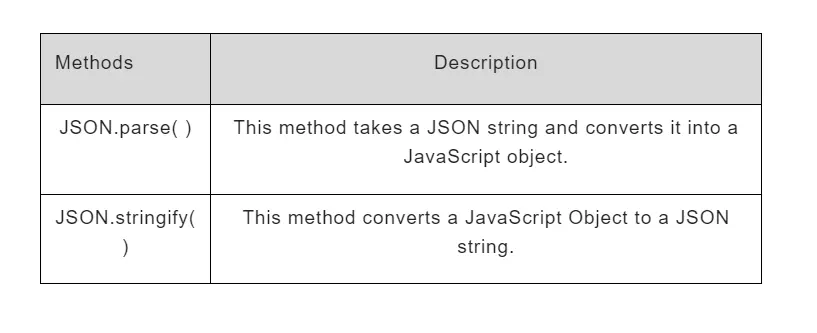
JSON.parse( )
JSON is used to exchange data to/from a web server.
When receiving data from a web server, the data is always a string.
Data is parsed with JSON.parse( ), and the data becomes a JavaScript object.
Syntax : JSON.parse( text ) ;
Example :     var text = ‘ { "name":  "Sam", "fees": 56000, "institution": “Coding Ninjas” } ’
        var json = JSON.parse( text ) ;

        json.name ; // Returns Sam
        json.fees ;   //Returns 56000
JSON.stringify( )
JavaScript JSON.stringify( ) method converts a JavaScript Object to a JSON string.
Syntax : Json.stringify( value ) ;
Example :     var obj ={
 "name":  "Sam",
 "fees": 56000,
 "institution": "Coding Ninjas"
  }

  var json = JSON.stringify( obj ) ;
  console.log(json) ;

Output : {"name":"Sam","fees":56000,"institution":"Coding Ninjas"}
- json is now a string and ready to be sent to a server