


Capabilities
JavaScript has the power to change the content shown on a web page using mouse/keyboard clicks.
JavaScript is used to add behaviour and interactivity to the web page. It is also possible to manipulate the web page using JavaScript.
SImply we can say that JavaScript can manipulate the HTML & CSS of a web page, and this manipulation is done using DOM (Document Object Model ).
JavaScript access the DOM to manipulate the web page. Using DOM, the JavaScript gets access to HTML as well as CSS of the web page and can also add behaviour to the HTML elements.
DOM(Document Object Model)
Document Object Model is an API that represents and interacts with HTML document. When a page is loaded, the browser creates the DOM for the web page. The DOM represents the document as a node tree, where each node represents part of the document. It can be an element, text, etc., just how that web page was written.
API( Application programming interface )
In simple terms, API is an easy way by which you can use code written by somebody else. They make life easy for us. For example: with the help of DOM, accessing elements in an HTML page and/or editing them or even adding new elements to the page will become quite easy for us, and we don’t have to write everything from scratch.
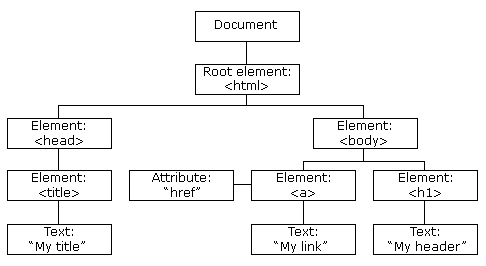
Capabilities of JavaScript using DOM
- Change all the HTML elements in the page
- Change all the HTML attributes in the page
- Change all the CSS styles in the page
- Remove existing HTML elements and attributes
- Add new HTML elements and attributes
- React to all existing HTML events in the page
- Create new HTML events in the page
DOCUMENT
A document object represents the HTML code that is displayed inside a browser window. The 'document' object has various properties that refer to other objects that allow accessing and modifying the web page’s content.
If you want to access any element in an HTML page, you always start with accessing the document object.
Syntax : document.property ;
Fetching Elements
The web page becomes dynamic when you use JavaScript to modify its elements and add events to it. But most of the time, dynamicity to web pages is more due to the change in the web page’s content.
You can use the document object to access the elements in your HTML page. It contains methods that can be called to access the elements as objects.
You can then manipulate these elements using their objects, and the changes would reflect in the elements on the web page.
You can access elements from the following selectors -
- document.getElementById
- document.getElementsByTagName
- document.getElementsByClassName
- document.querySelectorAll
- document.querySelector
Events In JavaScript
An HTML event is something that the browser does or something a user does. You can also call events as actions or occurrences that happen in the browser, to which you can respond in some way.
An event can be triggered by the user action, e.g. clicking a mouse button or tapping the keyboard.
Here are some more examples of HTML events -
- An HTML web page has finished loading
- An HTML input field was changed
- An HTML button was clicked
Events can represent everything from basic user interactions to automated notifications of things happening in the rendering model.
To execute these events, you use functions and link them to an element. Sometimes in a function, you will see a parameter name such as 'event', 'evt' or 'e'. This is called an event object, and it is automatically passed to the function.
To get notified of DOM events, you can use two ways -
- Using addEventListener( ) method
- Using on<event> handlers