


Introduction to Variables
A variable in Python represents a named location that refers to a value and whose values can be used and processed during the program run. In other words, variables are labels/names to which we can assign value and use them as a reference to that value throughout the code.
Variables are fundamental to programming for two reasons:
● Variables keep values accessible: For example, The result of a time-consuming
operation can be assigned to a variable so that the operation need not be performed each time we need the result.
● Variables give values context: For example, The number 56 could mean lots of different things, such as the number of students in a class, or the average weight of all students in the class. Assigning the number 56 to a variable with a name like num_students would make more sense, to distinguish it from another variable average_weight, which would refer to the average weight of the students. This way we can have different variables pointing to different values.
How are Values Assigned to A Variable?
Values are assigned to a variable using a special symbol “=”, called the assignment operator. An operator is a symbol, like = or +, that performs some operation on one or more values. For example, the + operator takes two numbers, one to the left of the
operator and one to the right, and adds them together. Likewise, the “=” operator takes a value to the right of the operator and assigns it to the name/label/variable on the left of the operator.
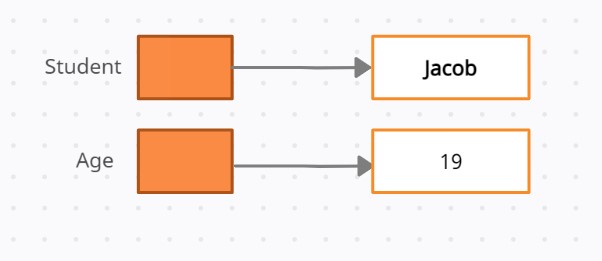
For Example: Now let us create a variable namely Student to hold a student’s name and a variable Age to hold a student’s age.
>>> Student = "Jacob"
>>> Age = 19
Python will internally create labels referring to these values as shown below:
Now, let us modify the first program we wrote.
greeting = "Hello, World!"
print(greeting)
Here, the Python program assigned the value of the string to a variable greeting, and then when we call print(greeting), it prints the value that the variable, greeting, points to i.e. "Hello, World!"
We get the output as:
'Hello, World!'
Naming a Variable
You must keep the following points in your mind while naming a variable:-
● Variable names can contain letters, numbers, and underscores.
● They cannot contain spaces.
● Variable names cannot start with a number.
● Variable names are case-sensitive. For example:- The variable names Temp and temp are different.
● While writing a program, creating self-explanatory variable names helps a lot in increasing the readability of the code. However, too-long names can clutter up the program and make it difficult to read.
Examples:
Correct
a1 = 5;
_b2 = 10;
b = 10;
Incorrect
1a = 5;
23b = 10;
1@ = 5;