





Juniper Networks interview experience Real time questions & tips from candidates to crack your interview
Staff Engineer
Juniper Networks


2 rounds | 5 Coding
problems

Rejected
Interview preparation journey

Preparation
Duration: 5 months
Topics: Data Structures, Algorithms, Networking, Aptitude, OOPS

Tip 1 : Must do Previously asked Interview as well as Online Test Questions.
Tip 2 : Go through all the previous interview experiences from Codestudio and Leetcode.
Tip 3 : Do at-least 2 good projects and you must know every bit of them.
Application process
Where: Other
Eligibility: Above 7 CGPA
Tip 1 : Have at-least 2 good projects explained in short with all important points covered.
Tip 2 : Every skill must be mentioned.
Tip 3 : Focus on skills, projects and experiences more.

Interview rounds
01
Round
Easy
Video Call
Duration45 minutes
Interview date29 Mar 2021
Coding problem2
Technical Interview round with questions on DSA
1. Level Order Traversal of Binary Tree
Easy
15m average time
85% success

0/40
Asked in companies



You have been given a Binary Tree of integers. You are supposed to return the level order traversal of the given tree.
For example:
For the given binary tree
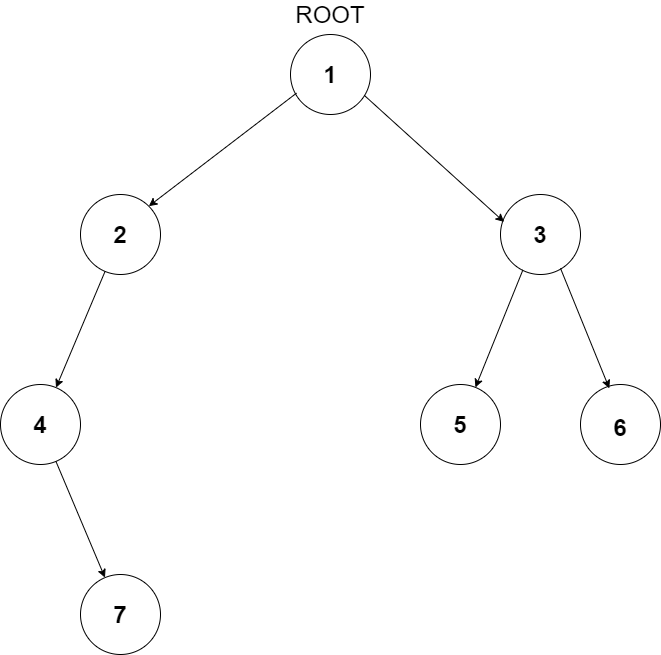
The level order traversal will be {1,2,3,4,5,6,7}.
Problem approach
A queue can be used to do level order traversal of the tree. For each node, first visit the node and then push its children nodes in the FIFO queue.
printLevelorder(tree)
1) Create an empty queue q
2) temp_node = root /*start from root*/
3) Loop while temp_node is not NULL
a) print temp_node->data.
b) Enqueue temp_node’s children
(first left then right children) to q
c) Dequeue a node from q.
Time Complexity: O(n) where n is the number of nodes in the binary tree
Space Complexity: O(n) where n is the number of nodes in the binary tree
2. Swap Adjacent Bit Pairs
Easy
10m average time
90% success
0/40
Asked in companies



You are given an integer 'N'. Your task is to find the number formed after swapping each even bit of 'N' in its binary representation with its adjacent bit on the right, assuming that the least significant bit is an odd bit.
For example :
Consider the integer N = 45 whose binary representation is 101101. The resulting number formed after swapping each even bit with its adjacent bit to the right will be 30 (011110) in this case.
Problem approach
- Let oddPositionBits and evenPositionBits be the two variables that store the value of bits at odd positions and even positions respectively.
- Set oddPositionBits as the Bitwise AND of N and 0x55555555.
- Set evenPositionBits as the Bitwise AND of N and 0xAAAAAAAA.
- Left shift oddPositionBits by 1 bit and right shift evenPositionBits by 1 bit. In this step, we are swapping the positions of the odd bits and the even bits.
- Let ans be the variable that stores the final result. Set ans as the Bitwise OR of oddPositionBits and evenPositionBits. Here, we are recombining the od bits and the even bits after swapping them.
- Return the variable ans.
02
Round
Easy
Video Call
Duration60 minutes
Interview date29 Mar 2021
Coding problem3
Technical round with questions on Networking.
1. Computer Network Question
Various components of IP Packet Header
Problem approach
Following are various components/fields of IP packet header
Version: The first IP header field is a 4-bit version indicator. In IPv4, the value of its four bits is set to 0100, which indicates 4 in binary.
Internet Header Length: Internet header length, shortly known as IHL, is 4 bits in size. It is also called HELEN (Header Length). This IP component is used to show how many 32-bit words are present in the header.
Type of Service: Type of Service is also called Differentiated Services Code Point or DSCP. This field is provided features related to the quality of service for data streaming or VoIP calls. The first 3 bits are the priority bits. It is also used for specifying how you can handle Datagram.
Total length: The total length is measured in bytes. The minimum size of an IP datagram is 20 bytes and the maximum, it can be 65535 bytes .
Identification: Identification is a packet that is used to identify fragments of an IP datagram uniquely. Some have recommended using this field for other things like adding information for packet tracing, etc.
IP Flags: Flag is a three-bit field that helps you to control and identify fragments. The following can be their possible configuration:
Bit 0: is reserved and has to be set to zero
Bit 1: means do not fragment
Bit 2: means more fragments.
Fragment Offset: Fragment Offset represents the number of Data Bytes ahead of the particular fragment in the specific Datagram. It is specified in terms of the number of 8 bytes, which has a maximum value of 65,528 bytes.
Time to live: It is an 8-bit field that indicates the maximum time the Datagram will be live in the internet system. The time duration is measured in seconds, and when the value of TTL is zero, the Datagram will be erased.
Protocol: This IPv4 header is reserved to denote that internet protocol is used in the latter portion of the Datagram. For Example, 6 number digit is mostly used to indicate TCP, and 17 is used to denote the UDP protocol.
Header Checksum: The next component is a 16 bits header checksum field, which is used to check the header for any errors. The IP header is compared to the value of its checksum. When the header checksum is not matching, then the packet will be discarded.
Source Address: The source address is a 32-bit address of the source used for the IPv4 packet.
Destination address: The destination address is also 32 bit in size stores the address of the receiver.
IP Options: It is an optional field of IPv4 header used when the value of IHL (Internet Header Length) is set to greater than 5. It contains values and settings related with security, record route and time stamp, etc.
Data: This field stores the data from the protocol layer, which has handed over the data to the IP layer.
2. Computer Network Question
Difference between TCP and UDP
Problem approach
TCP reads data as streams of bytes, and the message is transmitted to segment boundaries. UDP messages contain packets that were sent one by one. It also checks for integrity at the arrival time.
TCP messages make their way across the internet from one computer to another. UDP is not connection-based, so one program can send lots of packets to another.
TCP rearranges data packets in the specific order. UDP protocol has no fixed order because all packets are independent of each other.
TCP is heavy-weight. TCP needs three packets to set up a socket connection before any user data can be sent. UDP is lightweight. There are no tracking connections, ordering of messages, etc.
TCP does error checking and also makes error recovery. UDP performs error checking, but it discards erroneous packets.
The speed for TCP is slower. UDP is faster as error recovery is not attempted.
3. Computer Network Question
Various components of TCP Segment Header
Problem approach
Source port : 16 Bit number which identifies the Source Port number (Sending Computer's TCP Port).
Destination port : 16 Bit number which identifies the Destination Port number (Receiving Port).
Sequence number : 32 Bit number used for byte level numbering of TCP segments. If you are using TCP, each byte of data is assigned a sequence number. If SYN flag is set (during the initial three way handshake connection initiation), then this is the initial sequence number. The sequence number of the actual first data byte will then be this sequence number plus 1. For example, let the first byte of data by a device in a particular TCP header will have its sequence number in this field 50000. If this packet has 500 bytes of data in it, then the next packet sent by this device will have the sequence number of 50000 + 500 + 1 = 50501.
Acknowledgment Number : 32 Bit number field which indicates the next sequence number that the sending device is expecting from the other device.
Header Length : 4 Bit field which shows the number of 32 Bit words in the header. Also known as the Data Offset field. The minimum size header is 5 words (binary pattern is 0101).
Reserved : Always set to 0 (Size 6 bits).
Control Bit Flags : We have seen before that TCP is a Connection Oriented Protocol. The meaning of Connection Oriented Protocol is that, before any data can be transmitted, a reliable connection must be obtained and acknowledged. Control Bits govern the entire process of connection establishment, data transmissions and connection termination. The control bits are listed as follows: They are:
URG : Urgent Pointer.
ACK : Acknowledgement.
PSH : This flag means Push function. Using this flag, TCP allows a sending application to specify that the data must be pushed immediately. When an application requests the TCP to push data, the TCP should send the data that has accumulated without waiting to fill the segment.
RST : Reset the connection. The RST bit is used to RESET the TCP connection due to unrecoverable errors. When an RST is received in a TCP segment, the receiver must respond by immediately terminating the connection. A RESET causes both sides immediately to release the connection and all its resources. As a result, transfer of data ceases in both directions, which can result in loss of data that is in transit. A TCP RST indicates an abnormal terminination of the connection.
SYN : This flag means synchronize sequence numbers. Source is beginning a new counting sequence. In other words, the TCP segment contains the sequence number of the first sent byte (ISN).
FIN : No more data from the sender. Receiving a TCP segment with the FIN flag does not mean that transferring data in the opposite direction is not possible. Because TCP is a fully duplex connection, the FIN flag will cause the closing of connection only in one direction. To close a TCP connection gracefully, applications use the FIN flag.
Window :Indicates the size of the receive window, which specifies the number of bytes beyond the sequence number in the acknowledgment field that the receiver is currently willing to receive.
Checksum : The 16-bit checksum field is used for error-checking of the header and data.
Urgent Pointer : Shows the end of the urgent data so that interrupted data streams can continue. When the URG bit is set, the data is given priority over other data streams (Size 16 bits).


Here's your problem of the day 
Solving this problem will increase your chance to get selected in this company
Skill covered: Programming
How do you remove whitespace from the start of a string?
Choose another skill to practice
Similar interview experiences
Software Engineer
1 rounds | 3 problems
Interviewed by Juniper Networks
Rejected

0 views

0 comments

0 upvotes
Software Engineer Intern
4 rounds | 7 problems
Interviewed by Juniper Networks
 Selected
 2684 views
0 comments
0 upvotes
SDE - 1
6 rounds | 7 problems
Interviewed by Juniper Networks
 Selected
 1941 views
0 comments
0 upvotes

SDE - 1
3 rounds | 9 problems
Interviewed by Salesforce
 Selected
 4552 views
0 comments
0 upvotes