In this article, we’ll help you strategically leverage your references to strengthen your candidacy and stand out to potential employers.
What are References on a Resume?
References you list in your resume are points of contact who can confirm and verify your professional achievements, education, your skills and your work experience you’ve mentioned on your resume. This verification helps recruiters determine if you are a good fit for role. Thus, it is important to list references in your resume who can showcase and confirm your strengths and best qualities to the recruiter.
Who are References?
Recruiters might ask questions about you and your work experience or may request them for recommendation letters. References can be:
a. Former employers
b. Former managers
c. Former coworkers
d. Colleagues
e. Advisors or Instructors
What is the Purpose of Listing References on a Resume?
Professional references serve several valuable purposes:
1. They validate your capabilities - A reference can vouch for your skills and achievements.
2. They reveal your professionalism - The status of your references implies your workplace conduct.
3. They offer insight into your qualifications - References can give nuanced qualitative perspectives on your strengths beyond just resume facts.
4. They differentiate you from other candidates - Insightful references can set you apart from competition.
5. They expand your network reach - References showcase access to authoritative voices who know your work.
How to Add References on a Resume
To be able to standout from the competition depends on how you write a resume. A well- structured resume with a good list of references helps to do the trick.
When you want to add references to your resume, it's typically done on a separate document or as the final section on your resume.
You can add references in the following ways:
1. Separate References Document Format
Title the document: “References”
Use the same header as your resume (your name and contact information at the top), then list your references in a clean, consistent format.
References for Resume Format:
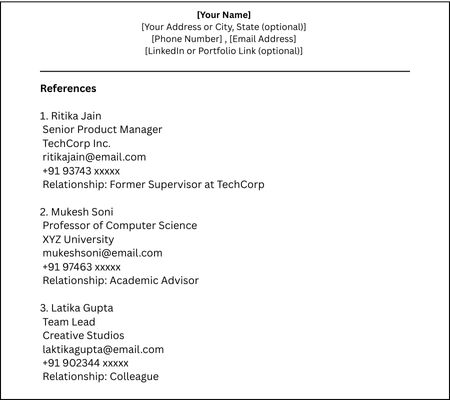
Tips:
- Use the same font and styling as your resume.
- Save as “YourName_References.pdf” for professionalism.
2. Adding References on the Resume Itself
Place the references at the end of your resume, after all other sections.
References on Resume Format:
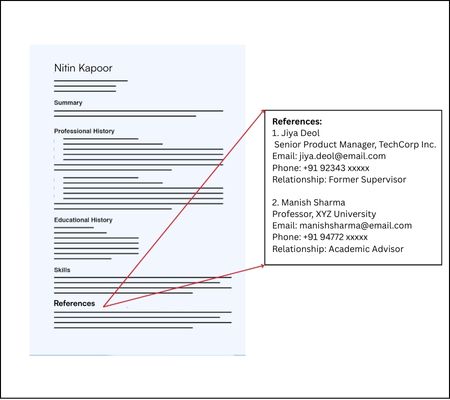
Tips:
- Limit to 2–3 references to save space.
- Use consistent formatting for each entry.
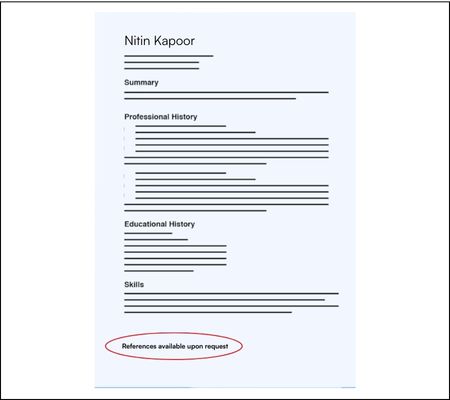
3. Short Placeholder Option (on Resume)
If space is limited or if not requested, use a simple line at the end of the resume: "References available upon request."
Example:
How To Use Linkedin Recommendations For References
Using LinkedIn recommendations as references is a smart and modern way to support your job application—especially if you're applying online or want to show social proof of your skills.
What Are LinkedIn Recommendations?
LinkedIn recommendations are written testimonials from people you've worked with—colleagues, managers, professors, or clients—displayed on your public profile. They add credibility and third-party validation of your skills, character, and accomplishments.
Steps to Use Linkedin Recommendations For References:
1. Include a Link to Your LinkedIn Profile in Your Resume
Place your LinkedIn URL in your resume header with your contact details.
Example:Jaiveer Arora
jaiveer@email.com
+91 93452 xxxxx
linkedin.com/in/johnapplicant |
This lets employers easily access your recommendations without needing a separate document.
2. Reference Specific LinkedIn Recommendations in Your Cover Letter or Interview
If someone has written a particularly strong or relevant recommendation, mention it briefly.
Example:“A former team lead described my project management style as ‘organized, communicative, and results-driven’ in a LinkedIn recommendation.” |
This shows confidence, professionalism, and self-awareness—without sounding boastful.
3. Attach Screenshots of Recommendations (if allowed/requested)
If you're emailing your application or submitting a portfolio:
- Take a screenshot of 1–2 standout LinkedIn recommendations.
- Add them as an appendix or page in your portfolio or reference sheet.
This is particularly effective in:
- Consulting
- Freelance or creative roles
- Academic or research portfolios
4. Create a Section in Your Reference Sheet or Portfolio
Instead of traditional references only, you can add a section titled:
Selected LinkedIn Recommendations
Format:Selected LinkedIn Recommendations Leena Gupta – Creative Director, CreativeCo
“Jaiveer is a rare combination of creative thinker and detail-oriented executor. His leadership on our rebranding project was key to its success.”
View on LinkedIn Dr. Smita Ahuja – Professor, XYZ University
“Jaiveer’s dedication to research and innovation stood out during our two-year collaboration on climate data modeling.”
View on LinkedIn |
5. Use Them to Back Up Traditional References
You can strengthen your formal references by including a link to a recommendation from the same person on LinkedIn. This:
- Provides written proof
- Reinforces credibility
- Saves the hiring manager time
How to Get LinkedIn Recommendations
If you don’t have any yet or want new ones:
- Go to the profile of a colleague or supervisor you’ve worked with.
- Click “More” → “Request a Recommendation.”
- Personalize your message:
“Hi [Name], I really appreciated working with you on [Project]. Would you feel comfortable writing a quick LinkedIn recommendation based on that experience? I’d be happy to write one for you as well.”
Tips for Managing References
1. Choose the Right References
- Select individuals who know your work ethic, skills, and achievements well.
- Ideal references include:
- Former managers or supervisors
- Professors or academic advisors (for students or recent grads)
- Senior colleagues or team leads
- Clients (if you're a freelancer or consultant)
- Avoid using friends or family members—they’re not considered objective.
2. Ask for Permission First
- Always ask your reference for permission before listing them.
- Let them know about the roles you’re applying for so they’re prepared if contacted.
3. Keep Your References Informed
- Notify your references when you’ve submitted an application or expect a call.
4. Tailor References to the Job
- Just like your resume, customize your reference list for each position.
- Choose references that best reflect the skills and qualities that align with the job description.
5. Double-Check Contact Information
- Make sure phone numbers and emails are current and correct.
- A wrong phone number can make you look careless and delay your application process.
6. Keep It Confidential (When Needed)
- If your current employer doesn’t know you're job-hunting, don’t list your current manager as a reference.
- Use a line like:
References available upon request. Confidentiality appreciated regarding current employer.
7. Use LinkedIn Recommendations Strategically
- Ask your references to write you a LinkedIn recommendation. This acts as a public endorsement and can supplement your application.
- Link to your LinkedIn profile in your resume header or email signature.
Conclusion
Including references the right way can enhance your credibility—but only if it's done professionally and appropriately. Unless a job posting asks for them, keep references off your resume and present them in a separate document when needed. With the right preparation, your references can be a powerful part of your job search.