









1. Node ‘U’ is said to be a sibling of node ‘V’ if and only if both ‘U’ and ‘V’ have the same parent.
2. Root 1 is a sibling node.
The first line contains an integer 'T' which denotes the number of test cases or queries to be run.

The first line of each test case contains elements of the tree in the level order form.
The line consists of values of nodes separated by a single space. In case a node is null, we take -1 in its place.

For example, the input for the tree is depicted in the below image.
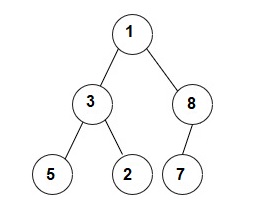
1
3 8
5 2 7 -1
-1 -1 -1 -1 -1 -1
Level 1 :
The root node of the tree is 1

Level 2 :
Left child of 1 = 3
Right child of 1 = 8

Level 3 :
Left child of 3 = 5
Right child of 3 = 2
Left child of 8 =7
Right child of 8 =  null (-1)


Level 4 :
Left child of 5 = null (-1)
Right child of 5 = null (-1)
Left child of 2 = null (-1)
Right child of 2 = null (-1)
Left child of 7 = null (-1)
Right child of 7 = null (-1)

The first not-null node(of the previous level) is treated as the parent of the first two nodes of the current level. The second not-null node (of the previous level) is treated as the parent node for the next two nodes of the current level and so on.
The input ends when all nodes at the last level are null(-1).
The above format was just to provide clarity on how the input is formed for a given tree.

The sequence will be put together in a single line separated by a single space. Hence, for the above-depicted tree, the input will be given as:
1 3 8 5 2 7 -1 -1 -1 -1 -1 -1 -1
For each test case, print a single line containing space-separated integers denoting all the node’s values that don’t have a sibling node in sorted order.

The output of each test case will be printed in a separate line.
You do not need to print anything, it has already been taken care of. Just implement the given function.
1 <= T <= 5
0 <= N <= 3000
0 <= node data <= 10 ^ 9

Where 'T' is the number of test cases and 'N' is the number of nodes in the tree.

Time limit: 1 sec.
The idea here is to use the fact that if a node of the binary tree has two child nodes, then both of them will be siblings to each other, and if a node of the binary tree has only one child, then that child will not have any sibling.
Example

In above figure 1 has two children, so nodes 3 and 4 are siblings to each other. Also, 3 has only one child, i.e., 5 and 5 have no sibling node.
So, we will use a dfs function to find all the nodes that have a single child.
This function will take two arguments, first one is ‘node’, which denotes the current node, and second is the array ‘answer’ to store all the nodes that don’t have a sibling.
DFS(node, ‘answer’) :
The idea here is to use a breadth-first search. We will calculate all single-child nodes using BFS.

