










The same letter cell should not be used more than once.
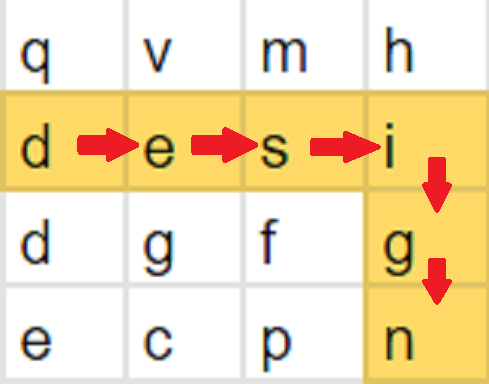
For a given word “design” and the given 2D board
[[q’, ‘v’, ‘m’, ‘h’],
 [‘d’, ‘e’, ‘s’, ‘i’],
 [‘d’, ‘g’, ‘f’, ‘g’],
 [‘e’, ‘c’, ‘p’, ‘n’]]

The word design can be formed by sequentially adjacent cells as shown by the highlighted color in the 2nd row and last column.
The first line contains a string 'word'.

The second line of input contains two single space-separated integers 'N' and 'M' representing the number of rows and columns of the grid respectively.

The next 'N' lines contain 'M' single space-separated characters each representing the elements in a row of the matrix.
The only line contains either “true” or “false”.
You do not need to print anything, it has already been taken care of. Just implement the function.
To efficiently find a word on a board using a DFS approach, we can explore the board starting from each cell as the initial position for the first letter of the word.
We check if the current cell matches the corresponding letter of the word. If it does, we mark the cell as visited and proceed to check the neighboring cells for the next letter. We continue this process recursively, incrementing the level of the word, until we either find the complete word or reach a dead-end.
If we successfully reach the level equal to the length of the word plus one, it means we have found the word on the board. Otherwise, if we exhaust all possible starting cells without finding the word, we conclude that it is not present on the board.
By utilizing DFS and backtracking, we efficiently explore different paths on the board, maximizing the chances of finding the desired word.
The dfs function :

