









For example, consider the following binary tree:
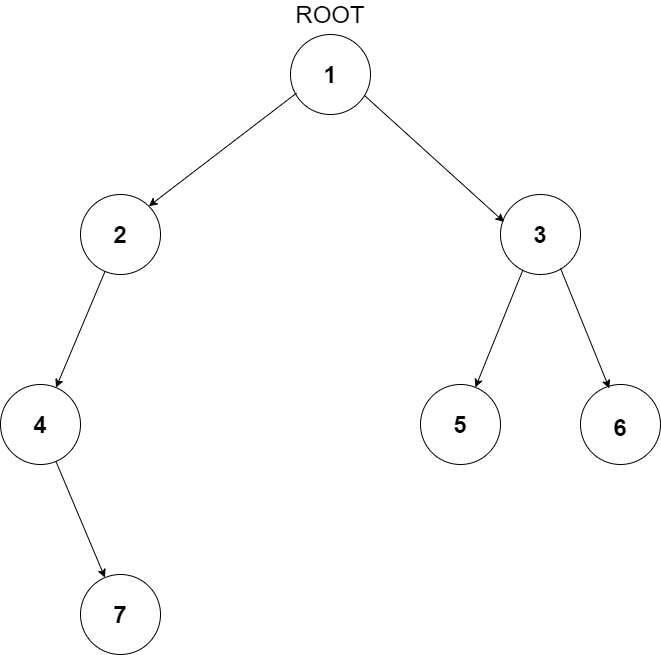
For the above tree, width of level 1 is 1, width of level 2 is 2, width of level 3 is 3 and width of level 4 is 1. So the maximum width of the tree is 3.
The first line of input contains an integer ‘T’ representing the number of test cases. Then the test cases follow.

The only line of each test case contains values of the nodes in the level order form. The line consists of values of nodes separated by a single space. In case a node is null, we take -1 on its place.

For example, the input for the tree depicted in the below image would be:
1
2 3
4 -1 5 6
-1 7 -1 -1 -1 -1
-1 -1
Level 1:
The root node of the tree is 1

Level 2:
Left child of 1 = 2
Right child of 1 = 3

Level 3:
Left child of 2 = 4
Right child of 2 = null (-1)
Left child of 3 = 5
Right child of 3 = 6

Level 4:
Left child of 4 = null (-1)
Right child of 4 = 7
Left child of 5 = null (-1)
Right child of 5 = null (-1)
Left child of 6 = null (-1)
Right child of 6 = null (-1)

Level 5:
Left child of 7 = null (-1)
Right child of 7 = null (-1)

The first not-null node(of the previous level) is treated as the parent of the first two nodes of the current level. The second not-null node (of the previous level) is treated as the parent node for the next two nodes of the current level and so on.
The input ends when all nodes at the last level are null(-1).
The above format was just to provide clarity on how the input is formed for a given tree.
The sequence will be put together in a single line separated by a single space. Hence, for the above-depicted tree, the input will be given as:

1 2 3 4 -1 5 6 -1 7 -1 -1 -1 -1 -1 -1
For each test case, a single integer denoting the maximum width of the given binary tree.

The output for each test case is in a separate line.
You do not need to print anything; it has already been taken care of.
1 <= T <= 100
0 <= N <= 3000
-10^6 <= data <= 10^6 and data != -1

Where ‘T’ is the number of test cases, ‘N’ is the total number of nodes in the binary tree, and “data” is the value of the binary tree node.

Time Limit: 1sec
This approach mainly involves two functions. One is to count nodes at a given level (getWidth()), and other is to get the maximum width of the tree (getMaxWidth()). getMaxWidth() makes use of getWidth() to get the width of all levels starting from root.
getMaxWidth(): This function returns maximum width of a binary tree. Below is the algorithm:
getWidth(): This function returns the no. of nodes (width) present at a given level. Below is the algorithm:
A better approach is to store all the child nodes at the current level in the queue and then count the total number of nodes after the level order traversal for a particular level is completed. Since the queue now contains all the nodes of the next level, we can easily find out the total number of nodes in the next level by finding the size of the queue. In this way, we will follow the same procedure for the successive levels. We store and update the maximum number of nodes at each level.
Below is the algorithm:
Another approach is to create a temporary array count[] having size equal to the height of the tree where each element in the count array contains count of nodes at that level in the Binary Tree. We traverse the tree using preorder traversal to fill the entries in the count array. Now, return the maximum value from the array which denotes maximum width of the binary tree.
Inorder Traversal
Inorder Traversal
Inorder Traversal
Inorder Traversal
Inorder Traversal
Postorder Traversal
Postorder Traversal
Height of Binary Tree
Height of Binary Tree
Height of Binary Tree
Height of Binary Tree
Locked Binary Tree
Maximum Island Size in a Binary Tree

