










1. The root node is not considered as the node with no sibling.
2. If there are no such nodes, return -1.
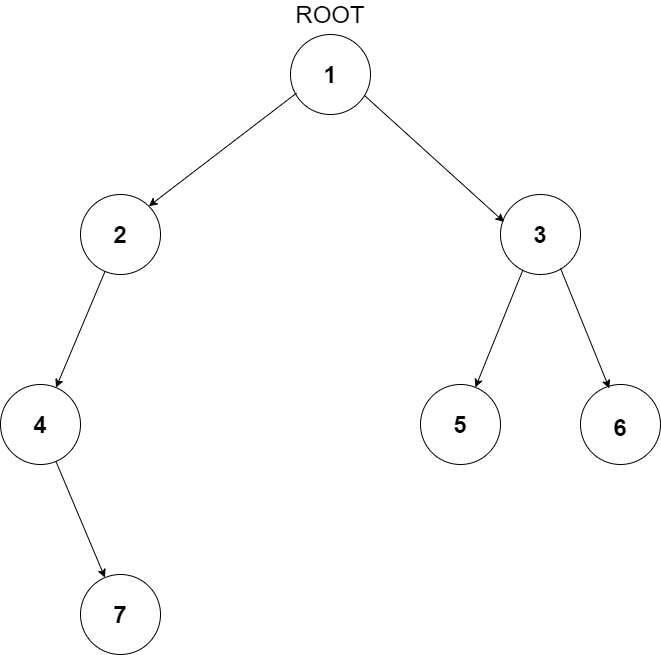
Here node 4 and 7 do not have any siblings.
The first line of input contains an integer ‘T’ representing the number of test cases. Then the test cases follow.

The only line of each test case contains elements in the level order form. The line consists of values of nodes separated by a single space. In case a node is null, we take -1 on its place.

For example, the input for the tree depicted in the below image would be:
1
2 3
4 -1 5 6
-1 7 -1 -1 -1 -1
-1 -1
Level 1:
The root node of the tree is 1

Level 2:
Left child of 1 = 2
Right child of 1 = 3

Level 3:
Left child of 2 = 4
Right child of 2 = null (-1)
Left child of 3 = 5
Right child of 3 = 6

Level 4:
Left child of 4 = null (-1)
Right child of 4 = 7
Left child of 5 = null (-1)
Right child of 5 = null (-1)
Left child of 6 = null (-1)
Right child of 6 = null (-1)

Level 5:
Left child of 7 = null (-1)
Right child of 7 = null (-1)

The first not-null node(of the previous level) is treated as the parent of the first two nodes of the current level. The second not-null node (of the previous level) is treated as the parent node for the next two nodes of the current level and so on.
The input ends when all nodes at the last level are null(-1). The last line contains the value of the two nodes (7 and 5) between which we have to find the distance.
The above format was just to provide clarity on how the input is formed for a given tree.
The sequence will be put together in a single line separated by a single space. Hence, for the above-depicted tree, the input will be given as:

1 2 3 4 -1 5 6 -1 7 -1 -1 -1 -1 -1 -1
For each test case, the output will be a list of nodes that do not have a sibling.

The output for each test case will be in a separate line.
You do not need to print anything; it has already been taken care of.
1 <= T <= 100
1 <= N <= 3000
1 <= data <= 10^6

Where ‘T’ is the number of test cases, ‘N’ is the total number of nodes in the binary tree, and “data” is the value of the binary tree node.

Time Limit: 1 second
We will traverse through all the nodes of the tree and check if any node has just one child. If a node has only one child we’ll add that child to list NWS (Nodes without siblings). Consider function NODESWITHOUTSIBLINGS that take a tree node ROOT as a parameter, and do:
NWS contains the list of nodes without siblings.
We will iterate through all the nodes of the tree and check if any node has just one child. If a node has only one child we’ll add that child to list NWS (Nodes without siblings). Consider function NODESWITHOUTSIBLINGS that take a tree node ROOT as a parameter, and do:
Inorder Traversal
Inorder Traversal
Inorder Traversal
Inorder Traversal
Inorder Traversal
Postorder Traversal
Postorder Traversal
Height of Binary Tree
Height of Binary Tree
Height of Binary Tree
Height of Binary Tree
Locked Binary Tree
Maximum Island Size in a Binary Tree

