Google Docs - Professional Templates

Win over recruiters with our professionally designed resume templates templates

Why Cloud-Based Cover Letter Templates Are Changing Job Applications?

Why Cloud-Based Cover Letter Templates Are Changing Job Applications?
Conventional cover letter writing usually entails format inconsistency as well as file compatibility problems. Using Google Docs Cover Letter Templates, the candidates have the advantage of:
  • Automatic formatting alignment.
  • In-built professional font styles.
  • Clean margin structures.
  • Easy export to PDF or Word.
  • Real-time availability at any device.
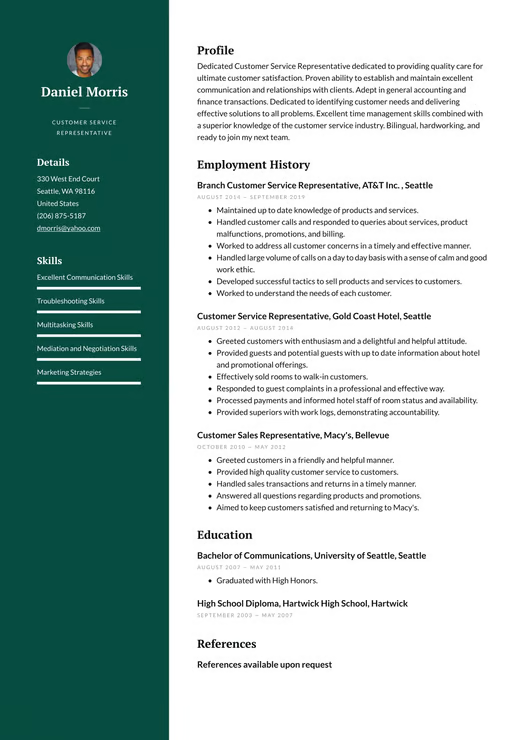
An example of a well-written and refined Google Docs Cover Letter Sample lets the reader see how well-organized formatting can help to make a presentation more professional and retain the information presented in a minimal and effective way.

Structural Framework That Recruiters Prefer

Structural Framework That Recruiters Prefer
Hiring managers value clarity and relevance. A good Google Docs cover letter format has a logical format:
  • Opening Paragraph: Clearly state the role you are looking for at the outset and offer your finest skills.
  • Middle Paragraph(s): Emphasize relevant accomplishments, work-specific skills, and value additions.
  • Closing Paragraph: Show that you are interested in continuing professionally, discuss, and sign off.
Modern use of the Google Docs Cover Letter Templates provides the correct spacing between sections, and your application will be easy to scan in a few seconds.

Built-In Formatting Advantages of Google Docs

Formatting control without design complexity is one reason professionals use Google Docs Cover Letter Templates. Google Docs provides:
  • Pre-set heading styles.
  • The baseline business fonts.
  • Consistent line spacing.
  • Professional alignment instruments.
  • Simple customization without layout degradation.
The well-edited Google Docs Cover Letter Sample is visually straightforward and content-driven rather than ornamental.

Optimizing Your Cover Letter for ATS Systems

In Applicant Tracking Systems (ATS), documents are scanned based on keywords and structure. An effective Google Docs cover letter format enhances compatibility by:
  • Using simple headings
  • Do not use too many graphics or tables.
  • Maintaining standard fonts
  • Job-specific keywords should be added automatically.
An organized Google Docs Cover letter sample stands a higher chance of beating automated screening filters.

Customization Without Complication

Any job application must be customized. The Google Docs Cover Letter Templates enable the user to:
  • Customize content at various levels.
  • Tone can be changed to adapt to corporate or creative industries.
  • Hit-and-miss insertion of relevant achievements.
  • Be able to maintain similar formatting in various programs.
A Google Docs cover letter sample is appropriate for candidates seeking entry-level, mid-career, and senior executive positions because of its flexibility.

Common Pitfalls to Avoid

Even with expert Google Docs Cover Letter Templates, mistakes might undermine your application. One should avoid:
  • An exact copy of your CV.
  • Too many long paragraphs.
  • Opening remarks are standard.
  • Accomplishments that are not important.
  • Personalization that is not related to a specific role should not be taken into consideration.
The Google Docs cover letter sample, which is short and clear, should not be the same as your resume.

How to Maximize Impact with Google Docs Templates

The best methods to create a good Google Docs cover letter sample are:
  • Being proactive and goal-oriented.
  • Including relevant accomplishments.
  • Match the job description with your skills.
  • Do not exceed one page with the letter.
  • For a formal submission, export as a PDF.
Formatting consistency and customized content make your application more competitive.

Conclusion

Google Docs Cover Letter Templates is a valuable tool for job seekers today because it is quick, clean, and easy to use. The formatting is done for the user, which makes it easier to write a professional cover letter.
By selecting the appropriate format, content, and structure, a job seeker are able to develop a powerful Google Docs cover letter that will enhance the entire job application and boost the chances of a successful interview.

Frequently Asked Questions

A Google Docs Cover letter format can be easily edited to make changes in fonts, spacing, and content without compromising the quality of the layout.
Yes, an effective ATS-friendly cover letter sample that consists of a well-arranged and well-formatted Google Docs Cover Letter Sample and keywords.
A professional Google Docs Cover letter sample should not be more than one page.
Yes, exporting Google Docs cover letter templates as a PDF will allow them to be professionally presented and utilised on devices with the same format.

Resume Examples by Job Title

Get inspired by real resume templates resume samples written for your industry
Start Building Your Google Docs Resume Now

Join 4 million+ professionals who built their winning google docs resume with Naukri360