Do you think IIT Guwahati certified course can help you in your career?
Introduction
Hey Ninja!! Today we will learn about the Salt Package Manager(SPM). If you don’t know about SaltStack, don’t worry!! Let us give you some idea about SaltStack.
SaltStack is an open-source platform. Salt is a Python-based data center orchestration tool.
It supports remote execution with a flexible targeting system.
As you know what SaltStack is, here we will discuss the Salt Package Manager(SPM) and how it works. Without any further delay, let's begin !!
Basic Information
Pillar in Salt
Pillars are Salt’s interface, which provides global values to salt minions.
State in Salt
The state is a reusable declaration to configure a specific system part.
Formula in Salt
Formulas are the collection of Salt states which other Salt users already write.
Salt Master
Salt master is a server that runs the remote execution commands. Salt master commands and controls its minions.
Salt Package Manager
The Salt package manager or SPM allows the facility to package the Salt formulas and distribute them to Salt masters.
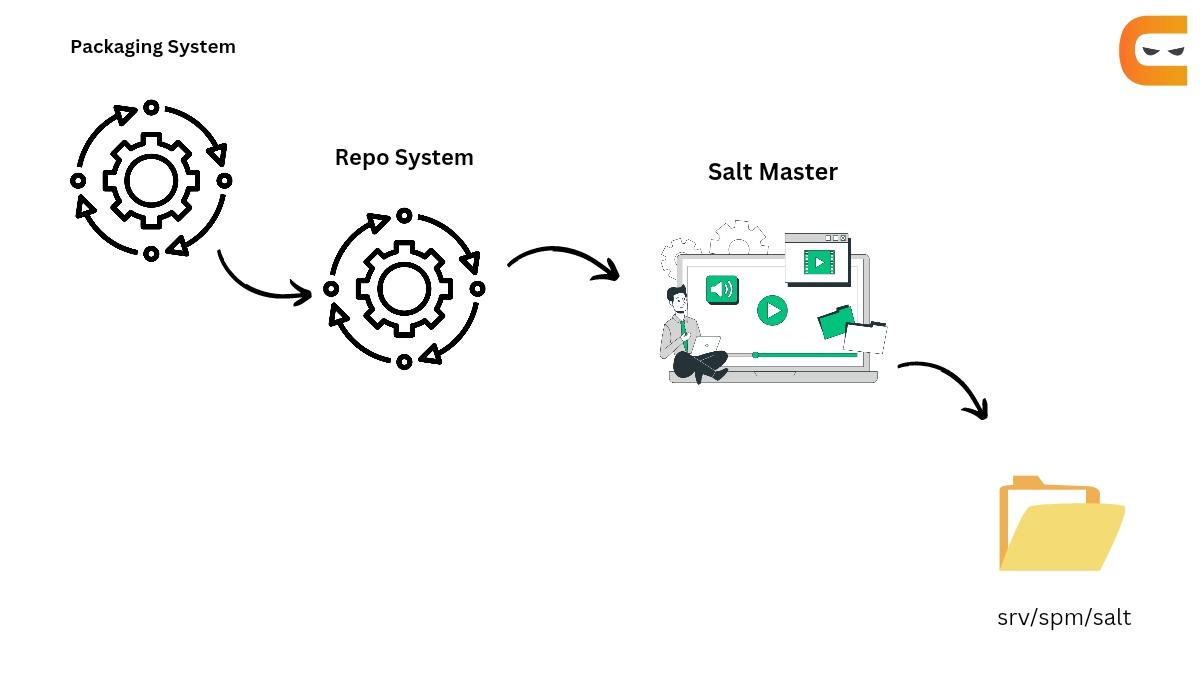
Let’s have a look at how SPM works.
Packaging System
The packaging system packages the state, jinja, pillar and file templates used by the user’s formula into a single file. It builds packages for each formula the user wants to distribute. One interesting fact is that the user can create the packages on any system which can install Salt. Let’s have an overview of the building of the packages.
Package Build Overview
All state, pillar, jinja, and file templates used by the user’s formula are assembled into a folder on the build system. Users can also clone these files from a Git repository.
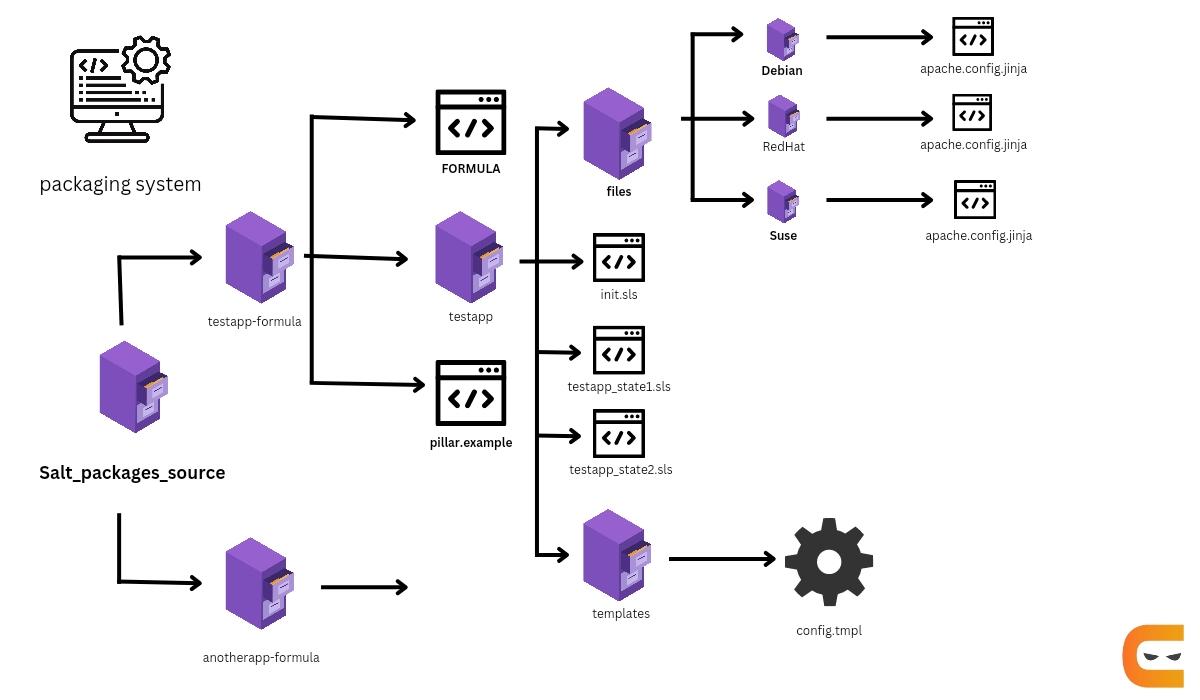
Let’s look at the following diagram, which demonstrates the typical formula layout on the build system.
As shown, the testapp-formula folder contains all formula files. While building the package, the spm build command will target this folder. Pillar data is placed in a pillar.example file at the root. All state, jinja, and template files are present within a subfolder named after the application being packaged.
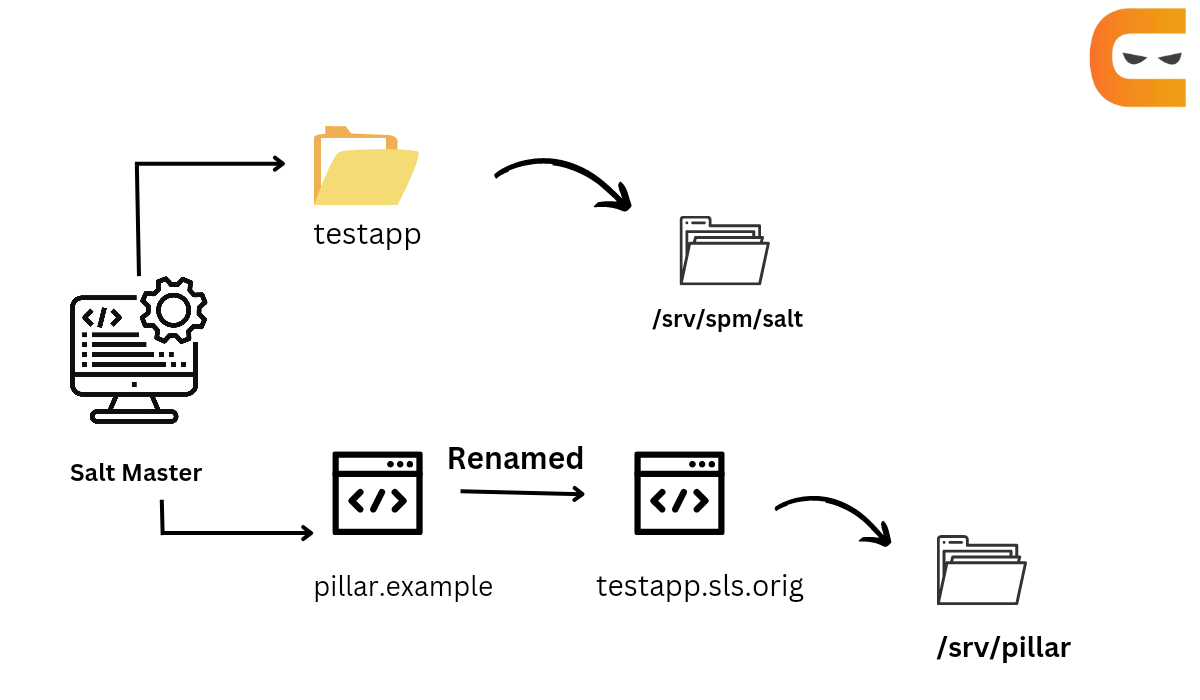
Package Installation Overview
During installation, all files except pillar.example and FORMULA are copied directly to the spm state tree on the Salt master (located at \srv\spm\salt). If a pillar.example file is present in the root, it is renamed to <the formula name>.sls.orig and placed in the pillar_path.
SPM Formula Package
Step 1: Assemble formula files in a folder on the build system.
Step 2: Create a FORMULA file and store it in the root of the package folder.
Step 4: Store the .spm file in a folder on the repository system.
Repo System
The Repo system stores the SPM package and metadata files and provides them to Salt masters via HTTP, FTP, or URLs. Salt Master or Salt Minion can host SPM repositories.
Run the spm create-repo add or update package to the repository.
Setting up a package repository
After packages are built, The generated SPM files after building the packages are placed in the srv/spm_build folder.
Users can share the srv/spm_build folder on the network or copy the files to the Web server.
Adding a package to the repository
New packages are added by copying the SPM file to the repository and then generating the repo metadata.
Generate Repo Metadata
During the time of updation or addition of any SPM package to the repository, issue the command,
spm create_repo /srv/spm_build
SPM generates the repository metadata for all of the packages in the /srv/spm_build directory and places it in the SPM-METADATA file at the folder root. This command is used even if the repository metadata already exists in that directory.
Salt Master
SPM packages are installed in Salt master, where they are available to the Salt minions using all of the Salt's package management functions.
Configuring Remote Repositories
SPM can use any repository when
Salt master knows where the repository is.
Salt master pulled down the repo metadata.
Repositories are configured by adding them to the /etc/salt/spm.repos.d/spm.repo file on each Salt master.
After the repository is configured on the salt master, download the repo metadata using the following command.
spm update_repo
Install Packages
To install packages, use the following command.
spm install apache
Note - If the package is not installed, the command installs it, but if it is already installed, then the command overwrites it.
To install a package from a local SPM file, use the following command.
spm local install /srv/spm/apache-201506-1.spm
Remove Package
To remove an installed package, use the following command.
spm remove apache
Frequently Asked Questions
What is Saltstack?
SaltStack is an open-source platform. Salt is a Python-based data center orchestration tool. It supports remote execution with a flexible targeting system.
What is the advantage of SaltStack?
SaltStack can be set up in a tiered configuration to achieve load balancing and boast redundancy.
What is a Salt minion?
Salt minions are the servers that run applications and services.
What is a Formula?
Formulas are the collection of salt states which other Salt users already write.
Conclusion
In this article, we discussed Salt Package Manager. We learned about Salt states, formulas, pillars, masters, and packaging. We discussed how Salt packages are built and how the repositories are generated. We have learned a few commands to install, update or remove the packages.
We hope this blog on the Salt Package Manager was helpful. You can also refer to other similar articles.







 27+ registered

