







Introduction
Welcome Ninjas! Are you interested in learning about the Eigen Library used as a linear algebra library for C++ users? Do you want to know how one can initialize matrices? Well, you are at the right place. Let’s begin with the introduction of Eigen and matrices first.
Eigen is an open-source high-level standard template c++ library for implementing linear algebra, matrix operations, vector operations, numerical solvers, and related algorithms. It works fast and is used in many tasks, from lengthy and complex numerical computations to simple vector arithmetics.
Matrices are a collection of rows and columns. They can be created using arrays or vectors.

Advanced methods for initializing matrices
In this section, we will look into the primary concern of this blog. So, let’s start without further ado and learn the methods for initializing matrices.
Comma Initialiser
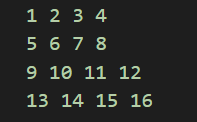
- Comma Initialiser provides an easy way to set the coefficients of a matrix(vector/array). For that, we need to enlist the coefficients starting from the first-row first column, moving column-wise, and then row-wise. Note that it’s essential to specify the object's size, or else the Eigen might complain.
#include <iostream>
#include <Eigen/Dense>
using namespace Eigen;
using namespace std;
int main(){
  Matrix4f mx;
  mx<<1,2,3,4
        5,6,7,8
        9,10,11,12;
  cout<<mx;
}
OUTPUT
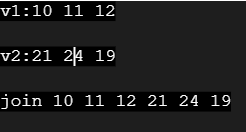
- Another way is to use vectors for the initialization of matrices. We can use two-row vectors and join them together. Look at the following example:
#include <iostream>
#include <Eigen/Dense>
using namespace Eigen;
using namespace std;
int main(){
  RowVectorXd v1(3);
  RowVectorXd v2(3);
  v1 << 10, 11, 12;
  cout<<"v1:"<<v1<<endl;
  v2 << 21,24,19;
  cout<<"v2:"<<v2<<endl;
  RowVectorXd join(6);
  join<<v1,v2;
  cout <<"join"<<join<<endl;
}
OUTPUT
- Comma Initialiser can even initialize the matrices with a block structure. Take a look at the following example:
#include <iostream>
#include <Eigen/Dense>
using namespace Eigen;
using namespace std;
int main(){
  MatrixXf m1(2, 2);
  m1<<1,2,3,4;
  MatrixXf m2(4, 4);
  m2<<m1,m1*10,m1*10,m1;
  cout<<m2<<endl;
}
OUTPUT
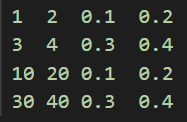
- The comma initializer is also used to fill the inbuilt block expressions like m.row(i).
Special matrices and arrays
1.We have static methods like Zero(), which initializes the coefficients to zero
We have three variants:
- The first one takes no arguments and is used for fixed-size objects only.
- The second variant uses one argument and is used for one-dimensional dynamic-size objects.
- The third variant takes two arguments and is used for two-dimensional objects.
#include <iostream>
#include <Eigen/Dense>
using namespace Eigen;
using namespace std;
int main(){
//fixed size array
Array33f a=Array33f::Zero();
cout<<a<<endl;

//1-D dynamic-size array
ArrayXf b = ArrayXf::Zero(3);
cout<<b<<endl;
//2-D dynamic-size array
ArrayXXf c = ArrayXXf::Zero(3, 4);
cout<<c<<endl;
}OUTPUT
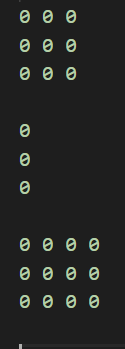
2. The next static method is Constant(value). It sets all the coefficients to the value given as a parameter in the method.
3.The next method is - Random() which fills the matrix with random matrix coefficients.
4. We have the Identity() method matrix to obtain the identity matrix.
5.The method Linspaced(size, low, high) is available only for vectors and 1-D arrays. It forms a vector whose coefficients are equally spaced between low and high.
Usage as temporary objects
Methods like Zero() and Constant() return expression objects which evaluate to a matrix or an array so that the syntax does not incur any overhead.
These expressions can be used as temporary objects. Look at the following example:
#include<iostream>
#include<Eigen/Dense>
using namespace Eigen;
using namespace std;
int main(){
  MatrixXd m1= MatrixXd::Random(3,3);
  m1=m1(m1 + MatrixXd::Constant(3,3,1.2))*50;
  cout<<"m1:"<<m1<<endl;
  VectorXd vec(3);
  vec<<1,2,3;
  cout<<m1*vec<<endl;
}
OUTPUT
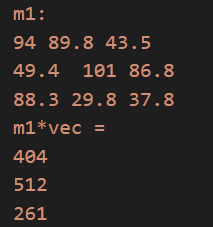
m + MatrixXf::Constant(3,3,1.2) forms a 3X3 matrix expression with all its coefficients equal to 2.2 plus the corresponding coefficient of m.
The comma initializer can also be used for constructing temporary objects.
#include<iostream>
#include<Eigen/Dense>
using namespace Eigen;
using namespace std;
int main(){
  MatrixXf m = MatrixXf::Random(2, 3);
  m= (MatrixXf(2,2) << 1, 0, 1, 0).finished()*m;
  cout<<m<<endl;
}
OUTPUT
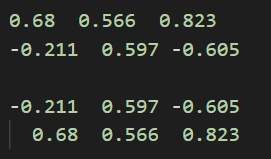
The finished() method helps to get the actual matrix object after the comma initialization of our temporary submatrix.



 1+ registered

