Do you think IIT Guwahati certified course can help you in your career?
Introduction
You might have kept the nicknames of your friends, or maybe you have one but have you ever heard a nickname or a temporary name of a table or column in SQL? Yes, you read it right. You can give a temporary name to a table or column using an alias.
You can temporarily rename a table or a column by giving another name to it. This other name is known as an alias. The scope of the alias is only for the SQL statement for which it is specified. Once the query is executed, the aliases defined are destroyed. Moreover, the original name of the table and column does not change in the database. This means if you have defined an alias of a table or column in a SQL statement, then that table or column will have two names - its original name and its temporary name, i.e., alias. The original name applies to all the SQL statements performed, but the alias applies only to that particular SQL statement.
Use of Alias
Using aliases makes a table or column more readable.
Generally used with SQL queries that involve more than one table or column.
Also used when the table name or column name is very big or not very readable.
Syntax
Alias is created using the AS keyword.
If the alias name contains space, then the alias name is included in double-quotes.
The basic syntax of column alias is as follows:
SELECT column_name1 AS alias_name1, column_name2 AS alias_name2 FROM table_name WHERE [condition];
The basic syntax of table alias is as follows:
SELECT column1,column2.... FROM table_name1 AS alias_name1, table_name2 AS alias_name2 WHERE[condition];
Examples
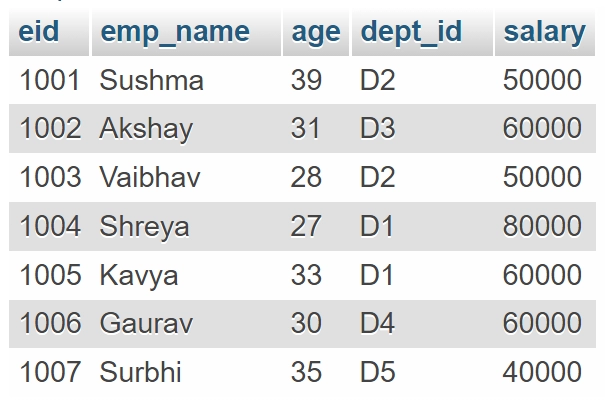
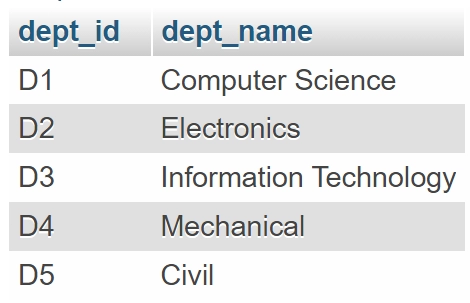
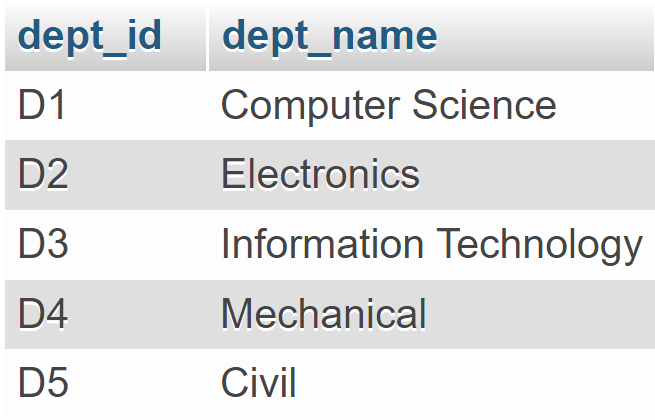
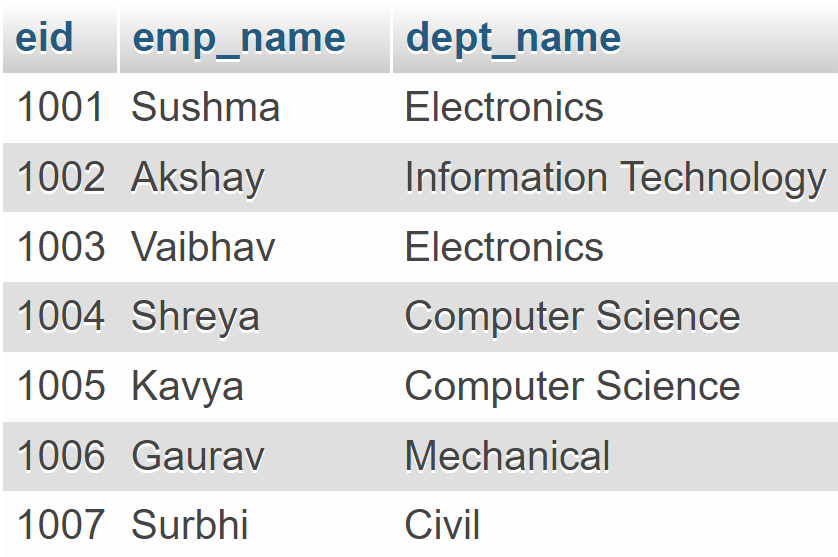
Consider the following two tables:
EMPLOYEE Table
DEPARTMENT Table
Alias Name Without Space
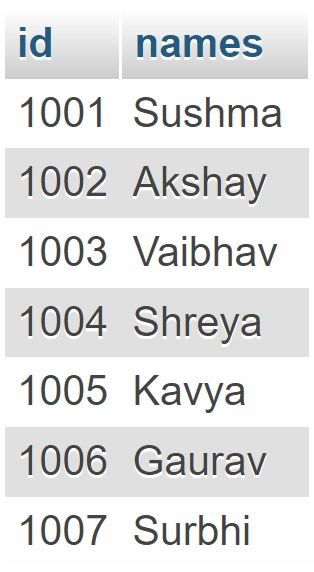
The below query fetches the data from two columns, EID and EMP_NAME, from the EMPLOYEE table, but we have aliased the name of EID as ID and EMP_NAME as NAME.
SELECT eid AS id, emp_name AS names FROM EMPLOYEE;
The above SQL query will give the following output:
Alias Name With Space
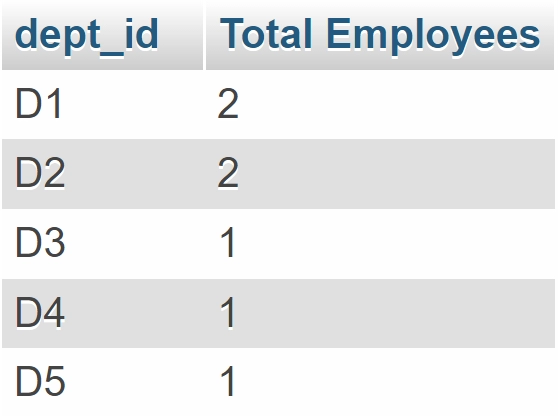
The below query fetches dept_id and the count of employees in each department. The count of employees is aliased as “Total Employees”.
SELECT dept_id, COUNT(*) AS "Total Employees" FROM EMPLOYEE GROUP BY dept_id;
Note: COUNT() is an aggregate function that returns the number of records in the table.
The above SQL query will give the following output:
Now, the following examples will show the usage of table alias:
Aliasing Single Table
The below query fetches data from two columns, DEPT_ID and DEPT_NAME, from the DEPARTMENT table, but we have defined an alias of the DEPARTMENT table as D.
SELECT dept_id, dept_name FROM DEPARTMENT AS D;
The above SQL query will give the following output:
Aliasing Multiple Tables
The below query fetches the data from three columns. EID and EMP_NAME from the EMPLOYEE table, DEPT_NAME from the DEPARTMENT table. We have defined alias for two tables EMPLOYEE AS E and DEPARTMENT AS D.
SELECT E.eid, E.emp_name, D.dept_name FROM EMPLOYEE AS E, DEPARTMENT AS D WHERE E.dept_id = D.dept_id;
The above SQL query will give the following output:
Frequently Asked Questions
What is an alias?
You can temporarily rename a table or a column by giving another name to it. This other name is known as an alias.
What is the need of a column alias?
Column alias is generally used to make column names in your result set more readable. It generally uses aggregate functions like MIN, MAX, COUNT, SUM, and AVG.
What is the need for a table alias?
Table alias is generally used to shorten the SQL query to make it more readable. It is often used while performing JOIN operations.
Is an alias given to a table or column permanent?
No, the scope of the alias is up to that query in which it is defined.
How many aliases can we define for a table or column?
You can define only one alias for a particular table or column in a query. You can use different aliases for the same table or column but in different queries.
Conclusion
In this article, we have briefly discussed aliases in SQL. We discussed the need and use of the alias. We can use alias in two ways- giving an alias to a column name and giving an alias to a table name. We went through the syntax of both and discussed their examples.
Reader, don’t stop here. Start your DBMS journey with DBMS course. Solve SQL problems here. Also, If you want to learn more about such articles, visit the given links below:








 5+ registered

