Do you think IIT Guwahati certified course can help you in your career?
Introduction
Ansible is a free and open-source IT automation technology that automates provisioning, configuration management, application deployment, orchestration, and other manual IT tasks. Ansible users (such as system administrators, developers, and architects) can use Ansible automation to install software, automate daily tasks, provision infrastructure, improve security and compliance, patch systems, and share automation across the entire organization, in contrast to more simplistic management tools.
Ansible AWX
AWX is a web application that is open source and provides a user interface, REST API, and task engine for Ansible. It's the Ansible Tower's open-source counterpart. You can use the online interface to manage Ansible playbooks and inventory and schedule jobs to perform.
AWX makes it easier for IT teams to utilize Ansible. It is intended to serve as the central hub for all automated activities. It includes an excellent browser REST API that allows you to regulate access, graphically manage or sync inventory with a broad range of cloud sources, log all jobs, and interact nicely with Lightweight Directory Access Protocol (LDAP).
Prerequisites
Software Requirements
2 or 3 servers
10.5.5.20 Ansible AWX
Ansible version 2.4+
10.5.5.21 lemp
Docker and Docker python module
Node 10.x LTS version
Git version 1.8.4+
Root privileges
NPM 6.x LTS
System Requirements
Minimum 4 GB of RAM
Dual-core CPU with 3.4 GHz Clock Speed
20 GB of free hard disk space
Configuration
Here are some instructions for deploying and running the Ansible playbook for a basic LEMP installation via the Ansible AWX dashboard.
Step 1: First Step is to install the EPEL service on CentOS 8
EPEL stands for Extra Packages for Enterprise Linux. It produces, maintains, and manages a high-quality set of extra Enterprise Linux packages required by AWX. Log in as root to your CentOS 8 node and perform the following command:
dnf install epel-release-y
Step 2: We need to install additional packages and dependencies required for setting up the environment
To check the installed docker version, use the following command:
docker --version
To start Docker, run the following command:
systemctl start docker
systemctl enable docker
Step 4: Install Docker Compose on CentOS 8
Compose is a Docker application that allows you to define and operate multi-container applications. Run the following command to install the Docker Compose:
pip3 install docker-compose
Installation of AWX
Now, we can begin with the installation of AWX.
First, Clone the ansible awx repo using the following command:
git clone https://github.com/ansible/awx.git
Configure the PostgreSQL host and password:
pg_admin_password= “Put Your Username”
admin_password= “Put Your Password.”
Now for security purposes, encryption is used. Therefore to generate an encryption key, run the following command:
openssl rand -base64 30
Copy and paste the secret key into the inventory file's secret key entry. Save and close the inventory file.
Now, run the following command to install AWX:
ansible-playbook -i inventory install.yml
Now you can access the AWX GUI Portal.
Automation
To access the AWX web console, use a browser and enter the IP address of your Ansible AWX server.
Enter the admin username and password and hit ENTER. It shows you an AWX dashboard.
Now we will learn how to deploy an automation service in ansible awx.
Step 1: Add credentials
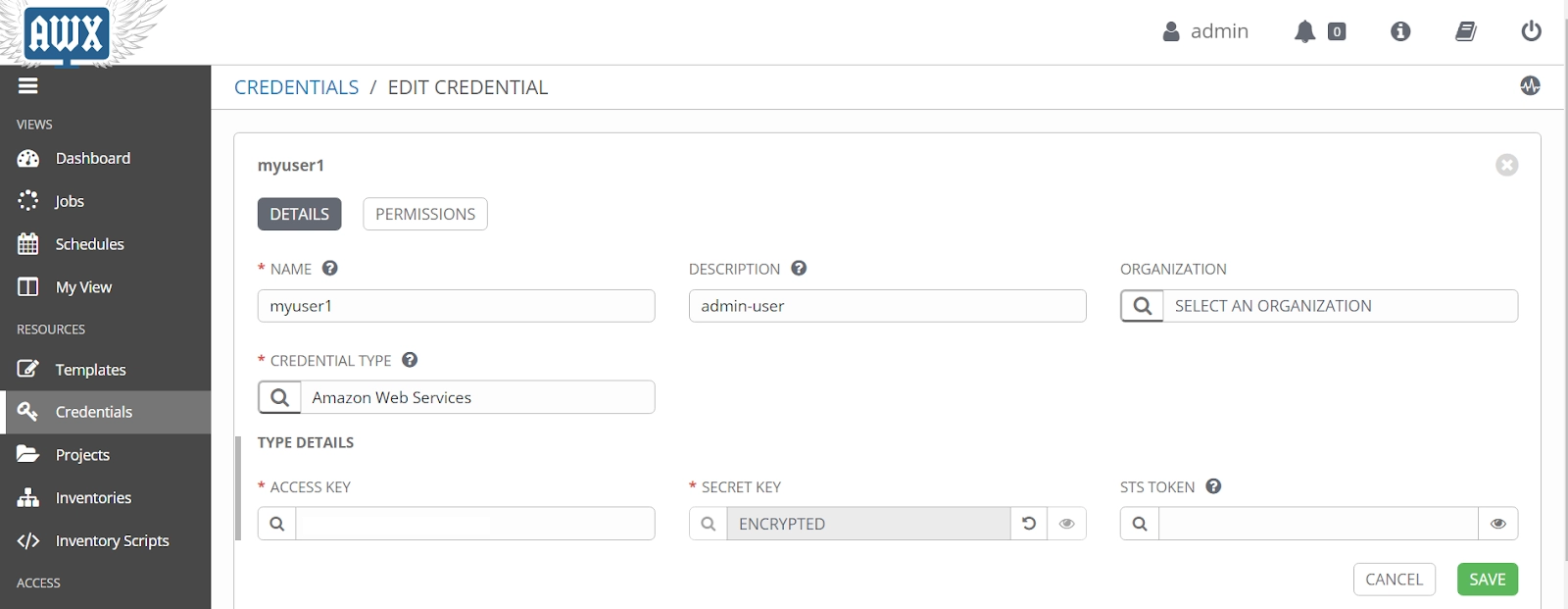
It is utilized for authentication when initiating and running tasks against managed servers, syncing with inventory sources, and importing projects. To configure credentials, go to the 'Credentials' menu on the left and click the '+' button on the right.
Now you need to add credentials for AWX Dashboard.
Step 2: Add Project Directory
Make a new project directory on the host where AWX is installed. AWX is operating on Docker containers, which are controlled via docker-compose. Create this directory on the same host that the AWX is operating on.
Run the following command in the terminal. Replace directory name as per your configuration.
mkdir “directory_name”
Step 3: Setup Inventory
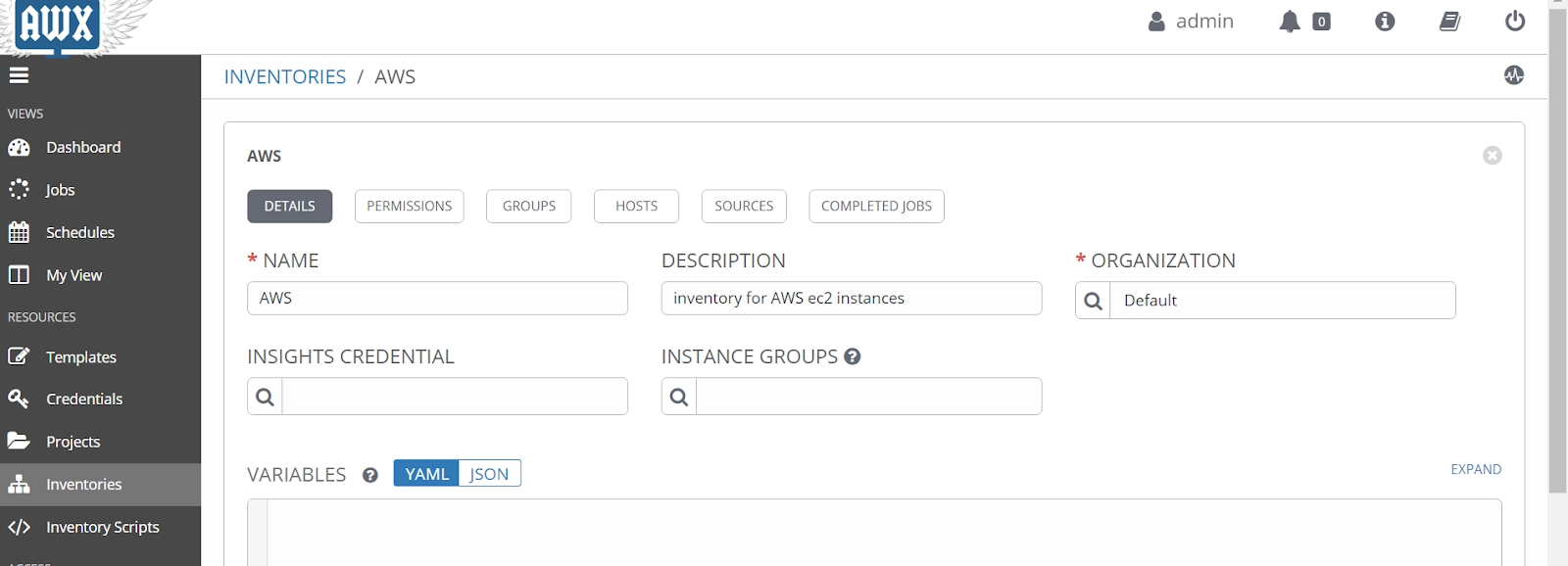
Ansible AWX manages inventories, which are collections of host servers. You can build a group with many host servers using the inventory. It also makes managing various servers with different environments easier.
To add new inventory, navigate to the 'Inventories' menu on the left, click the '+' button and select 'Inventory.'
Step 4: Setup Projects
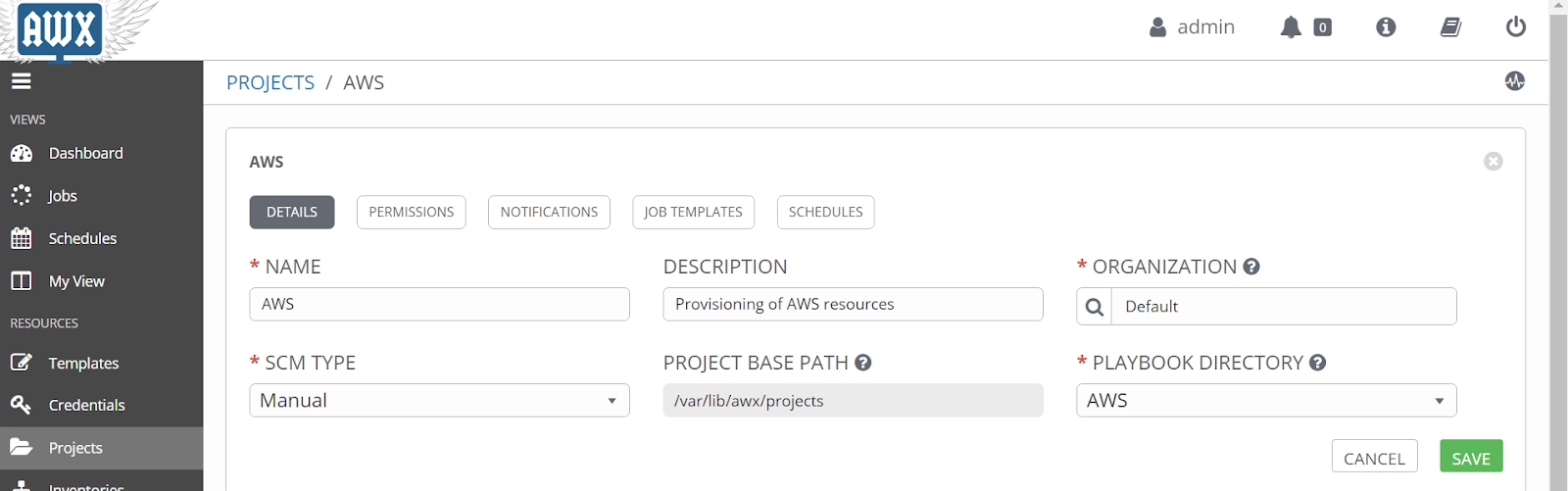
On the AWX, projects are represented as Ansible Playbooks. It is a collection of Ansible Playbooks that we may manage using a local project directory or an SCM system like Git, Subversion, Mercurial, or RedHat Insights.
Click the 'Projects' menu on the left and then the '+' button to start a new project.
Step 5: Create a new Template
The job template is the definition of how to run Ansible playbooks. On the left, select the 'Templates' menu, the Add '+' button, and the 'Job template' option.
Step 6: Run the Template to start a Job
After generating a new job template, we will run it and deploy the Playbooks 'Projects' to target hosts in the 'Inventory.'
Click the 'Templates' option to see a list of possible job templates.
And that’s how to automate a Job using Ansible AWX.
Frequently Asked Questions
What is Ansible?
Ansible is a free and open-source IT automation technology that automates provisioning, configuration management, application deployment, orchestration, and other manual IT tasks.
What is AWX?
AWX stands for Ansible WorX. AWX is a web application that is open source and provides a user interface, REST API, and task engine for Ansible.
What are ansible playbooks?
Ansible Playbooks are collections of tasks that run automatically against hosts. Your Ansible inventory is made up of groups of hosts. Each module in an Ansible Playbook is responsible for a specific task.
Conclusion
We hope this blog has helped you enhance your Knowledge about Ansible AWX, how we can configure Ansible AWX, how to install it, and how to manage automation using the Ansible AWX dashboard.
You can also refer to our Guided Path on Coding Ninjas Studio to upskill yourself in domains like Data Structures and Algorithms, Competitive Programming, Aptitude, and many more! You can also prepare for tech giants companies like Amazon, Microsoft, Uber, etc., by looking for the questions asked by them in recent interviews. If you want to prepare for placements, refer to the interview bundle. If you are nervous about your interviews, you can see interview experiences to get ideas about these companies' questions.
Nevertheless, you may consider our premium courses to give your career an edge over others!
Do upvote our blogs if you find them helpful and engaging!
Happy Learning!
Live masterclass
Ace Data Analyst Interviews with Amazon SQL Case Studies
by Prerita Agarwal
23 Oct, 2026
11:30 AM
One Prompt, Three AI Agents: Build a Portfolio Project for 25L+ GenAI Roles
by Saurav Prateek
19 Oct, 2026
11:30 AM
AI vs You: Crack a Data Analyst Interview Case with Claude + Excel
by Abhishek Soni
21 Oct, 2026
11:30 AM
Build Your Own Perplexity-Style App: Stand Out in GenAI Job Interviews
by Sumit Shukla
22 Oct, 2026
11:30 AM
Ace Data Analyst Interviews with Amazon SQL Case Studies
by Prerita Agarwal
23 Oct, 2026
11:30 AM
One Prompt, Three AI Agents: Build a Portfolio Project for 25L+ GenAI Roles








 1+ registered

