

Table of contents
1.
Introduction
2.
Azure App service
2.1.
Public preview limitations
2.2.
Pods created by the App Service extension
2.3.
Advantages of Azure App services
2.3.1.
Fully managed environment
2.3.2.
Compliance
2.3.3.
Security
2.3.4.
Supports multiple programming languages and frameworks
2.3.5.
Scalability
3.
Azure functions
3.1.
Scenarios
4.
Azure Logic Apps
5.
Frequently Asked Questions
5.1.
How much does Azure Arc cost to public?
5.2.
Are both Windows and Linux apps supported?
5.3.
Name the built-in application stacks that are supported?
5.4.
Are all app deployment types supported?
5.5.
Are all the networking features supported?
6.
Conclusion
Last Updated: Mar 27, 2024

App Service, Functions, and Logic Apps on Azure Arc

Career growth poll
Do you think IIT Guwahati certified course can help you in your career?

Introduction

Microsoft Azure or Azure is a cloud computing service provided and operated by Microsoft for application management. It provides services such as  Platform as a Service (PaaS), Infrastructure as a Service (IaaS), and Software as a Service (SaaS) that can be utilized for analytics, virtual computing, storage, and networking. After the brief overview of Azure, let us now understand the app services, functions, and logic applications provided by Azure.

Azure App service

Azure App Service is a Platform as a Service (PaaS) provided by Microsoft. Azure App Service lets you easily create enterprise-ready web and mobile apps for any platform or device and is used to host web applications, REST API, and backend services for mobile applications. Name any programming language or framework, be it .NET, .NET Core, Java, Ruby, Node.js, PHP, or Python, web applications and services that are developed using any of the following languages above can be hosted using the Azure app service. 

The Azure App Service enables you to easily create Web + Mobile + Logic + API Apps:
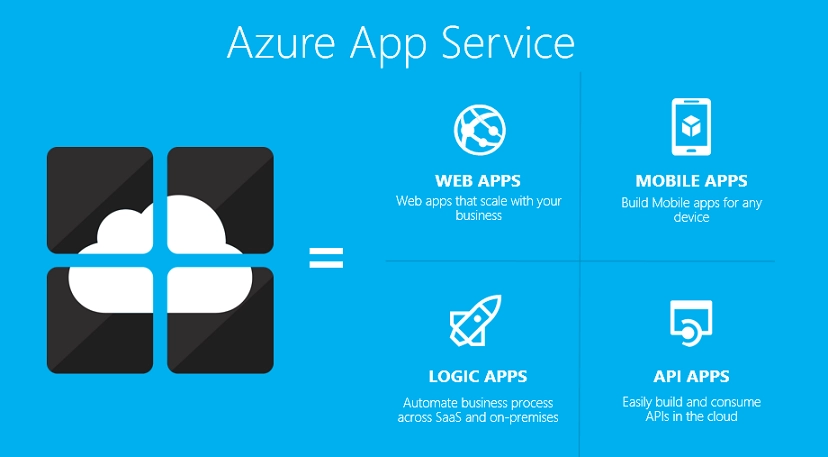
Image source

Public preview limitations

The following public preview limitations apply to App Service Kubernetes environments. This list of limitations is updated as changes and features are made available.

Limitations Details
Supported Azure regions East US, West Europe
Cluster networking requirement Must support LoadBalancer service type
Cluster storage requirement Must have cluster attached storage class available for use by the extension to support deployment and build of code-based apps where applicable
Feature: Networking Not available
Feature: Managed identities Not available 
Feature: Key vault references Not available (depends on managed identities)
Feature: Pull images from ACR with managed identity Not available (depends on managed identities)
Feature: FTP publishing Not available
Logs Log Analytics must be configured with cluster extension; not per-site

Pods created by the App Service extension

The following table describes the role of each pod that is created by default:

Pod Description
<extensionName>-k8se-app-controller The core operator pod that creates resources on the cluster and maintains the state of components.
<extensionName>-k8se-envoy A front-end proxy layer for all data-plane requests. It routes the inbound traffic to the correct apps.
<extensionName>-k8se-activator An alternative routing destination to help with apps that have scaled to zero while the system gets the first instance available.
<extensionName>-k8se-build-service Supports deployment operations and serves the Advanced tool features.
<extensionName>-k8se-http-scaler Monitors inbound request volume in order to provide scaling information to KEDA.
<extensionName>-k8se-img-cacher Pulls placeholder and app images into a local cache on the node.
<extensionName>-k8se-log-processor Gathers logs from apps and other components and sends them to Log Analytics.
placeholder-azure-functions-* Used to speed up cold starts for Azure Functions.

Advantages of Azure App services

Fully managed environment

App Service automatically maintains and patches the Operating system and language frameworks for you. This leads to get you more time to focus on designing, developing and maintaining your application and data.

Compliance

App Service is SOC (Service Organization Controls), ISO (International Organization for Standardization), and PCI (Payment Card Industry) compliant.

Security

We can authenticate users with Azure Active Directory or any of the external authentication providers like Google, Facebook, Twitter, or Microsoft.

Supports multiple programming languages and frameworks

App Service provides a wide variety of programming languages and frameworks such as .NET, .NET Core, Java, Ruby, Node.js, PHP, Python.

Scalability

App Service can scale your resources up and down or in and out, based on the demand for your application. We can do this either manually if you want to or automatically based on metrics like CPU utilization for example.
Azure functions

Azure Function is a serverless solution that allows you to write less code, save on costs, and maintain less infrastructure. Instead of worrying about deploying and maintaining servers, the cloud infrastructure provides all the up-to-date resources needed to keep your applications running. You only need to focus on the pieces of code that matter most to you, and Azure Functions handles the rest.

Azure Functions provides "compute on-demand" in two significant ways:

  1. Azure Functions permits you to implement your system's logic into readily available blocks of code. These code blocks are called "functions". Different functions can run anytime you need to respond to critical events.
  2. As requests increase, Azure Functions meets the demand with as many resources and function instances as necessary - but only while needed. As requests fall, any extra resources and application instances drop off automatically.

Scenarios

As you build your functions, you have the following options and resources available:

  1. Use your preferred language: We can write functions in Java, JavaScript, PowerShell, or python or use a custom handler to use virtually any other language.
  2. Automate deployment: From a tools-based approach to using external pipelines, there are various deployment options available.
  3. Troubleshoot a function: We can use monitoring tools and testing strategies to gain insights into our apps.
  4. Flexible pricing options: You only pay while your functions are running, while the Premium and App Service plans offer features for specialized needs.

Azure Logic Apps

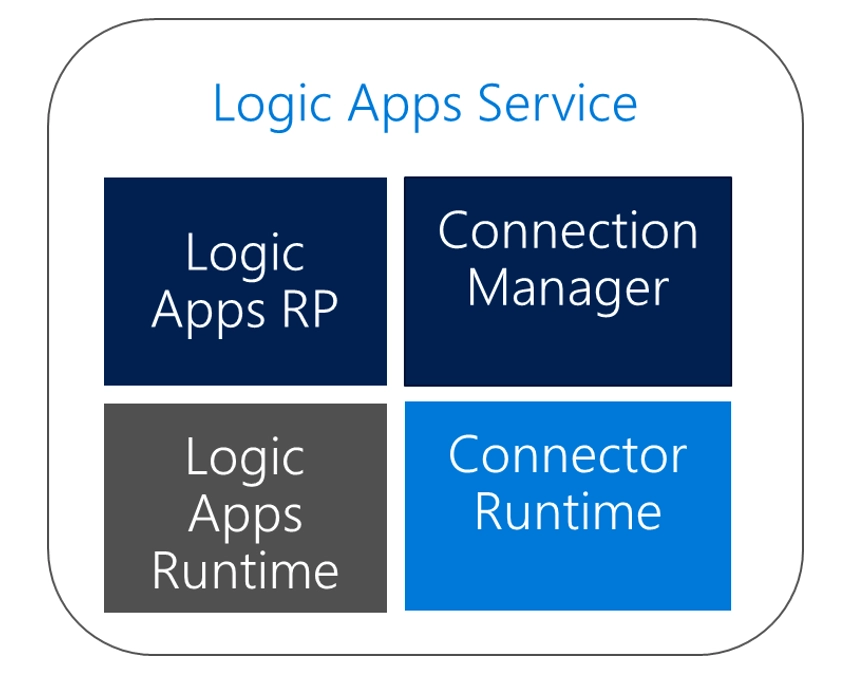
Logic Apps are a cloud-based platform for creating and running automated workflows that integrate your apps, data, services, and systems. You can easily run a business workflow in Azure using the Logic App service. The Logic App is a logical container for one workflow you can define using triggers and actions. A trigger can instantiate a workflow consisting of one or many activities (actions).

Image source

These components are:

  • Logic Apps RP – It reads the workflow definition and breaks down into a composition of tasks with dependencies.
  • Logic Apps Runtime – It distributed compute/workers are coordinated to complete tasks on-demand.
  • Connection Manager – It manages connection configuration, credentials, and token refreshment.
  • Connector Runtime – API abstraction via Open API descriptions.

Frequently Asked Questions

How much does Azure Arc cost to public?

App Service on Azure Arc is free of cost during the public preview.

Are both Windows and Linux apps supported?

Only Linux-based apps are supported, both custom and code containers while Windows applications are not supported.

Name the built-in application stacks that are supported?

All built-in Linux stacks are supported.

Are all app deployment types supported?

 Currently az webapp up, FTP deployment is also not supported. Other deployment methods that are supported, includes Visual Studio, Git, ZIP, CI/CD and VSCode.

Are all the networking features supported?

Networking features such as Virtual Network integration or hybrid connections are not supported. Access restriction support was included in April 2022. Networking is to be handled directly in the networking rules in the Kubernetes cluster itself.

Conclusion

I hope this article provided you with insights about Microsoft Azure, App Service, Functions, and Logic Apps on Azure Arc.

Refer to our guided paths on Coding Ninjas Studio to learn more about DSA, Competitive Programming, System Design, JavaScript, etc. Enroll in our courses, refer to the mock test and problems available, interview puzzles, and look at the interview bundle and interview experiences for placement preparations.

We hope this blog has helped you increase your knowledge regarding AWS Step functions, and if you liked this blog, check other links. Do upvote our blog to help other ninjas grow. Happy Coding!"

Live masterclass


