Table of contents
1.
Introduction
2.
Guide to Create an open-source Redis Cache
2.1.
Creating a Cache
3.
Guide to Create a Redis Enterprise Cache
3.1.
Creating a Cache
4.
Frequently Asked Questions
4.1.
What is Redis?
4.2.
Why do we use Redis?
4.3.
What rules must be followed while writing a DNS name?
5.
Conclusion
Last Updated: Mar 27, 2024

Azure Cache for Redis

Career growth poll
Do you think IIT Guwahati certified course can help you in your career?

Introduction

Azure is a public cloud computing platform by Microsoft that provides a range of cloud services, including computing, analytics, storage, and networking. A user can choose from these services provided to either develop and scale new applications or run existing applications in the public cloud.

Redis is an open-source, in-memory data store, cache, streaming engine, and message broker which is used as a database by millions of developers. Azure Cache for Redis provides an in-memory data store that is based on Redis. Redis helps in improving the performance and scalability of an application that uses backend data stores heavily. It keeps frequently accessed data in the server memory, which can be written to and read quickly so that it can process large volumes of application requests. It is a low-latency and high-throughput data storage solution for modern applications.

Azure Cache for Redis has both the Redis open-source as well as Redis Enterprise as a managed service. It offers secure and dedicated Redis server instances and full Redis API compatibility. Microsoft operates this service which is hosted on Azure. It can be used by any application which is within or outside of Azure. It has the ability to be deployed as a standalone, or it can be deployed with other Azure database services such as Azure SQL.

Guide to Create an open-source Redis Cache

The user can start with an Azure Cache for Redis instance of any tier and size, and it even has the capability to scale it when required to meet the application's performance needs. Azure Cache provides a fully managed and complete open-source Redis within Azure only.

Creating a Cache

Follow the steps to create a Cache

  • Sign in to the Azure portal and click on the Create a resource option.
Snapshot of how to create a resource

Source

  • On the New page, click on the Databases option and select Azure Cache for Redis
snapshot of New page

Source

  • Configure the settings for the new cache as per demand on the New Redis Cache page.
  • Click on the Networking button available at the bottom of the page.
  • Choose a connectivity method in the Networking tab.
  • Click on the Next: Advanced button available at the bottom of the page.
  • Enable the non-TLS port in the Advanced tab for basic or standard cache instances. It also allows you to choose which version of Redis you want to use
     
snapshot of the New redis cache box

Source

  • The user can configure the settings for non-TLS port, clustering, and data persistence for premium cache instances inside the Advanced tab.
  • Click on the Next: Tags button available at the bottom of the page.
  • If you wish to categorize the resources, you can enter a name and value in the Tags tab.
  • After selecting Review + create, the user is taken to the Review + create tab, where Azure validates the configuration.
  • Once the green Validation passed message appears, click on Create.
    It takes some time to create a cache. The user can monitor the progress on the Azure Cache for the Redis Overview page. Once the status shows Running, it means that the cache is ready to be used.

Guide to Create a Redis Enterprise Cache

The Azure Cache for Redis Enterprise tiers offers a fully integrated and managed Redis Enterprise on Azure, the new tiers are:

  • An enterprise that uses DRAM or volatile memory on a virtual machine to store data.
  • Enterprise Flash uses both NVMe and SSD, which is both volatile and non-volatile memory to store data.


Both support open-source Redis 6 and some additional features that aren't available in the Basic, Standard, or Premium tiers. Some of those features include Redis modules that allow other features like search, bloom filters, and time series.

Creating a Cache

  • Sign in to the Azure portal and click on the Create a resource option.
  • On the New page, click on the Databases option and select Azure Cache for Redis
Snapshot of new page

Source

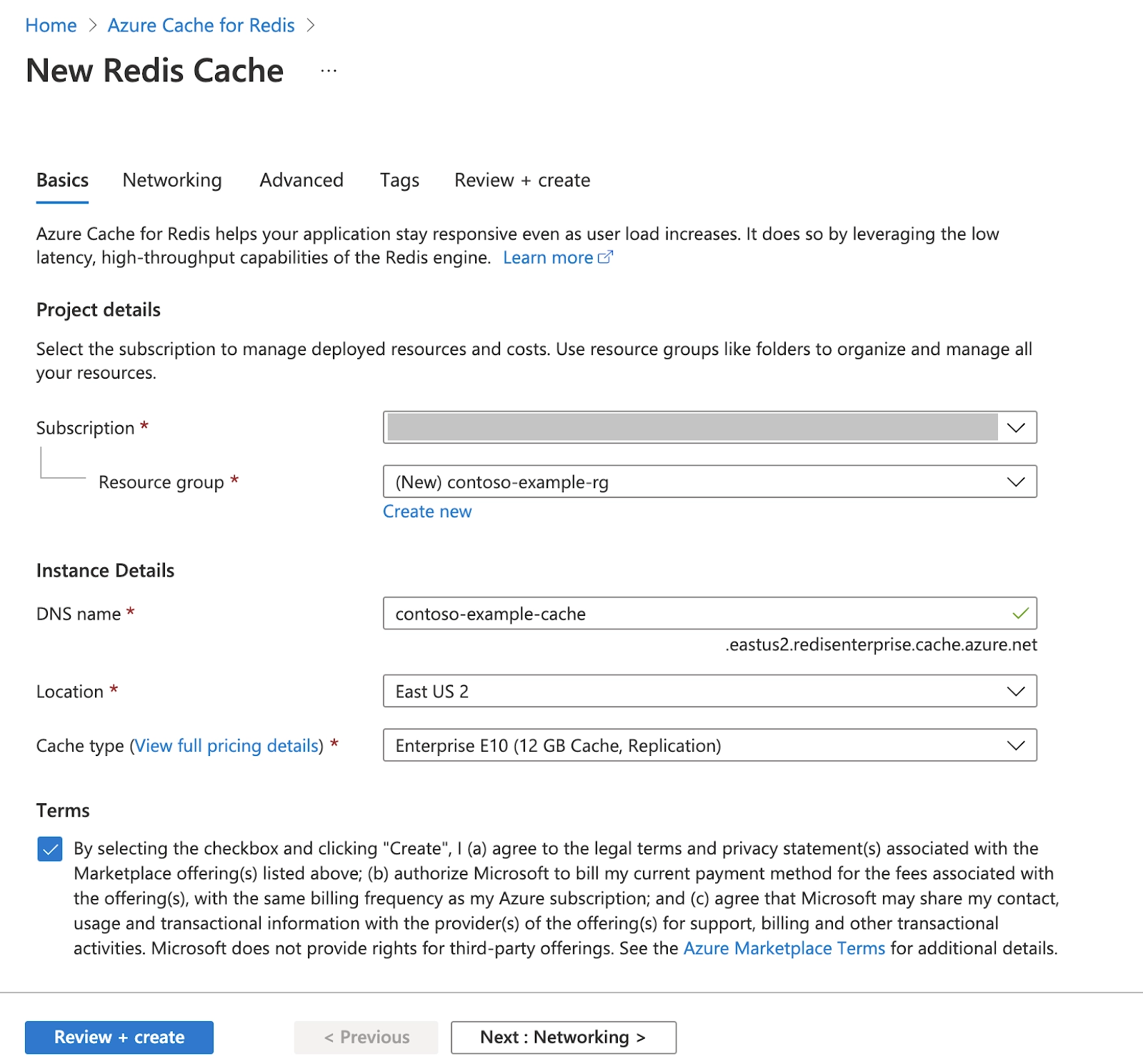
  • Configure the settings for the new cache as per demand on the New Redis Cache page.


Snapshot of new redis cache page

Source

  • Click on Next: Networking and skip.
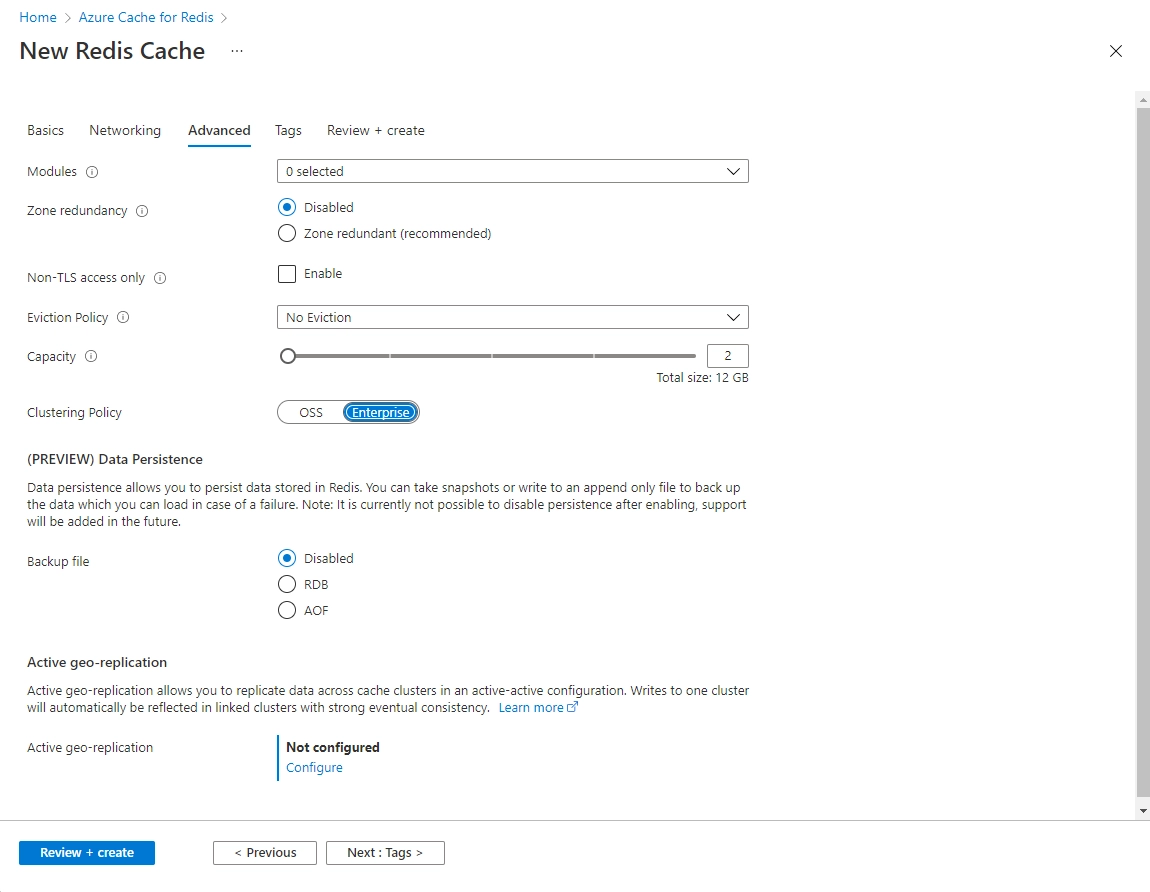
  • Click on Next: Advanced
    If you plan to connect to a new cache without using TLS only, enable Non-TLS access. However, disabling TLS is not recommended.
    For a non-clustered cache, set the Clustering policy to Enterprise
setting up new redis cache

Source

  • Click on Next: Tags and skip.
  • Click on Next: Review + create.
review+create page

Source

  • Review the settings and click on create
    It takes some time to create a cache. The user can monitor the progress on the Azure Cache for the Redis Overview page. Once the status shows Running, it means that the cache is ready to be used.
Frequently Asked Questions

What is Redis?

Redis is an open-source, in-memory data store, cache, streaming engine, and message broker which is used as a database by millions of developers.

Why do we use Redis?

Redis is used to improve the performance and scalability of an application that uses backend data stores heavily. It also keeps frequently accessed data in the server memory, which can be written to and read quickly so that it can process large volumes of application requests

What rules must be followed while writing a DNS name?

While writing a DNS name, it must be kept in mind that the name can only be a string with characters in the range 1-63. Also, it can only contain numbers, letters, or hyphens, and the name must only begin and end with a number or letter.

Conclusion

In this article, we have extensively discussed Azure Cache for Redis and how to create a cache.

After reading about the Azure Cache for Redis, are you not feeling excited to read/explore more articles on Azure? Don't worry; Coding Ninjas has you covered. To understand the difference between AWS, Azure & Google cloud, how to prepare for the Microsoft Azure certification exam, and what is Microsoft Azure certification.

If you wish to enhance your skills in Data Structures and AlgorithmsCompetitive ProgrammingJavaScript, and many more, then you should check out our Guided path column at Coding Ninjas Studio. We at Coding Ninjas Studio organize many contests in which you can participate. You can also prepare for the contests and test your coding skills by giving the mock test series available. In case you have just started the learning process, and your dream is to crack major tech giants like Amazon, Microsoft, etc., then you should check out the most frequently asked problems and the interview experiences of your seniors that will surely help you in landing a job in your dream company. 

Do upvote if you find the blogs helpful.

Happy Learning!

Live masterclass