Do you think IIT Guwahati certified course can help you in your career?
Introduction
Azure Media Services is a cloud-based platform that lets you create solutions for broadcast-quality video streaming, improved accessibility and distribution, content analysis, and more. Media Services can help you create apps that deliver high-quality media experiences to huge audiences on today's most popular mobile devices and browsers, whether you're an app developer, a call centre, a government agency, or an entertainment firm. We will be covering all the details of the Azure Media Service. Without further ado, let's get started with the concepts of Azure Media Service.
Azure Media Services Concept
The following are the main concepts of Azure Media Services:
Assets An asset is a collection of digital files and the metadata associated with them. These files can be audio, video, or image files, among other things.
AssetFile The AssetFile contains metadata about the media file.
AccessPolicy The permissions and duration of access to an asset are defined by the AccessPolicy.
Channels It's in charge of handling live-streaming material. It is used to offer an input endpoint to a live transcoder.
Locators They serve as a gateway to the files contained in an asset.
Job Its purpose is to process a single audio/video presentation.
Program It allows us to regulate the publishing and storage of parts in a live broadcast using a program.
Streaming endpoint It symbolises a content-delivery streaming service.
Let's get into the details of the Architecture of Azure Media Service.
Architecture of Azure Media Service
The following are the architectures of Azure Media Service.
Video on Demand Delivery
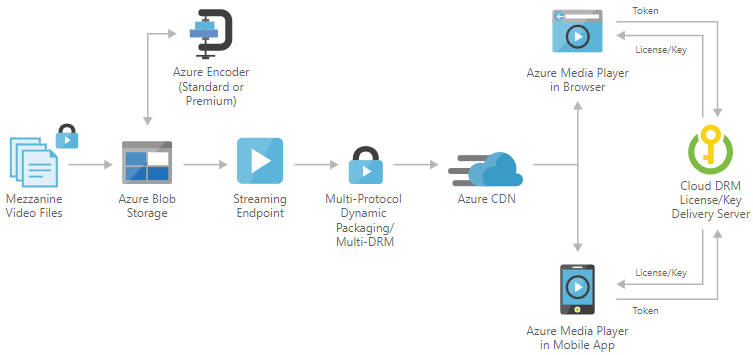
The Media Service will upload a high-quality media file into an asset first, then encode it to a set of adaptive bits that can read MP4 files. The asset distribution policy is then configured. Asset distribution policy instructs Media Services on how and by which protocol we want our assets supplied. Now they will create an on-demand location and publish an asset, then stream the content. The Azure managed services Blob Storage, Content Delivery Network, and Azure Media Player are used to create this solution. These services are patched and supported in a high-availability environment, allowing you to focus on your solution rather than the environment in which they execute.
The major components of the Video on Delivery are as follows:
Blob Storage: It Stores vast volumes of unstructured data that can be accessed over HTTP or HTTPS from anywhere around the globe. Blob storage can be used to make data available to the public or to keep application data secret.
Azure Media Services Encoder: One of the most typical processing processes in Media Services is encoding tasks. To convert media files from one encoding to another, you build encoding jobs.
Streaming Endpoint in Azure Media Services: A streaming service that can provide content to a client player application or to a content delivery network (CDN) for further dissemination.
Content Distribution Network (CDN): Offers secure, dependable content delivery with a worldwide reach and a comprehensive feature set.
Azure Media Player: Provides a rich adaptive streaming experience by utilising industry standards such as HTML5 (MSE/EME). Developers can access APIs with a single JavaScript interface, regardless of the playback technology used.
Multi-DRM content protection: Content is delivered securely utilising multi-DRM (PlayReady, Widevine, and FairPlay Streaming) or AES clear key encryption.
Live Streaming
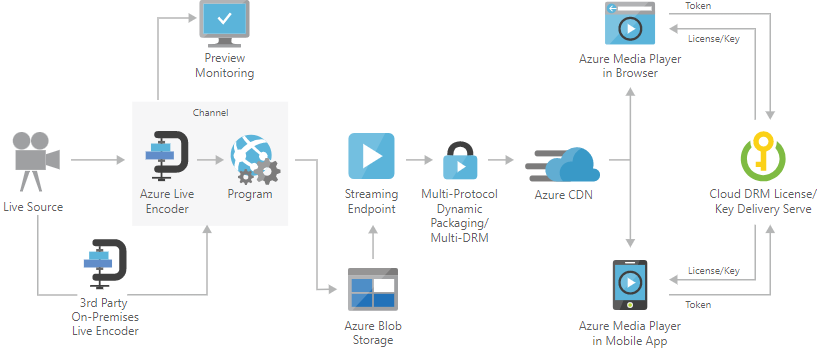
You can capture video in real-time and transmit it to consumers using a live streaming service. Interviews, conferences, and athletic events can all be streamed live online. A video camera captures video and sends it to a Live Event input endpoint in this approach. The Live Event receives the input stream and makes it available for streaming to a web browser or mobile app via a Streaming Endpoint. A preview monitoring endpoint is also available in the Live Event, allowing you to preview and evaluate your stream before it is processed and delivered. The Live Event can also record and save the content that is consumed so that it can be streamed later (video-on-demand).
The components of the live Streaming are as follows:
Blob Storage: It Stores vast volumes of unstructured data that can be accessed over HTTP or HTTPS from anywhere around the globe. Blob storage can be used to make data available to the public or to keep application data secret.
Partner on-premises live encoder: It Outputs the live source as RTMP(S), or Smooth Streaming, for ingestion into the cloud.
Streaming Endpoint in Azure Media Services: A streaming service that can provide content to a client player application or to a content delivery network (CDN) for further dissemination.
Content Distribution Network (CDN): Offers secure, dependable content delivery with a worldwide reach and a comprehensive feature set.
Azure Media Player: Provides a rich adaptive streaming experience by utilising industry standards such as HTML5 (MSE/EME). Developers can access APIs with a single JavaScript interface, regardless of the playback technology used.
Preview Monitoring: Before further processing and distribution, preview and confirm a live feed.
Multi-DRM content protection: Content is delivered securely utilising multi-DRM (PlayReady, Widevine, and FairPlay Streaming) or AES clear key encryption.
Azure Search
Azure Search is a cloud Search as a Service that allows us to add a powerful search experience to our applications utilising a simple REST API or .NET SDK while avoiding the costs of maintaining a search infrastructure.
Features of Azure Search
The following are the main features of Azure Search.
Insightful inquiries
Support for multiple languages
Recommendations for your search
Activate the highlighter
Navigation with a Twist
It's time to dive into the details of services offered by Azure Media Services.
Azure Media Services v3
Azure Media Services v3 allows you to create a range of cloud-based media processes. The following are some examples of what you can do with Media Services:
They provide videos in a number of formats so that they can be viewed on a variety of browsers and devices. Video and audio content must be encoded and packaged suitably for on-demand and live streaming transmission to various clients (TV, mobile devices, PC, and so on).
Stream live sporting events, such as soccer, baseball, college and high school sports, and more, to a big internet audience.
Public meetings and events, such as town halls, municipal council sessions, and legislative bodies should be broadcast live.
Analyze video or audio content that has been recorded. Organizations can, for example, extract speech-to-text and create search indexes and dashboards to improve customer satisfaction. They can then extract intelligence about common complaints, complaint sources, and other pertinent data.
Deliver material for offline viewing on flights, trains, and vehicles. When a consumer expects to be removed from the network, they may need to download content to their phone or tablet for playback.
To better handle high instantaneous loads, enable Azure CDN to achieve big scaling (for example, the start of a product launch event).
Quickstarts
Quickstarts provides you hands-on experience with Media Services through the Azure Portal. The Quickstarts offers the users with the following services:
Basic video-on-demand (VOD) application
Live event with portal and OBS
Live event with portal and Wirecast
Use portal to encrypt content
Frequently Asked Questions
What is Microsoft Azure?
Azure is a cloud computing platform and web portal that lets you access and manage Microsoft's cloud services and resources.
What is an Azure Media Services live event?
The process of ingesting live video feeds and disseminating them via the RTMPS protocol or Smooth Streaming is known as a Media Services live event.
What is Blob Storage?
Blob storage in Azure is a service that allows you to store huge amounts of unstructured object data, such as text or binary data.
Conclusion
In this article, we have extensively discussed the details of Azure Media Services, its components, architectures, and details of Azure search, Azure Media Services, and quickstarts. We hope that this blog has helped you enhance your knowledge regarding Azure Media Service, and if you would like to learn more, check out our articles on Microsoft Azure. You can refer to our guided paths on the Coding Ninjas Studio platform to learn more about DSA, DBMS, Competitive Programming, Python, Java, JavaScript, etc. To practice and improve yourself in the interview, you can also check out Top 100 SQL problems, Interview experience, Coding interview questions, and the Ultimate guide path for interviews. Do upvote our blog to help other ninjas grow.











 1+ registered

