Do you think IIT Guwahati certified course can help you in your career?
Introduction
An App Service Plan is required if you want to broadcast a web app, mobile app, or API app in Azure. Essentially, this is your app's compute resource. You have a choice of five SKUs: Free, Shared, Basic, Standard, and Premium. It's simple to see how the to compute resource grows between tiers. However, it is not just a question of computing power or storage space. As you progress through the SKUs, you will gain more features. Even if you don't need more computing power, you may need to scale up your App Service Plan in some cases to get the required feature. An App Service plan's pricing tier determines which App Service characteristics you get as well as how much you pay for the plan. The pricing tiers available for your App Service plan are determined by the operating system you choose when you create it.
When we create an App Service Plan, one of the most important decisions we must make is which pricing tiers to use because the pricing tiers define what options are available for the applications we deploy in Azure, the hardware that is available, and the price we pay. In general, the higher the pricing tiers, the greater the number of features and functionality.
In this blog, we will be discussing the various azure pricing tags.
Azure Virtual Machine (VM) Pricing
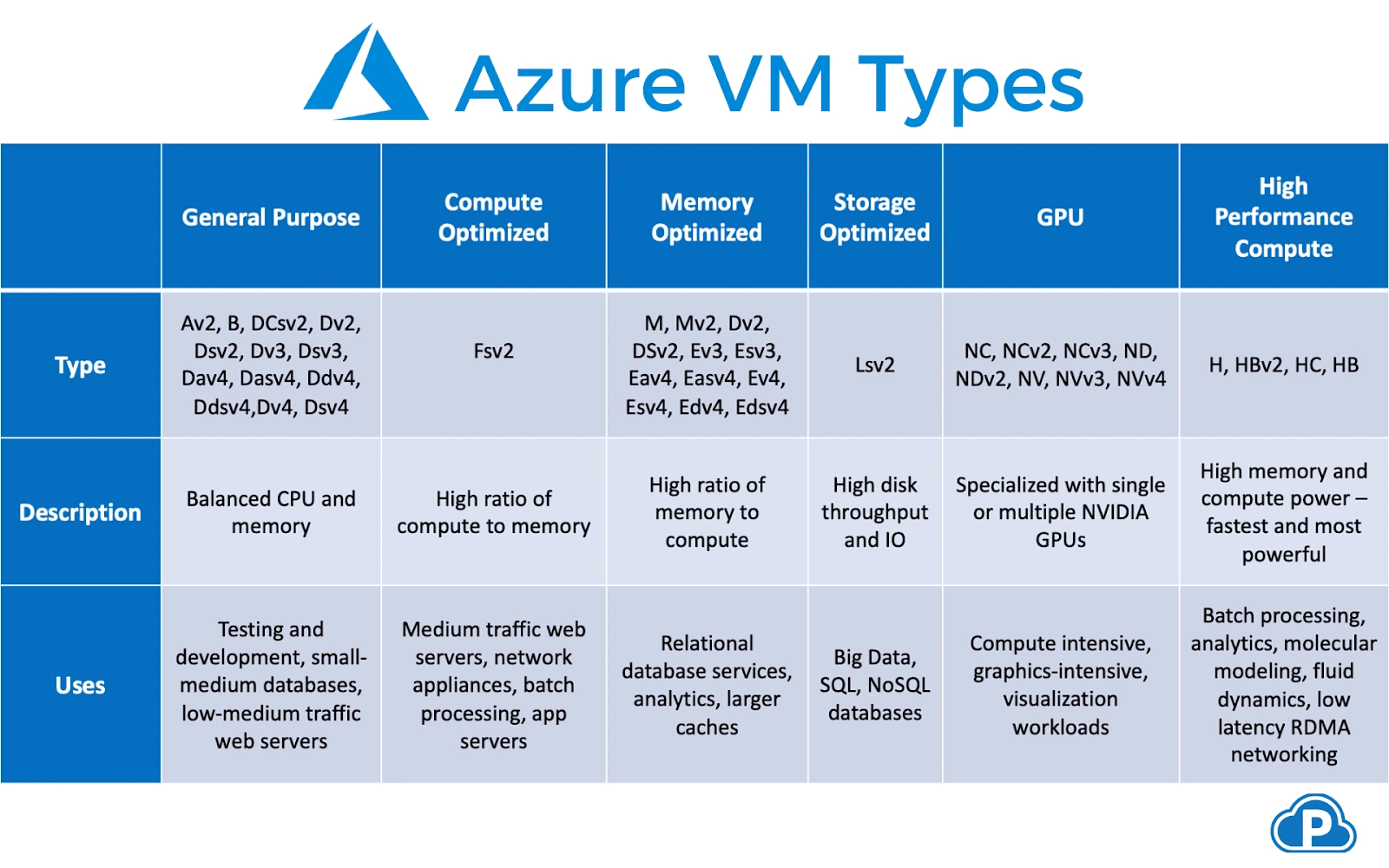
Microsoft provides a variety of virtual machine sizes, which are divided into six categories for various use cases.
VMs for General Purpose: Provide a balanced CPU/memory ratio. It is appropriate for medium and low-traffic servers, databases, and test environments. Pricing begins at $0.096/hour.
Optimized Computing: Strong CPU capabilities are provided. It is appropriate for medium-traffic servers, batch processing, and network services. Pricing begins at $0.0846/hour.
Memory Optimization: Increases the amount of RAM and speeds up the RAM hardware. Appropriate for in-memory analytics, caching services, and relational databases. Pricing Starting at $0.126 per hour
Storage Optimization: High storage throughput and I/O performance. Data warehouses, big data analytics, and transactional SQL/NoSQL databases are all good candidates. Pricing begins at $0.624 per hour.
Graphics Processing Units (GPU) GPU resources are provided as part of the virtual machine. Deep learning, machine learning, video editing, and graphics rendering are all possible applications. Pricing begins at $0.90 per hour.
High-performance computing (HPC) offers high-powered distributed CPU resources as well as support for high-throughput networking protocols such as RDMA. Appropriate for massively parallel HPC workloads. Pricing begins at $0.796/hour.
Pay as You Go: Azure services can be paid for based on actual usage, invoiced per second, with no long-term commitments or upfront payments. This gives you complete freedom to raise or reduce resources as needed. Using Azure's autoscaling features, virtual machines (VMs) can be automatically scaled up and down. This pricing model is best suited for users who value flexibility and prefer to transform capital expenses into operating expenses, as well as apps with volatile or short-term workloads.
Reserved Instances: Azure offers Reserved Virtual Machine Instances (RVMI)—virtual machines that are pre-purchased in a specific region for one or three years. When committing to booked instances in advance, you can save up to 72 percent off pay-as-you-go prices. This pricing model is appropriate for applications with consistent ongoing usage, organizations with a fixed budget, or large-scale applications with a fixed number of virtual machines.
Pricing on the Spot: Azure allows you to purchase unutilized computing power at up to a 90% discount off pay-as-you-go prices. However, because spot instances can be interrupted at any time, they are only recommended for caseloads that can withstand disruptions. Spot instances are best suited for distributed, fault-tolerant applications, stateless applications, non-urgent workloads, and workloads that are heavily parallelized.
Azure Pricing Tier Categories
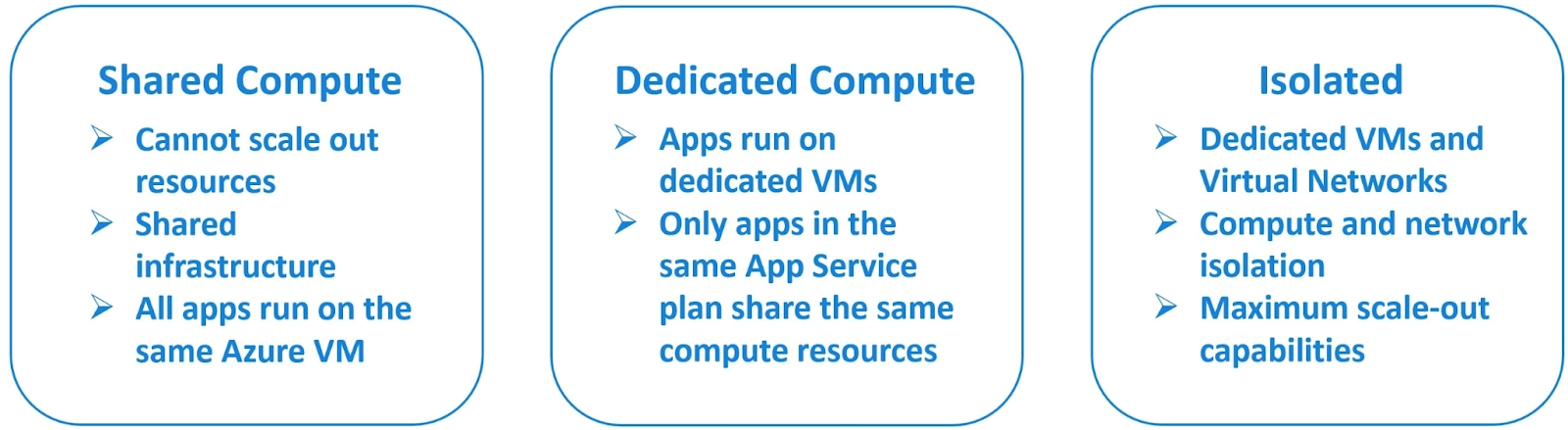
Azure pricing tiers are divided into three broad categories.
Shared compute: This category includes the free pricing tier (F1) and the shared pricing tier (D1). You cannot scale out resources in these two tiers, and they use a common infrastructure. This means that all of your apps will run on the same Azure VM as other App Service apps, including those from other customers. It provides simple apps with low traffic that are not business-critical. The two lowest tiers are Free and Shared. These tiers assign CPU quotas to each app that uses shared resources, and the resources cannot be scaled out.
Dedicated compute: This category includes, for example, the B1 and B2 pricing tiers, which run apps on dedicated Azure VMs. Apps are run on dedicated Azure VMs in the Basic, Standard, Premium, PremiumV2, and PremiumV3 tiers. The same compute resources are shared by only apps in the same App Service plan. The higher the tiers, the more VM instances that can be scaled out.
Isolated: This tier includes not only dedicated VMs, but also dedicated Virtual Networks. This means that in addition to computing isolation for your apps, you also get network isolation, which is made possible by virtual networks. It also has the greatest scale-out capabilities. The Isolated and IsolatedV2 tiers use dedicated Azure VMs and Azure Virtual Networks.
An app obtains CPU minutes on a shared VM instance in the Free and Shared tiers and cannot scale-out. An app runs and scales as follows in the other tiers.
When you create an app in App Service, it is assigned to one of the App Service plans. When you run the app, it runs on all of the VM instances specified in the App Service plan. If multiple apps are included in the same App Service plan, they will all use the same VM instances. If an app has multiple deployment slots, all deployment slots run on the same VM instances. When you allow diagnosing logs, perform backups, or run WebJobs, these processes consume CPU cycles and memory.
As a result, the App Service plan serves as the scale unit for the App Service apps. All apps in the plan run on all five instances if the plan is provisioned to run five VM instances. If the plan is set to autoscale, all apps in the plan are scaled out at the same time based on the autoscale settings.
What is the cost of my App Service plan?
This section explains how App Service apps are charged. An App Service plan, with the exception of the Free tier, incurs a charge for the compute resources it employs.
Each app receives a quota of CPU minutes in the Shared tier, so each app is charged for the CPU quota.
The App Service plan defines the number of VM instances to which the apps are scaled in the dedicated compute tiers (Basic, Standard, Premium, PremiumV2, PremiumV3), so each VM instance in the App Service plan is charged. Regardless of how many apps are running on them, these VM instances are billed the same. The App Service Encounter specifies the number of secluded workers that run your apps in the Isolated and IsolatedV2 tiers, and each worker is charged. Furthermore, there is a flat Stamp Fee in the Isolated tier for running the App Service Environment itself.
You are not charged for using the App Service features that are available to you (for example, configuring custom domains, TLS/SSL certificates, deployment slots, backups, and so on). The following are the exceptions:
App Service Domains are paid for when you buy one in Azure and when you renew it each year.
App Service Certificates - you pay for them when you buy them in Azure and when you renew them each year.
IP-based TLS connections - Each IP-based TLS connection costs an hourly fee, but some Standard tiers or higher include one IP-based TLS connection for free. TLS connections based on SNI are free.
Should I add an app to a new or existing plan?
Because you pay for the computing resources that your App Service plan allocates (see How much does my App Service plan cost? ), combining multiple apps into a single App Service plan may save you money. You can keep adding apps to an existing plan as long as it has sufficient resources to handle the load. Keep in mind, however, that apps in the same App Service plan share the same compute resources.
To determine whether the new app has the required resources, you must first understand the capacity of the existing App Service plan as well as the expected load for the new app. Overloading an App Service plan may result in downtime for both new and existing apps.
Isolate your app into a new App Service plan when:
The app is time-consuming.
You want to scale the app separately from the other apps in the plan.
The app requires resources from a different geographic region.
Frequently Asked Questions
What exactly is Microsoft Azure, and why is it so popular?
The companies that provide cloud services are referred to as Cloud Providers. There are numerous cloud providers available, one of which is Microsoft Azure. It is used to gain access to Microsoft's cloud infrastructure.
Which Azure service is used to manage Azure resources?
The service which is used to manage Azure resources:
Application Insights
Azure Resource Manager (ARM)
Log Analytics
Log Analytics
What are roles, and why do we need them?
In layman's terms, roles are nothing more than servers. These servers are Platform as a Service virtual machines that are managed, load-balanced, and collaborate to achieve a common goal.
Microsoft Azure has three types of roles: Worker Role, Web Role, and VM Role.
Conclusion
To conclude this blog, firstly we discussed Azure virtual machine pricing. We also discussed Azure pricing models and tier categories. And then we looked at some of the common Azure service plan questions like how my app scale and run, what is the cost of my app service plan, Should I add an app to a new or existing plan, etc.








 1+ registered

