Do you think IIT Guwahati certified course can help you in your career?
Introduction
Microsoft Azure is one of the leading cloud platforms and offers Azure Resource Manager (ARM). ARM is a powerful service that facilitates the management and provisioning of Azure resources.
ARM combined with ARM Templates makes the deployment and configuration of cloud resources very streamlined.
In this article, we will learn about Azure Resource Manager and ARM Templates. We will discuss what they are, what are their advantages and learn about the components of ARM templates.
What is Azure Resource Manager?
Azure Resource Manager (ARM) is a service that helps us to manage our Azure resources effectively. Resources can be anything from virtual machines to databases to storage accounts. ARM makes it easy to create, update, and delete resources. ARM also helps in managing the permissions, such as who can access our resources.
Advantages of Azure Resource Manager
Below are some of the advantages:
Resource Group Management: ARM allows users to create, modify, and delete resource groups. This helps in managing multiple resources as a single entity
Role-Based Access Control (RBAC): ARM allows fine-grained access control using RBAC. It only grants permissions to specific users or groups to perform specific actions on resources within a resource group
Reliability: ARM uses a variety of techniques to ensure the reliability of the resources. These techniques include resource redundancy, automated failover, and health checks
Scalability: ARM can scale to support a large number of resources. This makes it a perfect choice for applications which need to scale up quickly
What are ARM Templates?
ARM Templates are declarative JSON (JavaScript Object Notation) files that describe the desired state of Azure resources or, in other words, a way to describe your Azure resources in code. ARM templates help automate the creation and management of resources.
Components of ARM Templates
ARM templates use a defined structure in JSON format comprising several key-value pairs. Take a look below at the different sections that are present in the ARM template:
Schema
The “schema” key points to the location of the JSON format. It helps in understanding the structure and syntax of the template.
The functions section contains user-defined functions which can be used within the template to provide the ability to create reusable logic and calculations.
So, now let us see the advantages of ARM templates
Advantages of ARM Templates
Below are some of the advantages:
Consistent Deployment: ARM Templates help to deploy the resources in a consistent manner across multiple environments. This makes sure that the resources are configured in the same way irrespective of their deployed region
Automation: ARM templates can be used to automate the creation, deployment, and management of resources. This saves time and reduces the chance of human error
Modularity: ARM templates can be broken down into smaller components. Breaking o into smaller components enhances the code reusability and simplifies the management of complex infrastructures
Version Control Integration: ARM Templates can be stored in version control systems like Git, which allows teams to teams to work together, track changes and feature to rollback to previous versions
Create and Deploy ARM Template
Follow the below steps to create and deploy ARM templates
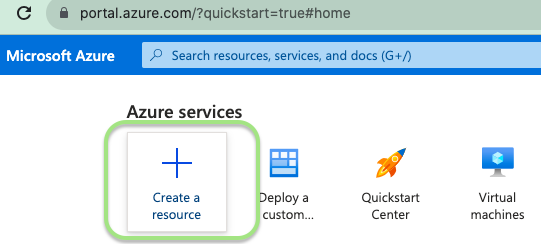
Step 1: Follow this link and signup into the Azure account and click on the + sign button, i.e. create a resource
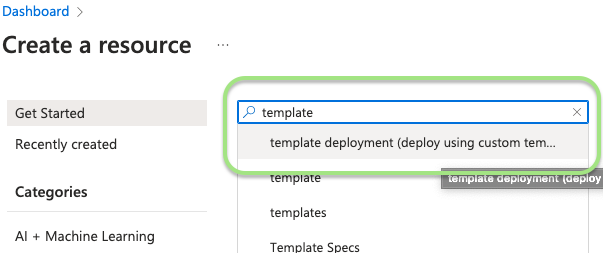
Step 2: go to the search bar and type template; there, you will see template deployment click on that
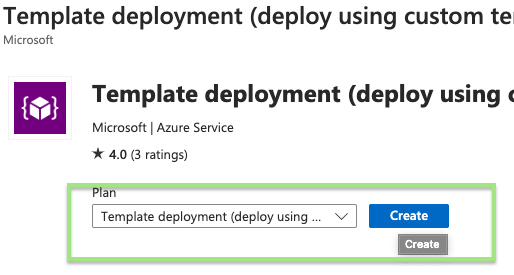
Step 3: Select a plan from the dropdown option and click create
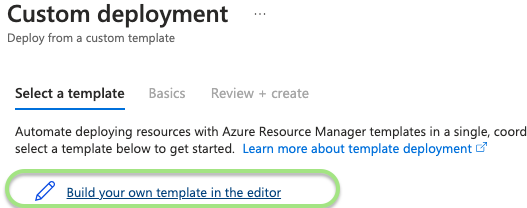
Step 4: After clicking on create button, the Azure portal will show a Custom Deployment screen. Select build your own Template in editor option
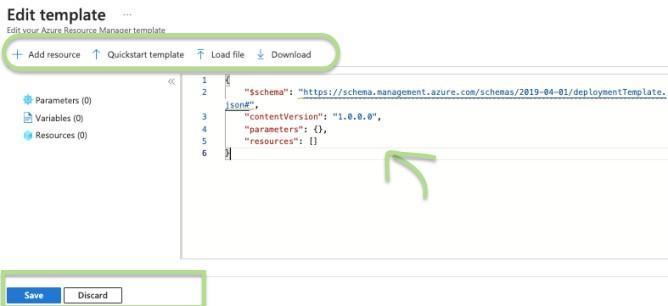
Step 5: The edit template screen will be shown with different options like adding your own template or so. after editing the template click on the save button
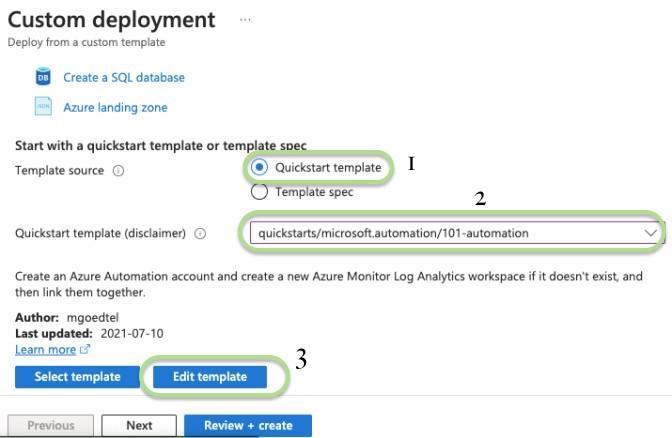
Step 6: In Custom deployment, Azure provide an option for beginner to choose a quickstart template which is predefined for the user. So select that option, and then from the drop-down options list, select one that suits and last click on edit template
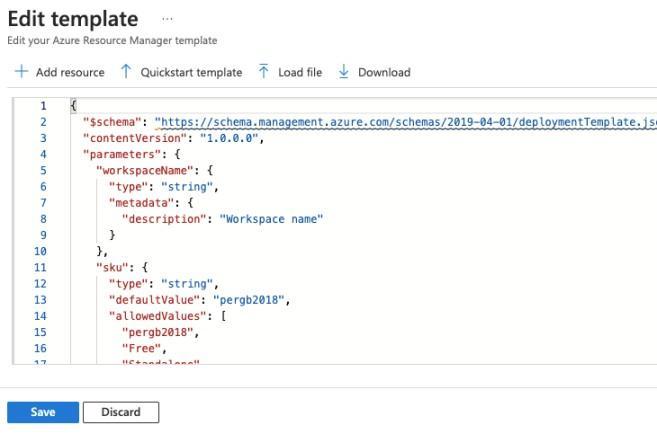
Step 7: On Edit Template, the user could edit some of the things in the code according to its needs.
Once ready, hit the Save button. After saving the template, another window opens to confirm the resources and verification. At last, deploy the template and purchase the resources.
Frequently Asked Questions
What are the advantages of variables in ARM Templates?
Variables provide the user to define a reusable value through the ARM Template. This allows for making the updates easier and centralising the commonly used values.
What benefits offered by ARM Templates?
ARM Templates offer several benefits, such as Consistency, Increased automation, and Improved security and integration of version control.
What is Azure Resource Manager?
Azure Resource Manager (ARM) is a service that helps the user to manage Azure resources effectively and allows the user to organise and control resources through resource groups.
Conclusion
Congratulations, you did a fantastic job!!. This article covered Azure Resource Manager and ARM Templates with their advantages and discussed the components of ARM templates. At last, some frequently asked questions were discussed.







 1+ registered

