Features
Auto-scale
The App Service platform automatically scales the web apps without the need for defining auto-scaling rules or schedules. The platform can automatically control the minimum number of running instances of the application to match the flow of incoming HTTP requests. It scales the application by reducing the number of running instances when the frequency of incoming requests reduces.
This way, users can scale out or scale up the web app instances to support the load accordingly. Web apps can be auto-scaled based on metrics like CPU percentage, RAM Utilization, etc.
Deployment Tools
Azure AppService provides automated deployments with continuous integration/continuous deployment (CI/CD) capabilities using DevOps, Github, and Bit-Bucket. It connects to a repository to regularly update the changes made to the source code. Performance and quality tests with staging environments use deployment slots to swap to production in seconds and roll back to previous versions with zero downtime.
Security
All the platform components of the Azure Web App service are highly secure and protected. Communications and connections between the app and other resources are encrypted. Apart from these, Azure Web App allows users to secure their app using HTTPS and TSL/SSL Certificates. Enforcing HTTPS ensures safety from unidentified and insecure protocols. Users can also impose IP restrictions and implement Client authentication and authorisation for access.
Diagnostics
Azure App Service provides Diagnostic reports and Health Checkups for CPU and Memory usage, app performance and the number of requests made along with HTTP server errors. App Service diagnostics provides an intelligent and interactive experience to help users troubleshoot their app with little effort. It helps point out specific errors and assists the user in quickly troubleshooting and resolving issues.
Benefits
Following are the benefits of using Azure Web Apps to build efficient and scalable web applications.
-
Continuous deployment of web applications using Git and Github with DevOps.
-
Azure Web App provides Multilanguage support for languages including Java, Node.js, Ruby, ASP.NET ,Core, Python, and ASP.NET.
-
Azure Web App provides high availability and conducts automatic scaling of the app. Azure web apps can be hosted from any remote data centre.
-
The Azure Marketplace for Azure Web App includes thousands of pre-built templates that are easy to use and deploy. Some examples are Joomla, WordPress, and Umbraco.
-
Users can use Visual Studio as their IDE Platform to quickly deploy a web application to the Azure app platform. It allows developers to fully access the application development workflow to conduct debugging and integration processes with ease.
-
Azure Web App uses multi-encryption and authentication security procedures that comply with PCI and ISO. IP addresses can be restricted and managed accordingly.
- It also supports platform integration and can easily connect to Dropbox or OneDrive.
App Service Plan and Pricing
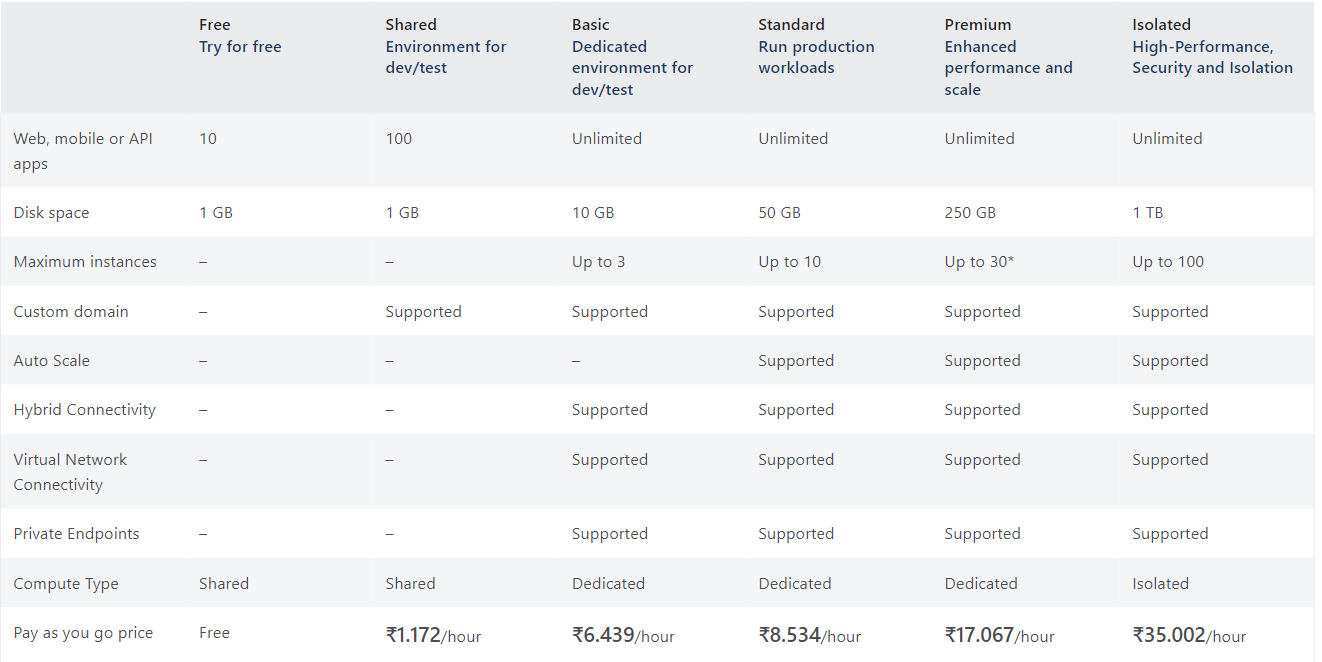
Azure Web Apps run under an App Service Plan. It defines a set of computing resources for the web app. Each App Service plan defines the Operating System, Region, Number and size of VM instances and the Pricing tier (Free, Shared, Basic, Standard, Premium, PremiumV2, PremiumV3, Isolated, IsolatedV2).
The pricing tier of an App Service plan determines the App Service features the user can get for his application. These pricing tiers depend on the operating system selected at creation time.
-
Shared compute: Free and Shared tiers run an app on the same Azure VM as other App Service apps.
-
Dedicated compute: The Basic, Standard, Premium, PremiumV2, and PremiumV3 tiers run apps on dedicated Azure VMs. The apps in the same App Service plan share the same compute resources.
- Isolated: Isolated and IsolatedV2 tiers run dedicated Azure VMs on dedicated Azure Virtual Networks.
Source
Creating Web App on Azure
Now that we know what the Azure Web App is, let us see how to create and deploy a Web App using this service. The following instructions are to deploy a Python web application built using Flask or Django.
Step 1: Have your Python application ready. For a sample Python application click here.
Step 2: To run the application locally, clone the Github repository to your local system using the following command.
git clone https://github.com/Azure-Samples/msdocs-python-flask-webapp-quickstart
Step 3: Navigate to the Application folder
cd msdocs-python-django-webapp-quickstart
Step 4: Create a virtual environment
py -m venv .venv
.venv\scripts\activate
Step 5: Install the dependencies and run the app. To view the page browse to http://localhost:8080.
pip install -r requirements.txt
python manage.py runserver
Creating a Web App
Step 1: Log in to the Azure portal.
Step 2: Click on create a Resource and search for Web App.
Step 3: Create a new Resource group and select it. Choose the runtime stack as Python 3.9. Enter the values in the other fields as required. Select the App Service Plan according to your convenience. It determines the number of resources available for your app.
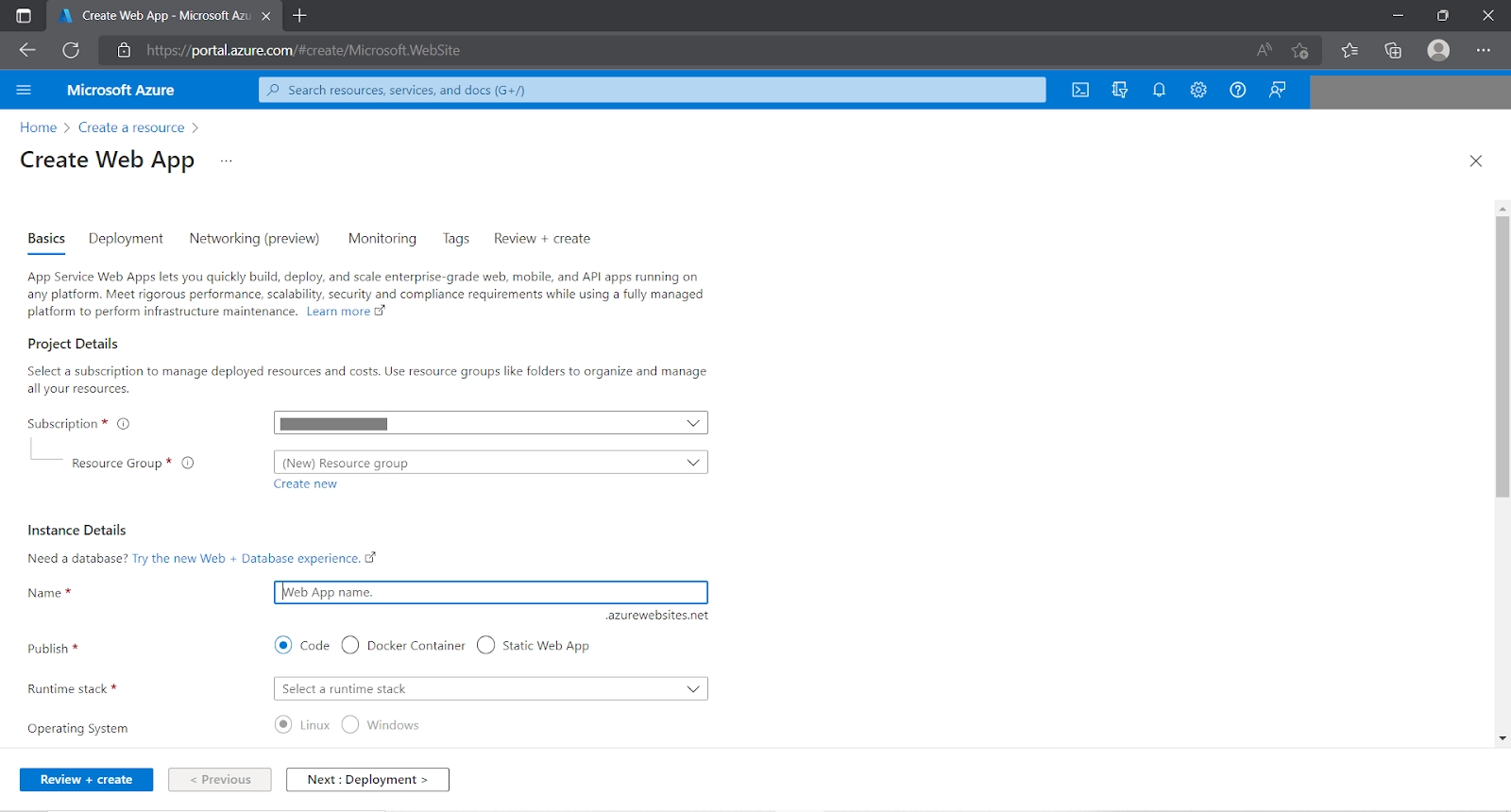
Step 4: Click on Review + Create.
Deploying to Azure from Visual Studio
Step 1: Download the Azure Tools extension on Visual Studio.
Step 2: Navigate to the Python project folder.
Step 3: Click the Azure Icon present in the toolbar on the left.

Step 4: After logging in to Azure with your account, choose your subscription.
Step 5: Search for App Services. This will list out all the App services created by you in this subscription.
Step 6: Find and give right-click on the Web App created by you on the Azure Portal.
Step 7: Select the Deploy to Web App option

Step 8: Choose the Python web app project folder and wait for deployment.

Step 9: Go back to the Azure Portal and navigate to the Web app created by you. Click on the web app’s URL to view the page.

Frequently Asked Questions
What are deployment slots in the Azure Web app service?
Deployment slots are live apps with their host names. Each slot is a full-fledged App service instance. They allow deploying the application in multiple such instances. This helps validate the app changes in a staging deployment slot before swapping it with the production slot. This greatly reduces downtime during deployment.
What is the difference between Azure App Service and Azure Web App?
Azure app service is a fully managed service provided the Azure to deploy web, mobile or REST-API-based applications. Azure Web App is the web application deployed in the Azure App service.
What is the difference between App Service Plan and App Service?
App Service Plan is a managed service that provides the infrastructure for hosting App Services. An App Service is a managed service used to deploy Web Applications inside the App Service Plan.
Conclusion
This article has extensively discussed the Azure Web Apps. We briefly learnt about the Azure App Service and moved on to explore the features and benefits of the Azure Web App service. We also discussed the steps to create a Web app using Azure Web Apps.
Feeling curious? Coding Ninjas has you covered. Check out our articles on Microsoft Azure, Cloud Delivery Models, and PaaS in Private Cloud. Follow our Guided path for Cloud Computing here.
Explore our Library on Coding Ninjas Studio to gain knowledge on Data Structures and Algorithms, Machine Learning, Deep Learning, and many more! Test your coding skills by solving our test series and participating in the contests hosted on Coding Ninjas Studio!
Looking for questions from tech giants like Amazon, Microsoft, Uber, etc.? Look at the problems, interview experiences, and interview bundle for placement preparations.
Upvote our blogs if you find them insightful and engaging! Happy Coding!






 1+ registered

