Do you think IIT Guwahati certified course can help you in your career?
Introduction
Binary Search is a highly efficient algorithm for finding an element in a sorted array or list. Instead of checking every element one by one, Binary Search cuts the search space in half with each step, significantly reducing the time complexity to O(log n). This makes it one of the most powerful algorithms in computer science when it comes to searching tasks.
In this article, we'll learn how binary search works, with proper examples, & provide C++ code implementations for both recursive & iterative approaches.
What is Binary Search in C++?
Binary Search is an efficient algorithm used to find a specific element in a sorted array or list. Unlike linear search, which checks every element sequentially, Binary Search divides the search interval in half at each step, reducing the time complexity to O(log n). This makes it much faster than linear search, especially for large datasets. Binary Search works by repeatedly comparing the target element with the middle element of the sorted array. If the target is equal to the middle element, the search ends. If the target is smaller, the search continues in the left half of the array; if it is larger, the search continues in the right half.
The key requirement for Binary Search is that the array or list must be sorted in either ascending or descending order.
Algorithm of Binary Search in C++
The algorithm for Binary Search follows these steps:
Initialize the left and right pointers: Set the left pointer to the first index (0) and the right pointer to the last index of the array.
Calculate the middle element: Find the middle element of the current search range by using the formula: middle= (left+right)/2
Comparison:
If the middle element is equal to the target value, the search is complete, and the index of the middle element is returned.
If the middle element is greater than the target, move the right pointer to middle - 1 to search in the left half.
If the middle element is less than the target, move the left pointer to middle + 1 to search in the right half.
Repeat: Continue this process until the target is found or the left pointer exceeds the right pointer, indicating the target is not in the array.
How Binary Search Works
Binary search is a technique used to find an item in a sorted list by repeatedly dividing in half the portion of the list that could contain the item, until you've narrowed the possible locations to just one. Here’s how it unfolds step-by-step:
Start in the Middle: First, you look at the middle item of the array.
Compare: If this item is equal to the target value, your search is complete.
Decide the Half: If the middle item is greater than the target, you focus on the left half of the array. Otherwise, you focus on the right half.
Repeat: This process continues, each time comparing the middle item of the new range with the target, until the item is found or the range is empty.
For example, if you're searching for the number 34 in an array that contains [10, 22, 34, 47, 59, 63, 77], you would start with 47 (the middle). Since 47 is greater than 34, you'd next look at the left half of the array: [10, 22, 34]. The middle of this new range is 22. Since 22 is less than 34, the next step is to look at the numbers greater than 22, so you look at 34, and you find your target.
Examples of Binary Search
To understand binary search better, let's look at some practical examples using an array of sorted numbers. We will show how binary search can be applied to find various numbers in the array.
Example 1: Searching for the number 15
Given the array: [3, 8, 11, 15, 18, 22, 27]
Start by examining the middle element (15 in this case).
Since 15 is the number we are looking for, the search is complete.
Example 2: Searching for the number 22
Using the same array: [3, 8, 11, 15, 18, 22, 27]
The middle element is 15.
Since 22 is greater than 15, focus on the right half of the array: [18, 22, 27].
The new middle element is 22, which matches the search target. Thus, the search ends successfully.
Example 3: Searching for the number 5
Same array: [3, 8, 11, 15, 18, 22, 27]
The middle element is 15.
Since 5 is less than 15, focus on the left half of the array: [3, 8, 11].
The middle element in this range is 8.
Since 5 is less than 8, focus on the left half, which is just [3].
The number 5 is not found as it is not present in the array.
Illustration of Binary Search
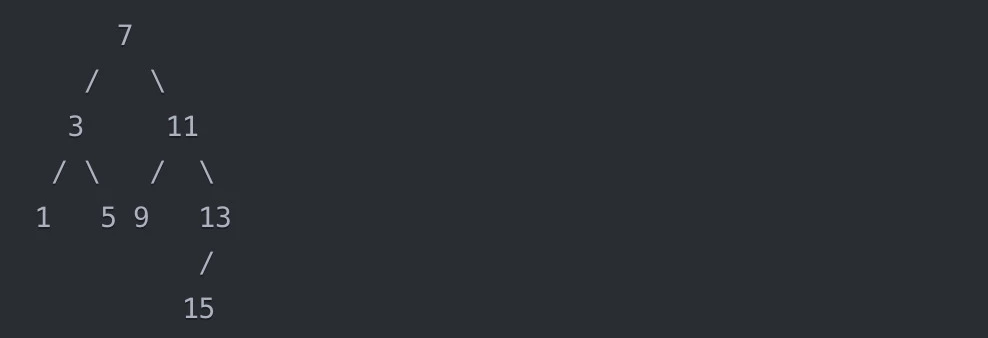
To further clarify how binary search works, let's visualize the process using a binary search tree. A binary search tree is a binary tree where the left subtree of a node contains only nodes with keys less than the node's key, and the right subtree contains only nodes with keys greater than the node's key.
Consider the following sorted array:
[1, 3, 5, 7, 9, 11, 13, 15]
We can represent this array as a binary search tree:
Now, let's say we want to search for the target value 5 in this array using binary search.
Compare 5 with the root node 7. Since 5 < 7, we move to the left subtree.
Compare 5 with the root of the left subtree, 3. Since 5 > 3, we move to the right subtree of 3.
Compare 5 with the only node in the subtree, 5. They match, so the search ends successfully.
If we search for a target value that doesn't exist in the array, like 4, the process would be:
Compare 4 with the root node 7. Since 4 < 7, we move to the left subtree.
Compare 4 with the root of the left subtree, 3. Since 4 > 3, we move to the right subtree of 3.
Compare 4 with the only node in the subtree, 5. Since 4 < 5, we need to move to the left subtree of 5. However, it doesn't exist, so the search ends unsuccessfully.
Binary Search Program in C++ (Recursive)
To implement binary search using recursion in C++, we write a function that calls itself to continue searching in the right subsection of the array until the target is found or the subsection becomes empty. Below is a detailed breakdown of the code for a recursive binary search function.
C++
C++
#include <iostream>

using namespace std;

// Recursive Binary Search Function

int binarySearch(int arr[], int left, int right, int target) {

    if (right >= left) {

        int mid = left + (right - left) / 2;

        // Check if the target is present at mid

        if (arr[mid] == target) {

            return mid;

        }

        // If target is smaller than mid, then it is in the left subarray

        if (arr[mid] > target) {

            return binarySearch(arr, left, mid - 1, target);

        }

        // Else the target can only be in the right subarray

        return binarySearch(arr, mid + 1, right, target);

    }

    // Target is not present in the array

    return -1;

}

int main() {

    int arr[] = {2, 3, 4, 10, 15, 18, 21, 30};

    int n = sizeof(arr) / sizeof(arr[0]);

    int target = 10;

    int result = binarySearch(arr, 0, n - 1, target);

    if (result != -1) {

        cout << "Element is found at index " << result;

    } else {

        cout << "Element is not found in the array";

    }

    return 0;

}
You can also try this code with Online C++ Compiler
Function Signature: The binarySearch function takes the array, left and right boundaries of the current search segment, and the target value.
Base Condition: If the right index is greater than or equal to left, the search continues. Otherwise, it indicates the target isn’t in the array.
Middle Element: We calculate the middle index. If the element at this index is the target, we return the index.
Recursive Calls: Depending on whether the target is less than or greater than the middle element, the function calls itself for the left or right half of the array respectively.
Complexity Analysis of Recursive Binary Search
This analysis helps you determine how fast the program can locate an item within a sorted array.
Time Complexity
The primary measure here is time complexity, which refers to how the execution time of the algorithm increases with the size of the input data. For binary search, the time complexity is O(log n). This means every time you perform a search, you split the data in half. This splitting process can occur about log₂(n) times where n is the number of elements in the array. For example, if the array has 1024 elements, you would make at most 10 comparisons, because 2¹⁰ equals 1024.
Space Complexity
The space complexity of the recursive version of binary search is O(log n) as well. This is because the recursive approach uses the call stack to store the return addresses of the recursive calls. Each recursive call adds a new layer to the stack until the base condition is met. The number of recursive calls can be as many as the number of times the array can be split in half, which is also log₂(n).
Advantages of Recursive Binary Search
Simplicity of Code: The recursive approach to binary search tends to be more succinct and easier to understand once you are comfortable with recursion. It allows the problem to be broken down into smaller, manageable tasks, which can make the code more intuitive.
Reduced Code Maintenance: Because recursive functions often require fewer lines of code and less manual handling of loop variables and bounds, they can be easier to maintain and less prone to bugs related to loop control.
Natural Fit for Divide-and-Conquer: Recursive algorithms are a natural fit for any divide-and-conquer approach, such as binary search, where the problem space is halved with each step. This method mirrors the logical structure of the algorithm very closely.
No Need for Additional Memory for Loop Control: Recursive binary search doesn’t require the setup and maintenance of loop control variables (like loop counters or bounds), which are needed in iterative solutions. This can lead to cleaner code with fewer temporary variables.
Adaptability: Recursion can be easily adapted or extended for more complex variants of binary search, such as searching in a binary search tree or applying more complex divide-and-conquer strategies without reconfiguring the logic of iteration.
Disadvantages of Recursive Binary Search
Stack Overflow Risk: Each recursive call adds a layer to the call stack. If the binary search is performed on a very large array, this can result in a stack overflow, especially in environments with limited stack size.
Overhead of Recursive Calls: Recursive calls involve significant overhead due to repeated function calls and returns. This includes the time and space needed to manage the call stack, which can impact performance, particularly when compared with the iterative approach.
Less Intuitive for Iteration-Familiar Programmers: Programmers more accustomed to iterative loops may find recursive approaches less intuitive. This could lead to difficulties in understanding or debugging recursive code, especially for those who are not familiar with how the call stack operates.
Dependency on Tail Call Optimization: The efficiency of recursive methods can depend heavily on whether the compiler implements tail call optimization. Without this, recursive calls may use more memory and have slower performance than their iterative counterparts.
Inefficiency in Time-Critical Applications: In applications where response time is critical, the additional overhead of recursive calls can make recursive binary search less suitable compared to its iterative counterpart. The performance difference could be crucial in time-sensitive applications.
Binary Search Program in C++ (Iterative)
For those who prefer not to use recursion, an iterative version of the binary search can be implemented. This approach uses a loop instead of recursion and is generally considered more efficient in terms of memory usage because it does not involve the overhead of recursive calls. Here’s how you can implement an iterative binary search in C++:
C++
C++
#include <iostream>

using namespace std;

// Iterative Binary Search Function

int binarySearchIterative(int arr[], int l, int r, int x) {

    while (l <= r) {

        int m = l + (r - l) / 2;

        // Check if x is present at mid

        if (arr[m] == x) return m;

       // If x greater, ignore left half

        if (arr[m] < x) {

            l = m + 1;

        }

        // If x is smaller, ignore right half

        else {

            r = m - 1;

        }

    }

    // If we reach here, then the element was not present

    return -1;

}

int main() {

    int arr[] = {2, 3, 5, 10, 14, 20, 23, 31};

    int n = sizeof(arr) / sizeof(arr[0]);

    int target = 10;

    int result = binarySearchIterative(arr, 0, n - 1, target);


    if (result != -1) {

        cout << "Element is found at index " << result;

    } else {

        cout << "Element is not found in the array";

    }

    return 0;

}
You can also try this code with Online C++ Compiler
Initialization: We start with defining the boundaries of the search area (l for left, and r for right).
While Loop: The search continues as long as the left boundary does not surpass the right. Within each iteration, the midpoint (m) is recalculated.
Midpoint Check: Each cycle checks if the middle element is the target. If it is, the search ends with the position of the found element.
Adjusting Boundaries: Depending on whether the middle element is less than or greater than the target, the search boundaries (l and r) are adjusted to either the right or left half of the current search interval, effectively narrowing down the search space.
Advantages of Iterative Binary Search
No Stack Overflow Risk: Unlike the recursive method, the iterative approach does not use the call stack. This eliminates the risk of stack overflow, which can occur in recursive implementations if the recursion depth becomes too deep, particularly with large datasets.
Memory Efficiency: Iterative binary search is more memory-efficient because it avoids the additional memory overhead associated with the call stack used in recursive calls. This makes it more suitable for environments with limited memory resources.
Consistent Performance: Iterative approaches generally offer more predictable and stable performance metrics, as they do not rely on compiler optimizations like tail recursion. This predictability can be crucial in systems where performance consistency is a key requirement.
Ease of Understanding for Loop-Familiar Programmers: For programmers who are more comfortable with loops than recursion, iterative binary search can be easier to understand, debug, and maintain. It follows a straightforward looping mechanism that many programmers find more intuitive.
Scalability: Since it does not depend on the call stack, iterative binary search scales better with larger datasets. This scalability makes it a more reliable choice in applications dealing with large amounts of data.
Disadvantages of Iterative Binary Search
Code Complexity: While not necessarily more complex, iterative binary search requires explicit management of loop conditions and boundaries, which can introduce more room for errors such as off-by-one errors or infinite loops if not handled correctly.
Less Elegant: Many consider the iterative approach less elegant compared to the recursive approach, which can be more concise and easier to express, especially for complex divide-and-conquer algorithms like binary search.
Adaptability: Iterative solutions can sometimes be harder to adapt or extend for more complex variations of the basic algorithm, such as binary search trees or other more nuanced divide-and-conquer strategies.
Verbosity: Iterative code for binary search tends to be more verbose compared to its recursive counterpart, involving more lines of code primarily due to the explicit loop and boundary management.
Potential for Less Efficient Code: If not carefully optimized, iterative binary search can end up being less efficient than recursive binary search due to poor loop control and more frequent evaluations of loop conditions.
When to Use Recursive Binary Search
Small to Medium Datasets: Recursive methods are perfectly suitable for small to medium-sized datasets where the depth of recursion will not be deep enough to risk stack overflow.
Clearer and More Concise Code: If code readability and conciseness are priorities, recursion can offer a more elegant solution. It’s especially useful in educational contexts or in scenarios where the code needs to be easily understandable.
Complex Problem Solving: In complex problems where the divide-and-conquer technique is vital, recursion can make the solution clearer and more direct, as it naturally fits the divide-and-conquer paradigm.
High-Level Languages with Optimization: In environments where the programming language provides good support for recursion, such as automatic tail recursion optimization, recursive approaches can be as efficient as iterative ones.
Less State Management: Recursive functions handle state management automatically, storing local variables and computation states on the call stack. This reduces the need for manual state management and can simplify complex state-dependent computations.
When to Use Iterative Binary Search
Large Datasets: For very large datasets, an iterative approach is generally preferred because it avoids the potential for stack overflow by not using the call stack for each recursive call.
Performance Critical Applications: If the application is performance-sensitive, the iterative approach might be preferable as it typically uses fewer resources by avoiding the overhead of function calls and returns.
Limited Stack Memory: In environments with limited stack memory, such as certain embedded systems, iterative methods can be more suitable as they use a fixed amount of memory irrespective of the dataset size.
Familiarity and Maintainability: If the development team is more comfortable with iterative loops, or if the maintenance of the code requires a straightforward approach that is widely understood, choosing an iterative method can be advantageous.
System Constraints: In systems where the compiler or interpreter does not effectively optimize recursive calls, iterative solutions can provide a more reliable and consistent performance.
Applications of Binary Search in C++
Binary Search is a powerful algorithm with various applications in computer science, especially when dealing with sorted data. Here are some of the most common and practical applications of Binary Search in C++:
Searching in Sorted Arrays or Lists The most straightforward and widely-known application of Binary Search is searching for an element in a sorted array or list. Instead of checking each element one by one (as in linear search), Binary Search divides the search space in half with each step, drastically reducing the number of comparisons. This makes searching much faster with a time complexity of O(log n).
Finding the First or Last Occurrence of an Element Binary Search can be adapted to find the first or last occurrence of a given element in a sorted array. By modifying the algorithm slightly to continue searching in the left or right half even after finding a match, we can locate the exact position of the first or last occurrence of the element.
Finding the Position to Insert an Element In many scenarios, you may need to insert an element into a sorted array while maintaining the array's sorted order. Binary Search can help determine the correct index where the new element should be inserted, optimizing the process. This is commonly used in data structures like sorted lists or arrays, where maintaining order is important.
Finding Square Roots or Other Mathematical Functions Binary Search can be applied to find the square root of a number, or solve for roots of mathematical functions, especially when the function is continuous and monotonic. By iteratively halving the search range, Binary Search can converge to the correct value, even for non-integer results. This is often used in numerical algorithms for finding approximations.
Solving Optimization Problems Many optimization problems, especially in competitive programming, can be solved using Binary Search. For example, problems involving finding the maximum or minimum value under specific constraints (such as maximizing profit or minimizing time) can often be approached with Binary Search by treating the problem as a decision-making process and adjusting the search space accordingly.
Searching in Rotated Sorted Arrays In situations where a sorted array is rotated (for example, a sorted array is rotated at some pivot point), Binary Search can still be applied with modifications. By recognizing the properties of the rotated array, we can efficiently find an element, keeping the time complexity O(log n), as opposed to the O(n) complexity of linear search.
Binary Search for Specific Value in a Range In problems where you need to find a specific value within a given range (like finding the largest or smallest number satisfying a condition), Binary Search can be used to narrow down the search space efficiently. This is common in problems like searching for a value within a dynamic range in databases or finding an answer to a parameterized problem.
Lower Bound and Upper Bound in Sorted Data The concept of lower bound and upper bound refers to finding the first position where an element is greater than or equal to (lower bound) or greater than (upper bound) a given value. These operations are frequently used in C++ Standard Template Library (STL) algorithms and data structures like vectors and maps. Binary Search is the core of these algorithms, enabling efficient searching.
Frequently Asked Questions
What is the main advantage of using binary search over linear search?
Binary search is significantly faster than linear search as it divides the search interval in half with each step, reducing the time complexity to O(log n) compared to O(n) for linear search.
Can binary search be used on unsorted arrays?
No, binary search can only be applied to arrays that are already sorted. If the array is unsorted, you must sort it first before applying binary search.
How does recursive binary search differ from iterative in terms of system resources?
Recursive binary search uses more system resources, specifically stack space, because each recursive call adds a layer to the call stack. Iterative binary search uses a fixed amount of memory, making it more suitable for environments with limited stack space.
Conclusion
In this article, we have learned about the binary search algorithm, understood both its recursive and iterative implementations in C++. We discussed how binary search efficiently narrows down the search process by halving the search space with each step, making it much faster than linear search. We also discussed code examples for both approaches and analyzed their complexities to understand their advantages and limitations. Moreover, we provided criteria to help decide when to use the recursive versus the iterative approach based on specific project needs and environment constraints.







 1+ registered

