Get a skill gap analysis, personalised roadmap, and AI-powered resume optimisation.
Introduction
A calendar program in Python allows users to display monthly or yearly calendars, check leap years, and manage dates efficiently. Python provides the built-in calendar module, which simplifies working with dates and calendars. With this module, you can generate text-based calendars, find weekdays of specific dates, and customize calendar outputs.
In this article, we will learn how to create a calendar in Python, its functionalities, and practical implementation examples.
Calendar in Python Example
Python provides the calendar module, which makes working with calendars simple. This module contains several useful functions that help in displaying months and years, checking leap years, and more.
Importing the Calendar Module
Before using any calendar-related functions, we need to import the calendar module in Python.
import calendar
Checking If a Year is a Leap Year
The calendar module allows checking whether a given year is a leap year or not using the isleap() function.
import calendar
year = 2024
if calendar.isleap(year):
    print(f"{year} is a leap year.")
else:
    print(f"{year} is not a leap year.")
You can also try this code with Online Python Compiler
Displaying the current month is one of the most basic yet useful features of a calendar program. Python’s `calendar` module makes this task straightforward. The `calendar` module provides functions to generate & format calendars, & when combined with the `datetime` module, it becomes easy to fetch & display the current month.
Let’s see how you can display the current month in Python:
1. Import the Required Modules:
First, you need to import the `calendar` & `datetime` modules. The `calendar` module helps in formatting & displaying the calendar, while the `datetime` module is used to get the current date.
   import calendar
   import datetime
2. Get the Current Month & Year:
Use the `datetime` module to fetch the current year & month. The `datetime.now()` function gives the current date & time, & you can extract the year & month from it.
Let’s take a look at the complete code to display the current month:
import calendar
import datetime
//Get the current year & month
   current_date = datetime.datetime.now()
   current_year = current_date.year
   current_month = current_date.month
// Display the calendar for the current month
current_month_calendar = calendar.month(current_year, current_month)
print("Calendar for the Current Month:")
print(current_month_calendar)
You can also try this code with Online Python Compiler
The `datetime.datetime.now()` function fetches the current date & time.
`current_date.year` extracts the current year, & `current_date.month` extracts the current month.
The `calendar.month()` function generates a formatted calendar for the specified year & month.
Finally, the calendar is printed using the `print()` function.
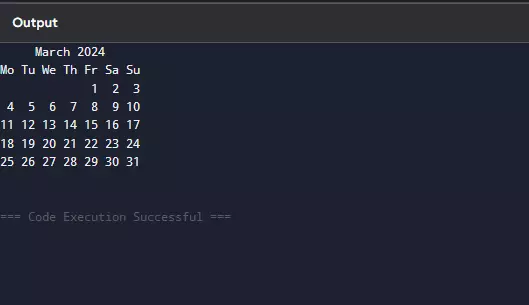
When you run this code, it will display the calendar for the current month in a neatly formatted way. For example, if the current month is October 2023, the output will look like this:
This is a simple yet effective way to display the current month using Python.
Display Any Specific Month
Sometimes, you may want to display the calendar for a specific month & year, not just the current one. Python’s `calendar` module makes this easy. You can specify the year & month, & the module will generate the calendar for that specific month.
Let’s see how you can display any specific month in Python:
1. Import the Required Module:
You only need the `calendar` module for this task.
import calendar
2. Specify the Year & Month:
You need to define the year & month for which you want to display the calendar. For example, if you want to display the calendar for August 2023, you’ll set the year as 2023 & the month as 8.
   year = 2023
   month = 8
3. Display the Calendar for the Specific Month:
Use the `calendar.month()` function to generate & display the calendar for the specified year & month. This function takes two arguments: the year & the month.
Here’s the complete code to display the calendar for a specific month:
import calendar

#Specify the year & month
year = 2023
month = 8

#Display the calendar for the specific month
specific_month_calendar = calendar.month(year, month)
print(f"Calendar for {calendar.month_name[month]} {year}:")
print(specific_month_calendar)
You can also try this code with Online Python Compiler
The `calendar.month()` function generates a formatted calendar for the specified year & month.
`calendar.month_name[month]` is used to get the name of the month (e.g., "August") instead of just the number (e.g., 8).
The calendar is printed using the `print()` function.
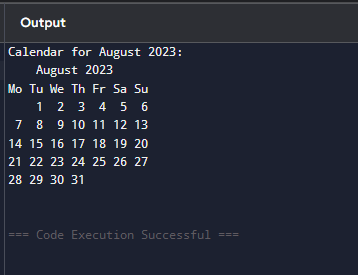
When you run this code, it will display the calendar for the specified month & year. For example, if you set the year as 2023 & the month as 8, the output will look like this:
This is a simple & effective way to display the calendar for any specific month using Python.
Displaying a Year's Calendar
Displaying an entire year’s calendar is a useful feature, especially when you want to view all the months at once. Python’s `calendar` module provides a simple way to generate & display a full year’s calendar. This can be helpful for planning, scheduling, or simply visualizing the entire year.
Let’s take a look at how you can display a year’s calendar in Python:
1. Import the Required Module:
You only need the `calendar` module for this task.
import calendar
2. Specify the Year:
Define the year for which you want to display the calendar. For example, if you want to display the calendar for the year 2023, you’ll set the year as 2023.
year = 2023
3. Display the Calendar for the Year:
Use the `calendar.calendar()` function to generate & display the calendar for the specified year. This function takes one argument: the year.
Let’s see the complete code to display the calendar for a specific year:
import calendar


#Specify the year
year = 2023


#Display the calendar for the year
year_calendar = calendar.calendar(year)
print(f"Calendar for the Year {year}:")
print(year_calendar)
You can also try this code with Online Python Compiler
The `calendar.calendar()` function generates a formatted calendar for the specified year.
The calendar is printed using the `print()` function.
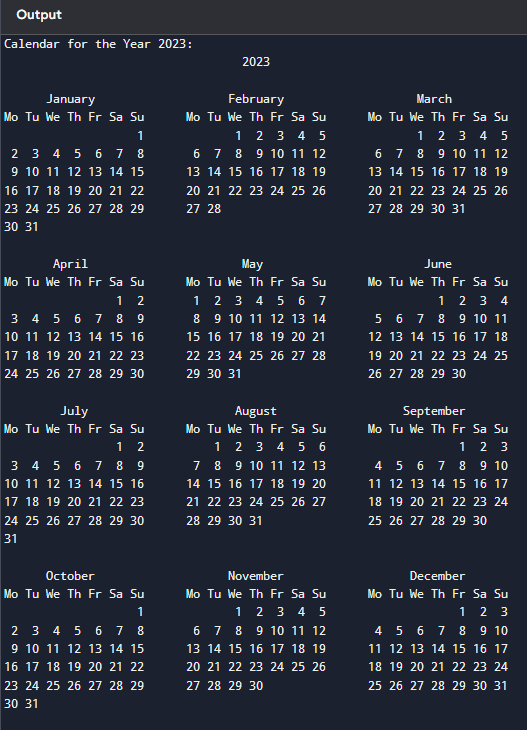
When you run this code, it will display the calendar for the entire year, including all 12 months. For example, if you set the year as 2023, the output will look like this:
This is a simple & effective way to display the calendar for an entire year using Python.
Display the Current Year
Displaying the calendar for the current year is a practical feature, especially when you want to see the entire year at a glance. Python’s `calendar` module, combined with the `datetime` module, makes it easy to fetch the current year & display its calendar.
Let’s see how you can display the calendar for the current year in Python:
1. Import the Required Modules:
You need to import the `calendar` module to generate the calendar & the `datetime` module to fetch the current year.
   import calendar
   import datetime
2. Get the Current Year:
Use the `datetime` module to fetch the current year. The `datetime.now()` function gives the current date & time, & you can extract the year from it.
current_year = datetime.datetime.now().year
3. Display the Calendar for the Current Year:
Use the `calendar.calendar()` function to generate & display the calendar for the current year. This function takes one argument: the year.
Here’s the complete code to display the calendar for the current year:
import calendar
import datetime


#Get the current year
current_year = datetime.datetime.now().year


#Display the calendar for the current year
current_year_calendar = calendar.calendar(current_year)
print(f"Calendar for the Current Year ({current_year}):")
print(current_year_calendar)
You can also try this code with Online Python Compiler
The `datetime.datetime.now()` function fetches the current date & time.
`current_year` extracts the current year from the date.
The `calendar.calendar()` function generates a formatted calendar for the specified year.
Finally, the calendar is printed using the `print()` function.
When you run this code, it will display the calendar for the current year, including all 12 months. For example, if the current year is 2023, the output will look like this:
This is a simple & effective way to display the calendar for the current year using Python.
Display Any Specific Year
Displaying the calendar for a specific year is a useful feature, especially when you want to view or plan for a year other than the current one. Python’s `calendar` module makes this task straightforward. You can specify any year, & the module will generate the calendar for that year.
Let’s see how you can display the calendar for any specific year in Python:
1. Import the Required Module:
You only need the `calendar` module for this task.
import calendar
2. Specify the Year:
Define the year for which you want to display the calendar. For example, if you want to display the calendar for the year 2024, you’ll set the year as 2024.
year = 2024
3. Display the Calendar for the Specific Year:
Use the `calendar.calendar()` function to generate & display the calendar for the specified year. This function takes one argument: the year.
Let’s take a look at the complete code to display the calendar for a specific year:
import calendar


#Specify the year
year = 2024


#Display the calendar for the specific year
specific_year_calendar = calendar.calendar(year)
print(f"Calendar for the Year {year}:")
print(specific_year_calendar)
You can also try this code with Online Python Compiler
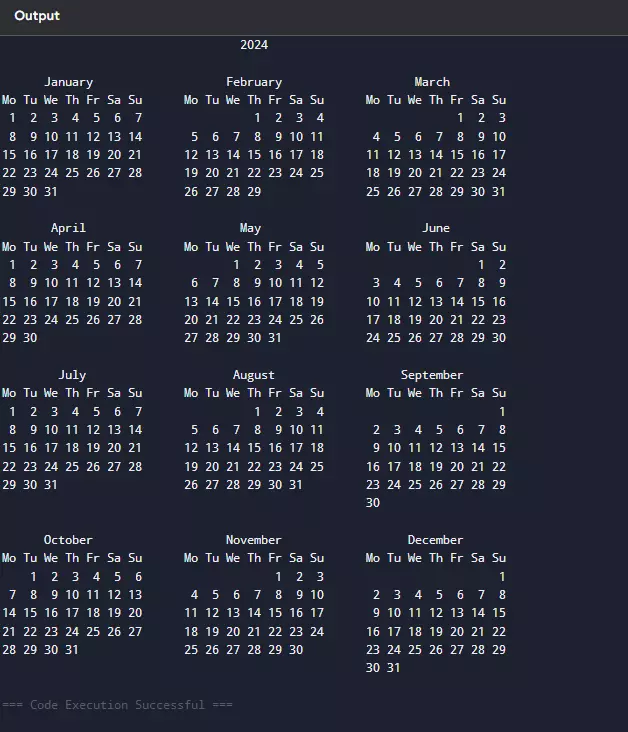
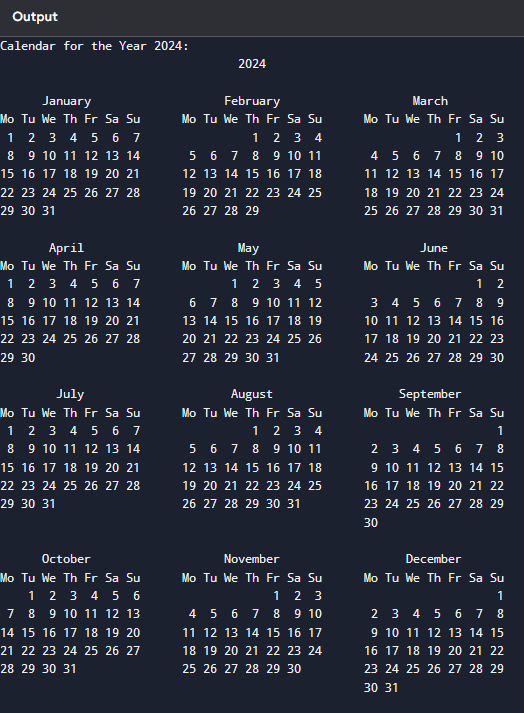
The `calendar.calendar()` function generates a formatted calendar for the specified year. The calendar is printed using the `print()` function.
When you run this code, it will display the calendar for the entire year, including all 12 months. For example, if you set the year as 2024, the output will look like this:
This is a simple & effective way to display the calendar for any specific year using Python.
Frequently Asked Questions
How do I check if a year is a leap year in Python?
You can use the calendar.isleap(year) function to check if a year is a leap year.
How can I display a monthly calendar in Python?
Use calendar.month(year, month) to print a formatted calendar for a specific month.
How do I display a full-year calendar in Python?
You can use calendar.prcal(year) to print the entire year's calendar in a structured format.
Conclusion
In this article, we explored how to create a calendar program in Python using the built-in calendar module. This program allows users to display monthly or yearly calendars and even customize them based on requirements. Understanding how to work with dates and calendars inPython helps in developing scheduling applications, reminders, and time-based automation efficiently.
Live masterclass
Ace 6-Figure GenAI Roles with AI-Engineering tool-kit
by Shantanu Shubham
29 Oct, 2026
11:30 AM
Build Your Own AI Data Analyst Using SQL + GenAI for 20L+ CTC
by Sumit Shukla
26 Oct, 2026
11:30 AM
Beyond Chatbots: Build an AI Support Agent & Prepare for AI Engineer Interviews
by Yogesh
27 Oct, 2026
11:30 AM
Prompt-to-Dashboard: Build Power BI Reports Faster with GenAI
by Abhishek Soni
28 Oct, 2026
11:30 AM
Ace 6-Figure GenAI Roles with AI-Engineering tool-kit
by Shantanu Shubham
29 Oct, 2026
11:30 AM
Build Your Own AI Data Analyst Using SQL + GenAI for 20L+ CTC











 7+ registered

