Get a skill gap analysis, personalised roadmap, and AI-powered resume optimisation.
Introduction
The CHARINDEX function is crucial in SQL Server for searching a specific substring within a given string, starting from a designated position.
In this blog, we will learn about charindex SQL. We will write different examples and codes for better understanding.
What is CHARINDEX() in SQL?
In Sql, CHARINDEX() is a function that is used to find the starting position of a substring within a string. The function returns the position of the first occurrence of a specified substring (expression) in a given string. If the substring is not found, it returns 0.
substring: The sequence of characters to search for.
string: The string within which to search.
start_location (optional): The position from where to start the search.
Parameters: Let’s break down the parameters with examples:
substring:
SELECT CHARINDEX('text', 'The text is here'); --
Output
In this example, the function searches for 'text' in the given string.
string:
The string parameter is where CHARINDEX will look for the specified substring. In all the examples given, the string parameter is the text within which we are searching.
start_location (optional):
SELECT CHARINDEX('is', 'This is a string', 5); -
Output
In this example, the search begins at the 5th character of the string, finding 'is' at position 6.
These examples demonstrate the basic usage of CHARINDEX and its parameters. Understanding the syntax and parameters is crucial for utilizing CHARINDEX effectively in SQL Server for various string manipulation tasks. The optional start_location parameter adds flexibility to the search, enabling more precise string searching and manipulation.
Before diving into the usage of CHARINDEX, it's essential to have SQL Server installed and properly configured on your system. If it's not already set up, you can download it from the official Microsoft website and follow the installation instructions provided.
Basic Usage
The CHARINDEX function is fairly straightforward to use. The core of its functionality revolves around searching for a substring within a given string, optionally starting at a specific character position. Here are some examples to illustrate its usage:
Basic Search
Searching for a substring within a string
SELECT CHARINDEX('text', 'The text is here');
Output:
In this example, CHARINDEX returns 5 because the substring 'text' begins at the 5th position in the string 'The text is here'.
Case Sensitivity
CHARINDEX is case sensitive
SELECT CHARINDEX('Text', 'The text is here');
Output:
Here, CHARINDEX returns 0 as it's case-sensitive and does not find 'Text' with an uppercase 'T'.
Starting Position
Specifying a starting position for the search
SELECT CHARINDEX('is', 'This is a string', 5);
Output:
By providing a starting position, you can control where CHARINDEX begins its search. In this example, the search begins at the 5th character, finding 'is' at position 6.
Searching for Space
Searching for a space character
SELECT CHARINDEX(' ', 'The text is here');
Output:
CHARINDEX can also search for spaces. In this example, it finds the first space at position 4.
Non-existent Substring
Searching for a substring that doesn't exist
SELECT CHARINDEX('xyz', 'The text is here');
Output:
When CHARINDEX doesn't find the specified substring, it returns 0.
These examples cover the basic usage of the CHARINDEX function. By understanding and experimenting with these examples, you'll grasp how CHARINDEX operates and how it can be a powerful tool for string manipulation in SQL Server. The optional starting position parameter allows for more targeted searches, enhancing the flexibility and usefulness of the CHARINDEX function in your SQL queries.
Exploring More with CHARINDEX
Using start_location Parameter
The start_location parameter in the CHARINDEX function allows you to specify the position in the string from where the search should begin. This is particularly useful when you want to skip a certain number of characters from the beginning or when you are looking for subsequent occurrences of a substring. Here's an elaboration on the example provided:
Using the start_location parameter
SELECT CHARINDEX('is', 'This is a string', 5);
Output:
In this query, the start_location parameter is set to 5, which instructs the CHARINDEX function to start searching from the 5th character in the string 'This is a string'. It finds the substring 'is' starting at the 6th position, so it returns 6.
Case Sensitivity
CHARINDEX is a case-sensitive function, which means it considers the case (uppercase/lowercase) of characters when performing the search. This is a crucial aspect to remember while working with CHARINDEX to avoid unexpected results. Here’s an example to demonstrate the case sensitivity:
Case sensitivity in CHARINDEX
SELECT CHARINDEX('TEXT', 'The text is here');
Output:
In this example, CHARINDEX returns 0 because it does not find 'TEXT' (all uppercase) in 'The text is here' (where 'text' is lowercase). This behavior emphasizes the importance of matching the case of the substring and the string while using CHARINDEX.
If you need to perform a case-insensitive search, you can convert both the substring and the string to the same case using the UPPER or LOWER function, like so:
Case-insensitive search using CHARINDEX
SELECT CHARINDEX(UPPER('text'), UPPER('The text is here'));
Output:
Here, both the substring 'text' and the string 'The text is here' are converted to uppercase before performing the search, ensuring that the case difference doesn't affect the search result.
Understanding the start_location parameter and the case sensitivity of CHARINDEX are crucial for effectively using this function in your SQL queries. By mastering these aspects, you'll be better equipped to handle string searching and manipulation tasks in SQL Server.
Real-World Applications
Let’s understand the real world applications of using charindex in sql.
Data Cleaning
In real-world scenarios, data may not always be consistent or formatted correctly. The CHARINDEX function can be instrumental in identifying inconsistencies in string data, thus aiding in the data cleaning process. For instance, suppose you have a dataset containing phone numbers, but some entries have alphabets in them which is incorrect. You can use CHARINDEX to identify such entries.
Assume the table 'contacts' with a column 'phone_number'
Identifying records with alphabets in the phone number
SELECT phone_number
FROM contacts
WHERE CHARINDEX('A', phone_number) > 0
   OR CHARINDEX('B', phone_number) > 0
   -- ... continue for other alphabets
In this query, CHARINDEX is used to search for each alphabet letter in the 'phone_number' column, and the entries with alphabets are selected for further review or correction.
Pattern Matching
CHARINDEX is also useful in pattern matching tasks, where you might need to find specific patterns in textual data for analysis or manipulation. For example, suppose you need to find all entries in a text column that contain a specific word or phrase.
Assume the table 'articles' with a column 'content'. Finding all articles containing the word 'SQL'
SELECT *
FROM articles
WHERE CHARINDEX('SQL', content) > 0
;
In this query, CHARINDEX is used to search for the word 'SQL' in the 'content' column of the 'articles' table, and all matching entries are selected.
Common Issues and Solutions
Invalid Length Parameter Issue
Sometimes, you may encounter an error related to an invalid length parameter when using CHARINDEX. This error typically occurs when the start_location parameter is set to a value that is outside the range of the string length.
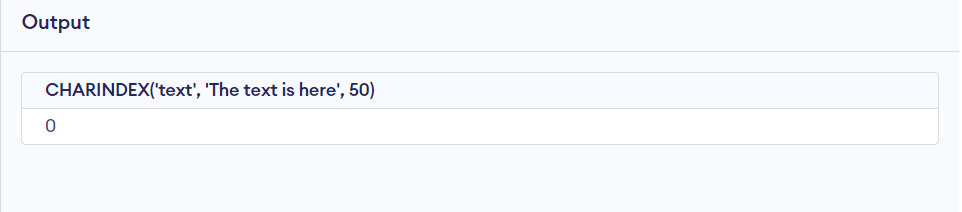
This will cause an error because the start_location is beyond the length of the string
SELECT CHARINDEX('text', 'The text is here', 50);
Output
In such cases, it's important to ensure that the start_location parameter is within the valid range, i.e., greater than 0 and less than or equal to the length of the string.
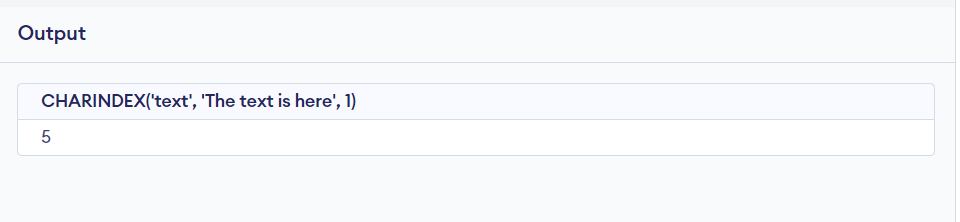
Corrected query
SELECT CHARINDEX('text', 'The text is here', 1);
Output:
In this corrected query, the start_location parameter is set to 1, which is within the range of the string length, so the query executes successfully and returns 5 as the position of the substring 'text' in the string 'The text is here.'
Best Practices
Error Handling
When using the CHARINDEX function, it's a good practice to handle cases where the substring is not found, which results in a return value of 0. This can be managed using a conditional statement:
Example with error handling
DECLARE @position INT;
SET @position = CHARINDEX('hello', 'The text is here');
IF @position = 0
    PRINT 'Substring not found'
ELSE
    PRINT 'Substring found at position: ' + CAST(@position AS VARCHAR);
In this example, if CHARINDEX returns 0, a message 'Substring not found' is printed. Otherwise, the position of the substring is printed.
Usage with Other String Functions
CHARINDEX can be combined with other string functions for more complex string manipulation tasks. For example, you can use CHARINDEX together with the SUBSTRING function to extract a substring from a given string:
Example with CHARINDEX and SUBSTRING
DECLARE @str VARCHAR(255);
SET @str = 'The text is here';
SELECT SUBSTRING(@str, CHARINDEX('text', @str), 4);
In this query, CHARINDEX is used to find the position of the substring 'text', and then SUBSTRING is used to extract the substring 'text' from the string 'The text is here'.
Similarly, CHARINDEX can be used alongside other string functions like LEFT, RIGHT, LEN, etc., to achieve desired string manipulations. Through proper error handling and effective combination with other string functions, CHARINDEX can serve as a powerful tool for string manipulation in SQL Server.
CHARINDEX is a SQL function that returns the starting position of a substring in a string. It's used to find the position of a specified substring within a given string.
What does char 10 mean in SQL?
CHAR(10) typically represents a line feed (LF) character in SQL. It's often used in conjunction with CHAR(13) (carriage return) to represent a newline character.
Why is Charindex used in SQL?
CHARINDEX is used to find the position of a substring within a string. It's helpful for searching and extracting data based on specific patterns or values within a larger text.
What is the difference between Charindex and Patindex?
Both CHARINDEX and PATINDEX are used to find the position of a substring in a string. The main difference is that PATINDEX allows the use of wildcard characters, providing more flexible pattern matching capabilities.
Conclusion
Throughout this discussion, we've delved into the CHARINDEX function in SQL Server, its significance, syntax, and practical usage. We've explored various examples demonstrating how CHARINDEX can be employed for string manipulation, pattern matching, and data cleaning operations. By understanding the case-sensitivity nature of CHARINDEX, the inability to use wildcard characters, and how it handles non-alphanumeric characters, developers can better leverage this function in their SQL operations.










 7+ registered

